WhatsApp that works the way HubSpot already works.
Flowella puts WhatsApp into the HubSpot tools your team already lives in. The HubSpot forms you already built become WhatsApp Flows, and the answers land back as native form submissions. Agents reply in the conversations inbox, workflows send Flows with custom actions, and every answer is something you can branch, score and follow up on.



Flowella in numbers
- on the HubSpot Marketplace
- Rated 5/5 on the HubSpot Marketplace, see the reviews (opens in a new tab)
- WhatsApp Flows completed
- 100K+
- median first reply
- 3 min
The HubSpot forms you already built become WhatsApp Flows.
Flowella reads the form definition from HubSpot, builds the matching WhatsApp Flow with the same fields, validation and labels, and uploads it to Meta. When someone completes the Flow, the answers write back as a native HubSpot form submission: same properties, same workflows, same reporting. No copying and pasting, no shadow fields.
Flows page: sync HubSpot forms
- First name, requiredSingle-line text
- Email, requiredEmail
- What do you need?Dropdown select
- Best time to callRadio select
- WhatsApp updatesSingle checkbox
Website enquiry5 fields
In syncHubSpot form changedSyncing to MetaFlow built from the HubSpot form as of 15 Oct, 09:30
HubSpot form changed since this Flow was built. Sync again to pick it up.
- Preflight check
- Read the HubSpot form
- Build the WhatsApp Flow
- Upload it to Meta
First name, required
AnnaEmail, required
anna.price@example.comWhat do you need?
A call backBest time to call
Managed by Acme. Learn more
Reply to WhatsApp from your HubSpot inbox.
Connect Flowella as a custom channel in Inbox and Help Desk. WhatsApp threads sit next to email, chat and calls. Route them to owners or teams, open the live conversation from the contact timeline, and keep the CRM as the system of record.
The inbox channel needs Sales Hub or Service Hub Professional or Enterprise, and HubSpot Credits may also be required. See what works on your plan
Add the Flowella custom channel- Anna PriceFlowella Channel
- Ben OrtizTeam email
- Website visitorChat
Hi, can I move my call to Friday morning?
Of course. Friday at 10:00 is booked in.
The WhatsApp 24-hour window has closed. Use Re-engage to send an approved template.
- Re-engage
- Send update
- Send offer
Every message is logged on Anna’s contact record.
Custom HubSpot workflow actions, not a separate automation tool.
Search “Flowella” on the contact-based workflow canvas. Four triggers start a workflow when something happens on WhatsApp, and six actions send, read, write and hand off, all inside HubSpot.
Workflow triggers and actions Four triggers, six actionsFlowella10 results
Triggers
Actions
Form Completed
Flowella trigger, inboundFires when a contact submits a WhatsApp Flow sent through Flowella, and enrols them in the workflow.
Filter on
formNamesource
Use it to process the answers from a feedback, booking or KYC Flow.
Text Reply
Flowella trigger, inboundFires when a contact sends a free-text reply in a conversation Flowella manages.
Filter on
phonemessageresponseTimeSeconds
To route on what they wrote, branch on the flowella_last_reply_message property. Flowella writes it before the trigger fires, so it always holds the reply that started the workflow.
Message Read
Flowella trigger, outboundFires when a contact opens a WhatsApp message you sent through Flowella.
Filter on
phonemessageTypetimeToReadSeconds
Use it to follow up only once a message has been seen.
Message Sent
Flowella trigger, outboundFires when Flowella sends a WhatsApp message to a contact.
Filter on
phonedeliveryStatustemplateName
Use it for sends that start outside a workflow, such as an agent’s reply from the Flowella inbox.
Send WhatsApp Template
Flowella actionSends a Meta-approved template, including Flow templates, so a form can go out from any workflow.
- Contact Phone Number, required
- WhatsApp phone number
- Template Name, required
- enquiry_follow_up
- Contact Email
- Template Variables 1 to 5
- First name
Use it for booking confirmations, feedback requests and renewal reminders.
Send WhatsApp Message
Flowella actionSends a message written in the workflow: plain text, a document, an image, a video or audio.
- Message Type, required
- Text Message
- Recipient Phone Number, required
- WhatsApp phone number
- Message Text
- Thanks, First name. We’ll be in touch today.
Use it for personal thank-yous and follow-ups that don’t need a template.
Send WhatsApp Reply
Flowella actionSends a personal message that still works after the 24-hour customer service window has closed.
- Recipient Phone Number, required
- WhatsApp phone number
- Message, required
- Just checking in, First name.
- Skip if window is closed
- Off
Outside the window, Flowella wraps the message in your approved reopen template, so one action works either way.
Assign to Customer Agent
Flowella actionHands the conversation to a HubSpot Breeze Customer Agent, which answers the contact in WhatsApp.
- Agent to assign, required
- Customer Agent
- Record to assign
- Conversations: All associated
Use it for questions after a form, out-of-hours replies and triage before a person steps in.
AI Document Reader
Flowella actionReads a PDF or image and writes the values you ask for into contact properties.
- Document source, required
- A link, a HubSpot file or a file property
- Field map JSON, required
- date_of_birth → date_of_birth
- Extraction instructions
- Where to find each value
Use it for an ID uploaded through a form, or a signed agreement in HubSpot files.
Generate Document
Flowella actionFills a PDF template with the contact’s HubSpot properties and saves the finished file to HubSpot files.
- Document template ID, required
- From Settings, Document templates
- Output filename
- Quote for First name
- HubSpot file property
- Where to keep the file ID
Use it for personalised letters, confirmations and summaries, then send the file on WhatsApp.
The triggers and actions run in contact-based workflows, which need HubSpot Professional or Enterprise. See what works on your plan
Send, wait, then branch on what they actually did.
Anna fills in your website enquiry form. Send her a WhatsApp Flow, play her part, and watch the workflow wait, branch and follow up: what she sees on her phone, and what lands on her HubSpot record, step by step. Non-responders get a reminder or an owner task. Keyword replies route without a chatbot sitting outside HubSpot.
Contact activity and delays
- EnrolledThe website enquiry form was submitted
- Send WhatsApp Template
enquiry_follow_up, with a Flow - Delay until event Form Completed or Text Reply, up to 2 days Form Completed, after 1 minute Text Reply, after 1 minute No event in 2 days
- Branch on the answer
- Wants a call back
enquiry_typeiscall_back, or the reply contains BOOK - Wants pricing
enquiry_typeispricing - Just looking
enquiry_typeisjust_looking - None metNo event in 2 days
- Wants a call back
-
The chosen path runs here.
Send WhatsApp ReplySam will call you tomorrow morning
Create a taskCall Anna back, for Sam Lee
Generate DocumentPricing PDF, filled from her record
Send WhatsApp MessageDocument: the pricing PDF
Send WhatsApp ReplyNo rush, reply any time
Add to a listNurture
Send WhatsApp Template
flowella_form_reminderDelay until eventForm Completed, up to 2 more days
Today
Play Anna
Properties
- Phone number
phone - +447700900123From the website form
- Enquiry type
enquiry_type - No valueFrom the Flow
- Last WhatsApp reply message
flowella_last_reply_message - No valueSaved before the Text Reply trigger runs
Activity
- Form submissionWebsite enquiry
See it in HubSpot
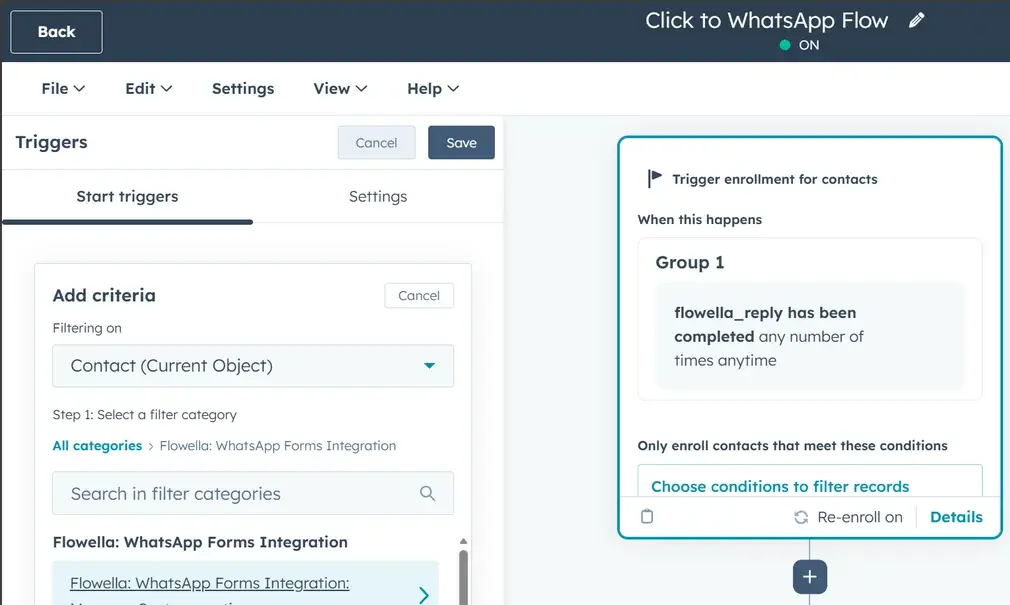
The same steps in HubSpot’s own workflow editor. Select a screenshot to open it full size.
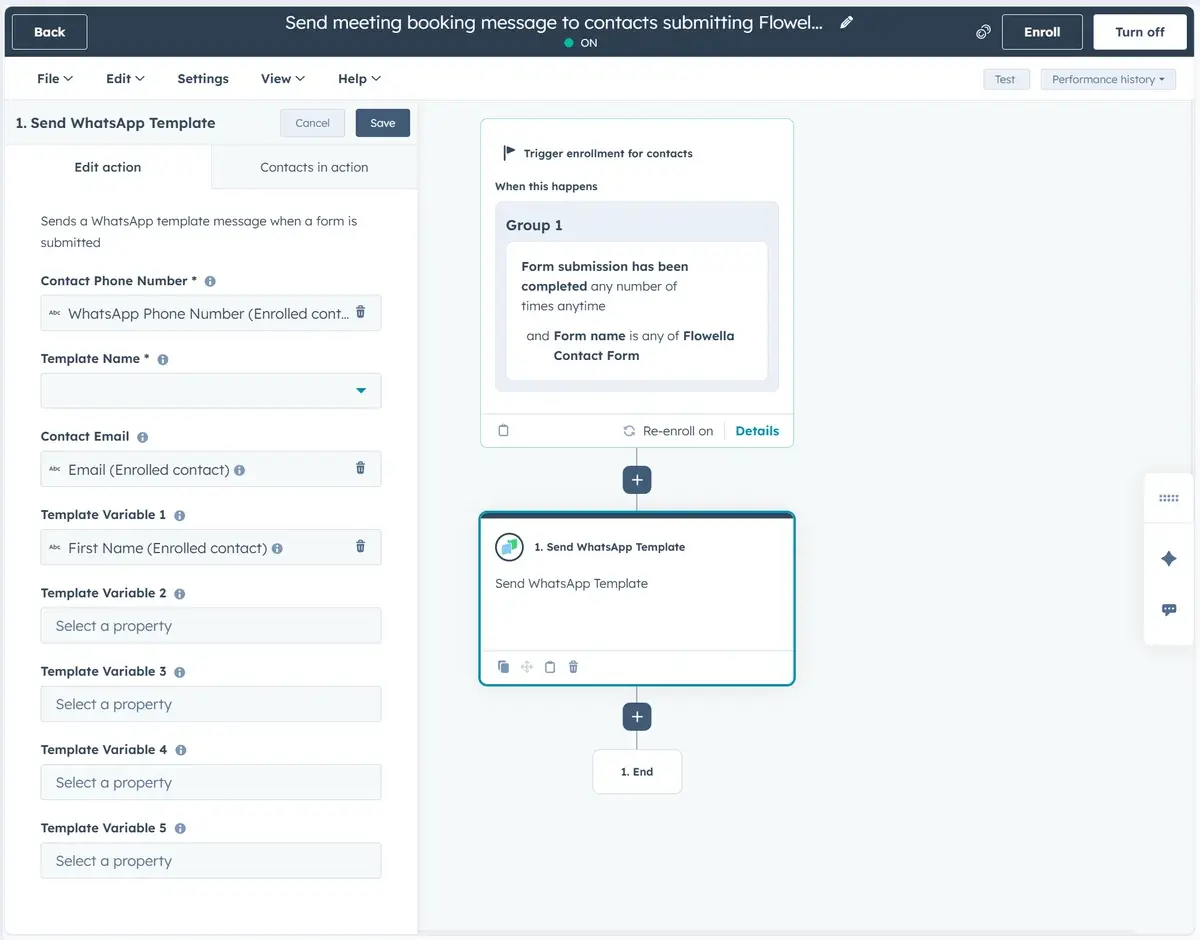
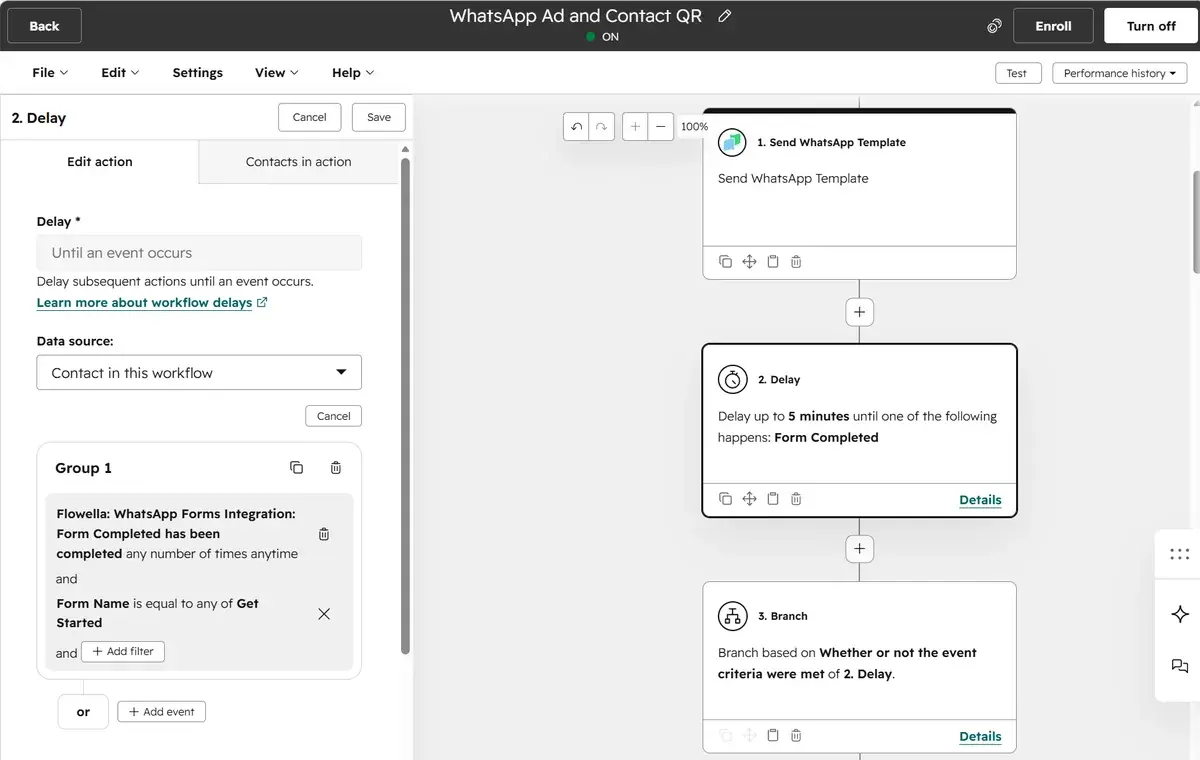
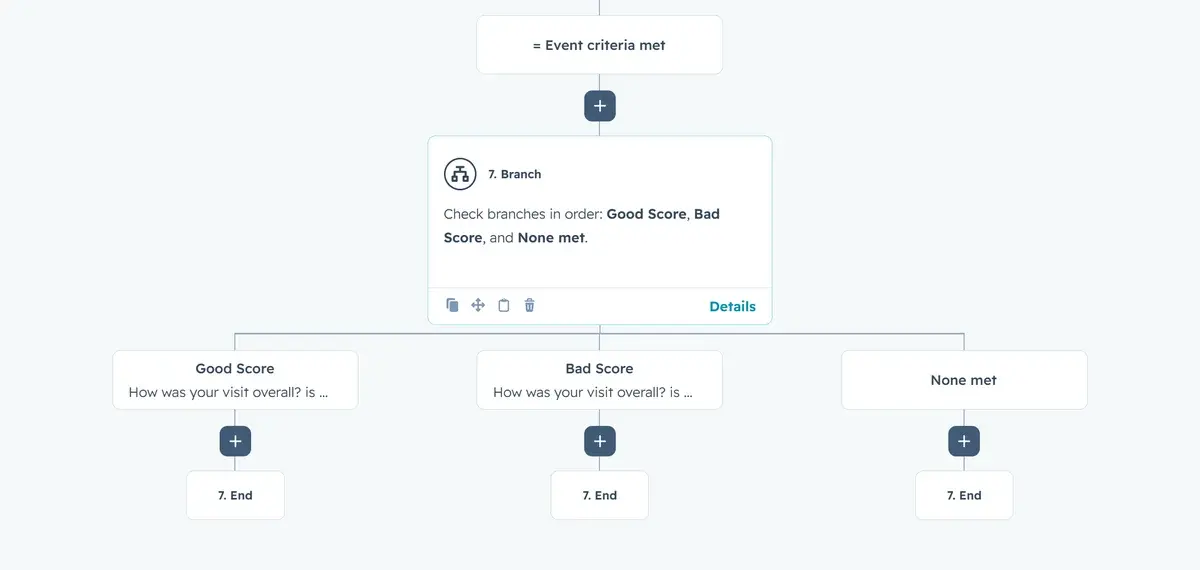
Send WhatsApp TemplateSend a template or interactive Flow from the canvas. Delay until Form CompletedWait for the Flow submission before the next step runs. Branch on the answerGood score, bad score or none met, after a feedback Flow. Flowella events as triggersFlowella’s WhatsApp events in the workflow trigger panel.
2 days later
Live in HubSpot in three steps.
About 30 minutes to connect Flowella. Meta’s business verification is separate and usually takes one to two business days.
-
Step 1: Connect HubSpot
Authorise Flowella by OAuth during onboarding. It installs the Flowella app in your portal, so forms, properties and workflows stay in HubSpot. Whoever connects needs permission to install apps.
HubSpot setupFlowella onboardingSample data- WhatsApp Business
- Connected
- HubSpot
- Connected
- Portal ID
- 12345678
-
Step 2: Sync a form and open the inbox
Pick an existing HubSpot form and sync it to Meta as a WhatsApp Flow, then connect the Flowella Channel in Inbox and Help Desk.
The Flows pageFlows- Website enquiry
- In sync
- Event sign-up
- In sync
- Flowella Channel
- Connected
-
Step 3: Automate on the canvas
Send, delay and branch on the canvas, as in the workflow above.
Workflow actionsWorkflow- 1
- Send WhatsApp Template
- 2
- Delay until Form Completed
- 3
- Branch on the answer
What works on your HubSpot plan.
Flowella runs on HubSpot’s free tier. Pick your plan to see what works on it today. Each line links the knowledge base article it comes from.

FreeStarterProfessionalEnterprise
Plan facts from the Flowella knowledge base2 of 4 work on this plan.
-
Forms to Flows, with answers on contact properties
Flows page: sync HubSpot formsWorks on every HubSpot plan, including Free.
-
WhatsApp activity on the contact timeline
Contact activityWorks on every HubSpot plan, including Free.
-
Workflow triggers and actions
Workflow triggers and actionsYour plan meets the requirement: Flowella’s triggers and actions run in contact-based workflows, which need Professional or Enterprise.
Not on this plan. Flowella’s triggers and actions run in contact-based workflows, which need HubSpot Professional or Enterprise.
-
The HubSpot inbox channel
The Flowella custom channelWorks on this plan. HubSpot Credits may also be required, and routing rules need a Sales or Service seat.
Not on this plan. It needs Sales Hub or Service Hub Professional or Enterprise, and HubSpot Credits may also be required.
In our customers’ words.
Exceptional engagement platform that transformed our student conversion with 160% increase in same-day applications and 90% WhatsApp response rates.
 Peter HudsonDirector of Admissions, Brand & Customer InnovationHubSpot Marketplace integration

 G2 reviews

Put WhatsApp on your HubSpot canvas.
Create your Flowella account, connect HubSpot during onboarding, and you’re live in 30 minutes. Free 14-day trial, no card.
Book a Flowella demo · 30 minutes on Teams