A home insurance quote form can run to forty questions. A renewal pack arrives as a PDF nobody opens. A claim starts with a phone queue. WhatsApp Flows for insurance replace each of those with a short, structured form inside the chat your customers already use, and the answers can go straight to the systems that price, renew and settle.
This guide is for insurers, MGAs and brokers who want more than a chatbot that sends PDFs. It covers five journeys step by step, shows how to connect a Flow to your policy and rating systems through an API, n8n or an AI assistant, and sets out the design rules that keep a regulated journey safe.
The short answer. A WhatsApp Flow collects quote, renewal or claim details as taps and short fields inside WhatsApp. The answers arrive as structured data, so your own systems can price the risk, update the policy or open the claim, and the result comes back in the same chat. Start with one journey, usually renewals, and connect it to the API you already have.
Why insurance forms struggle on a phone
Insurance asks for more information than almost any other purchase, and most of it is now requested on a small screen. Zuko's 2025 benchmark of more than five million form sessions puts insurance form conversion at 47.8% on mobile, against 56.8% on desktop[1]. Roughly half the people who start on a phone do not finish.
WhatsApp is where those same people already are. Ofcom's Online Nation 2025 report found that WhatsApp reached 90% of UK online adults in May 2025, and 74% used it every day[2]. In a 22-market study for Meta, Kantar found that 73.3% of consumers prefer messaging when they communicate with a business[3].
We learned this first hand. Flowella grew out of our team's work on CoverKraft, an insurance platform where quote requests, claim details, onboarding forms and renewals are captured in WhatsApp and sent to the platform as clean, structured data. The tool we built to do that became Flowella.
What WhatsApp Flows change for insurance
WhatsApp Flows are Meta's native forms: screens that open inside the chat with dropdowns, date pickers, option lists, text fields and photo or document upload. They are different from a chatbot, which asks one free-text question at a time and leaves someone to interpret the replies. We covered that difference in the real problem with WhatsApp chatbots.
| What happens | Web form or chatbot | WhatsApp Flow |
|---|---|---|
| Where the customer answers | A browser tab, a login or a long chat | A form inside the chat they already have open |
| The data you receive | Free text someone reads and retypes | One field per answer, ready for your systems |
| Evidence for a claim | Emailed photos, matched by hand | Photos and documents uploaded in the form |
| The record | Scattered across inboxes and phones | Each answer on the customer record, with the time it was given |
Meta treats insurance as a core use of Flows. Its developer documentation includes a full "Insurance Quote" guide, with screens for applicants, cover level, excess, details, policy selection and a quote summary[4]. One detail in that guide matters for anyone planning a real build: the prices in Meta's sample are fixed values written into the demo code. Connecting the form to a real rating engine is left to you. The rest of this guide is about that part.
Five WhatsApp Flows for insurance, step by step
Each journey below follows the same shape: something starts it, a Flow collects the facts, your systems do the insurance work, and the customer gets the result in the chat.
1. A quote, priced by your own rating engine
- The start. A customer taps a Click to WhatsApp ad, scans a QR code on a letter or messages your number. Messages sent in the window an ad opens are free for the business[5].
- The Flow. Two or three screens ask what they want to cover, the rating questions you need and when cover should start. Options are tapped, not typed.
- The price. The answers go to your rating engine. A clean risk is priced in seconds. Anything outside your rules is referred to an underwriter or broker, with the answers already on the record.
- The quote. The price, the excess and a link to the policy documents arrive in the same chat, with a button to accept or ask a question.
- The purchase. Payment happens on your own secure page. WhatsApp's policy does not allow you to ask for card or bank account numbers in a chat[6].
2. A renewal that checks what has changed
- The start. Three weeks before the renewal date, your policy system has already written this year's price and last year's to the customer record.
- The message. A WhatsApp message shows both prices and the date, with a button that opens a one-screen Flow.
- The Flow. Two questions: has anything changed this year, and how would you like to renew?
- The branch. Nothing changed and happy to renew: the customer gets the link to your renewal page. A new address, vehicle, driver or claim: the change goes to your rating engine or to a person, and an updated price comes back before the date.
This is the journey we suggest starting with. Your system already holds the risk details, so the Flow is short, and a change told to you before renewal is better for everyone than one discovered at a claim. Our renewals workflow guide shows the HubSpot build.
3. First notice of a claim, with photos
- The start. The customer messages "claim", or scans the QR code printed on their policy schedule.
- The Flow. What happened, when and where, whether anyone was hurt, and photos of the damage. Meta's Flows support photo and document upload inside the form, up to 30 files of 25 MB each when the Flow uses an endpoint[7].
- The claim. The answers open a claim in your claims system and return a reference. Urgent answers, such as an injury or an undrivable car, go to a handler straight away.
- The updates. Status changes from your claims system are sent as short messages. When the claim closes, a two-question Flow asks how it went.
Always leave a route to a person. In a 2026 KPMG UK survey, 90% of adults said human interaction is important when a claim is handled[8], and WhatsApp's own policy requires a clear way to reach a human[6].
4. Mid-term changes without the phone queue
- The start. The customer messages "change my policy".
- The Flow. What is changing (vehicle, address, driver, cover), the new details and the date it takes effect. A registration number is enough to look up a vehicle through the DVLA's Vehicle Enquiry Service, so nobody types a make and model[9].
- The price. Your policy system prices the adjustment and the customer sees the additional or return premium before they confirm.
5. Missing documents and payment reminders
- The start. Your system flags a missing proof of no claims, or a failed direct debit.
- The message. A short, factual message explains what is needed.
- The Flow. The customer uploads the document or chooses a new payment date, and the record is updated. Payment itself stays on your own page.
How to connect a WhatsApp Flow to your policy system
There are two ways to put live insurance data behind a Flow. They suit different systems, and most insurers should start with the second.
Pattern one: a live endpoint inside the Flow
Meta lets a Flow call your own server between screens. The customer taps Continue, WhatsApp sends the answers so far to your endpoint, and your endpoint replies with the next screen, such as a list of plans and prices[4].
It is the smoothest experience, and it sets a high bar for your systems. You build and host an encrypted endpoint yourself. Meta asks for a response in under a second and gives up after ten. If your endpoint is slow or unavailable, Meta first limits the Flow to ten sends an hour, then blocks it[10]. A rating engine that calls a panel of insurers, or a policy system with a maintenance window, will struggle to meet that.
Pattern two: collect, call, come back
The second pattern keeps the Flow simple and does the slow work between messages. The customer is never waiting on a spinner, and a slow or failed call never puts the Flow itself at risk.
- Collect. A Flow built in Flowella, from a HubSpot form or through the Flowella API, gathers the answers.
- Hand over. The answers are saved as a HubSpot form submission, which can start a workflow. A Flow created through the API can post its answers to your own web address as a signed request, so nothing but your system needs to see them.
- Call. Your middleware sends the answers to your rating, policy or claims API. This can take five seconds or fifty.
- Come back. The result is written to the customer record and sent to the chat through the Flowella API: the price as a message, with a button for the next step.
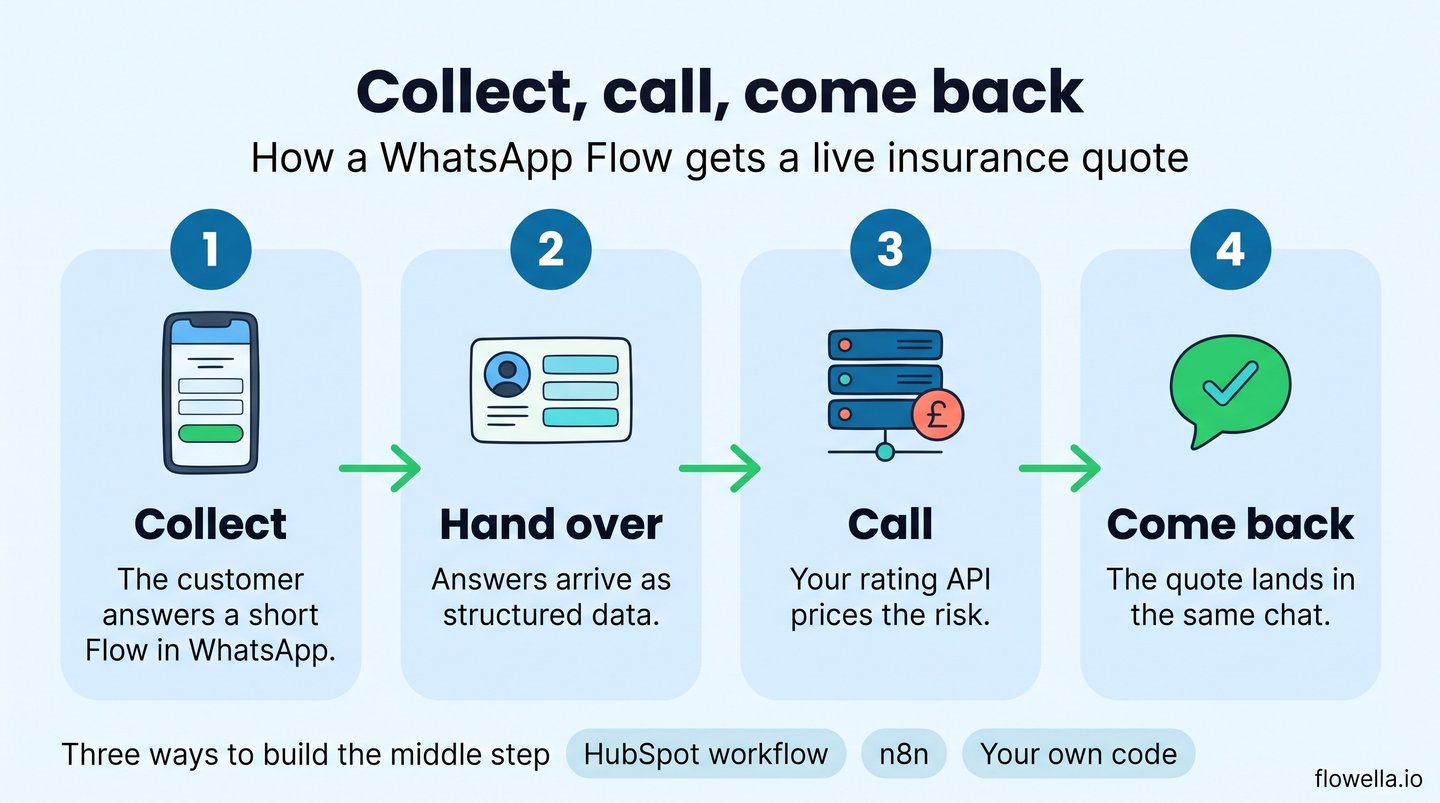
Three ways to build the middle step
| Route | How it works | Best for |
|---|---|---|
| HubSpot workflow | The Form Completed event starts a workflow. A Send a webhook step passes the answers to your API, and Flowella's Send WhatsApp Template action returns the result. | Teams already on HubSpot Professional with Data Hub |
| n8n | A Webhook node receives the answers, an HTTP Request node calls your rating API, and a second HTTP Request node calls the Flowella API to send the quote. | Teams that want a visual, self-hosted layer between systems |
| Your own code | Your service verifies Flowella's signed webhook, calls your systems and uses the REST API to reply. | Insurers with an integration team and an API gateway |
The Flowella side of each route is the same handful of calls, documented in the API reference[11]:
- Create the Flow.
POST /v1/flowstakes a list of fields and where the answers should go: a HubSpot form, the Flowella contact, or your own web address. - Send a template.
POST /v1/templates/sendsends an approved message, filled with values such as the customer's name, the price and the renewal date. A button on it can open a Flow. - Listen for events. Signed webhooks tell your system when a message is delivered, read, answered or failed. Each request carries an
X-Flowella-Signatureheader, so your system can check it came from Flowella.
A request that sends a quote looks like this:
POST https://api.flowella.io/v1/templates/send
Authorization: Bearer flo_your_api_key

{
  "templateId": "your_quote_ready_template_id",
  "whatsappChannelId": "your_whatsapp_number_id",
  "recipients": [
    {
      "phone": "+447700900417",
      "bodyParameters": [
        "Maya",
        "buildings and contents",
        "£284.16",
        "30 November"
      ]
    }
  ]
}
On n8n: there is no native Flowella node yet. It is on our roadmap. Today the connection uses n8n's own Webhook and HTTP Request nodes, and the interactive API docs include an n8n quickstart.
Where an AI assistant fits
Flowella also has an MCP server, which lets AI assistants such as Claude, ChatGPT and Cursor work with your account[12]. It is a building and operations tool, not the thing that prices a quote. A product owner can ask an assistant to draft the renewal messages, create the Flow, check which templates Meta has approved or report on delivery, and the assistant must confirm before it sends or changes anything. The pricing call still belongs to your rating engine.
Which insurance systems can it call?
Any system with an API you are licensed to use. Some publish their documentation openly: Socotra documents a quotes API that creates, prices and underwrites a quote[13], and the DVLA publishes its vehicle lookup. Many core and broker platforms keep their API documentation for customers and partners. Flowella does not ship ready-made connectors to those platforms, so the right question for your supplier is which quote, policy and claim calls your licence already includes.
Design rules for a regulated journey
This is not legal advice, and your compliance team will have its own view. These are the points we see matter most.
- Never ask for sensitive identifiers in the chat. WhatsApp's Business Messaging Policy bars asking for full payment card numbers, financial account numbers or personal ID numbers[6]. Use payment links, and look customers up by policy number or registration.
- Take care with health questions. The same policy restricts health information where regulations require systems with heightened protections. Health and life underwriting questions need a legal view before they go into a Flow.
- Layer the information. The FCA's Consumer Duty guidance accepts that people read less on a smartphone and suggests a layered approach, while requiring that all relevant information is given before the customer decides[14]. Put the key facts in the message and send the policy summary and documents as files or links you can evidence.
- Keep the formal notices. A WhatsApp renewal message sits beside the renewal notice your rules require, not in place of it.
- Get opt-in, and name your firm. Collect WhatsApp consent inside the Flow. Our guide to WhatsApp CRM workflow best practices covers how to record it.
- Choose the right message category. Meta classes a message that invites someone to renew as marketing, not utility[15]. A factual update, such as a claim reference, is utility. The category sets the price and the consent you need.
- Budget for messages. Since 1 October 2026 Meta charges for replies beyond 1,000 free service messages per number each month[5]. Our guide to what WhatsApp on HubSpot really costs has the detail.
- Know where the data sits. Flowella is hosted on Microsoft Azure in London, and every Flow answer is stored against the customer record with the time it was given.
What results to expect
We would rather be straight about the evidence. There is no published UK insurer case study built on WhatsApp Flows yet. What exists points in one direction:
- Zurich UK moved contents claims to WhatsApp and video, and reported the average time to agree a settlement falling to 13 minutes[16].
- Insurance Revolution, a Manchester motor broker, reported service emails down 22% ten months after adding WhatsApp for quotes and documents[17].
- PolicyBazaar in India, which Meta says pioneered Flows and payments in insurance, reported 30% higher conversion on WhatsApp[18].
- Kotak Life, working with Haptik, reported a 75% reduction in drop-out after moving a lead form into a Flow, although the case study gives no time period[19].
All of these are self-reported, and only the last two involve Flows. Treat them as reasons to run a measured pilot of your own, not as a forecast.
A 30-day pilot for WhatsApp Flows in insurance
- Pick one journey. Renewals for one product, or first notice of loss for one claim type.
- Agree the measure. Completion rate against your current form, time to respond, or calls avoided.
- Build the Flow from the form you already use. Cut every question your system already knows the answer to.
- Connect one call. Write the price to the record before the message goes, or post the answers to one API.
- Run it beside your current process for a month, with a person behind every branch.
If you use HubSpot, connecting WhatsApp to HubSpot takes one sitting, and your first Flow can come from an existing form.
WhatsApp Flows for insurance: frequently asked questions
Can a WhatsApp Flow give a live insurance quote?
Yes. Either the Flow calls your rating engine between screens through an endpoint you host, or the Flow collects the answers and your system returns the price as the next message. The second route is easier to run reliably.
Can customers upload photos for a claim in WhatsApp?
Yes. WhatsApp Flows include photo and document upload fields, so the evidence arrives with the answers it belongs to[7].
Do we need HubSpot to use Flowella?
No. HubSpot is Flowella's native integration, and Flows can be built from HubSpot forms on any plan. Other systems connect through the REST API and signed webhooks.
Is insurance allowed on WhatsApp?
Yes. Insurance is not on WhatsApp's list of restricted industries. The limits are on what you ask for in the chat, such as card, account and ID numbers, and on how you obtain consent[6].
Does Flowella integrate with our policy administration system?
Not out of the box. Flowella provides the Flow, the messaging and an open API. The connection to your policy, rating or claims system is built with that API, directly or through a tool such as n8n.
Start with the form your customers least like filling in
Insurance runs on accurate information, and WhatsApp Flows are a better way to collect it than a forty-question web page or a phone queue. Pick one journey, connect it to the system that already does the insurance work, and measure what changes. We are at Insurtech Insights Europe in London in March 2027, and happy to walk through a working quote or renewal Flow before then.
References
- Zuko: form conversion benchmarks by industry (2025)
- Ofcom: Online Nation 2025
- Meta and Kantar: State of Business Messaging
- Meta for Developers: Use Case Guide, Insurance Quote
- Meta for Developers: WhatsApp Business Platform pricing
- WhatsApp Business Messaging Policy
- Meta for Developers: Flows media upload components
- KPMG UK: consumers want humans managing insurance claims (2026)
- DVLA: Vehicle Enquiry Service API
- Meta for Developers: Flow health and monitoring
- Flowella: REST API reference
- Flowella: connect AI assistants with MCP
- Socotra: Quotes API documentation
- FCA: FG22/5, final guidance for firms on the Consumer Duty
- Meta for Developers: template categorisation
- Zurich UK: claim times cut to 13 minutes (2023)
- FinTech Global: Insurance Revolution's WhatsApp service (2026)
- Meta: PolicyBazaar success story
- Haptik: Kotak Life case study
See a quote or renewal Flow connected to your own system
Flowella turns your insurance forms into WhatsApp Flows, with an open API for your policy and rating systems.