INBOX

Reply to WhatsApp where your team already works.

Every WhatsApp conversation Flowella manages can be handled in two places: the Flowella app inbox, a focused home for WhatsApp, or the HubSpot conversations inbox, alongside email, chat and calls. Read, reply, send templates and manage opt-outs in whichever fits how your team works.

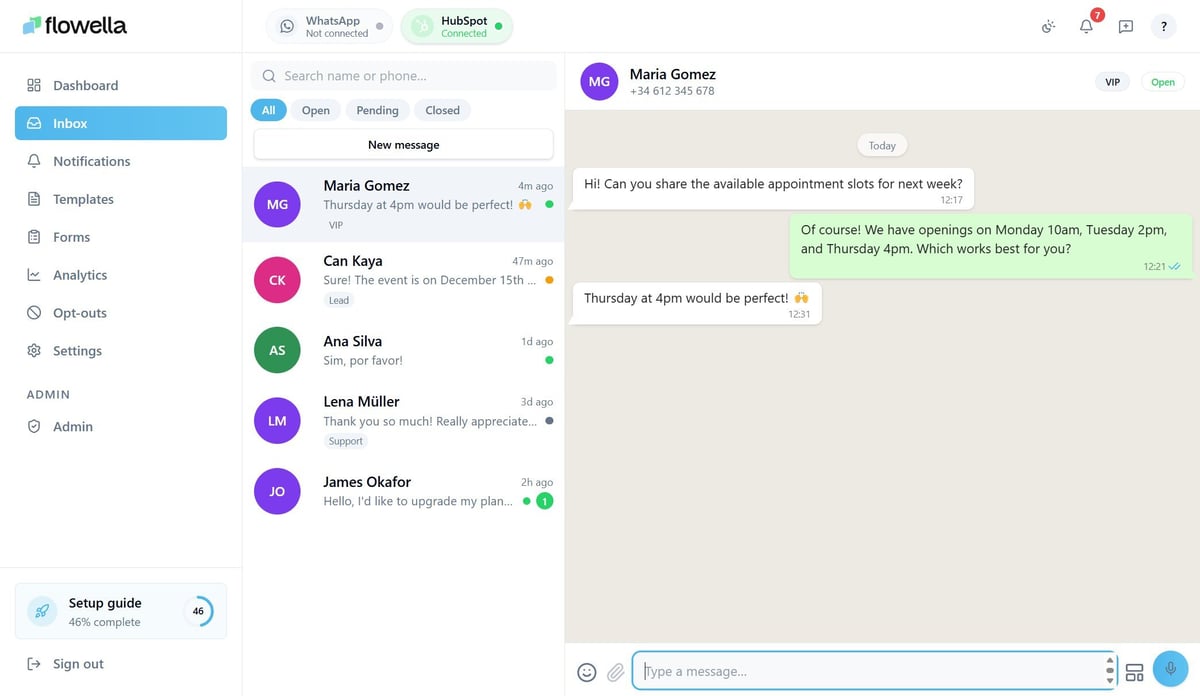
The Flowella app inbox showing a list of WhatsApp conversations, an open thread with Maria Gomez about appointment slots, and the contact phone number and VIP status in the header
In the Flowella app

A focused home for WhatsApp.

The Flowella app inbox is a dedicated home for WhatsApp. A conversation list on the left, the full thread in the middle, and the contact's number and opt-in status on the right. Search by name, number or message text, filter by status, and archive resolved chats to keep the queue tidy. It is built for one-to-one replies, with everything an agent needs in a single view.
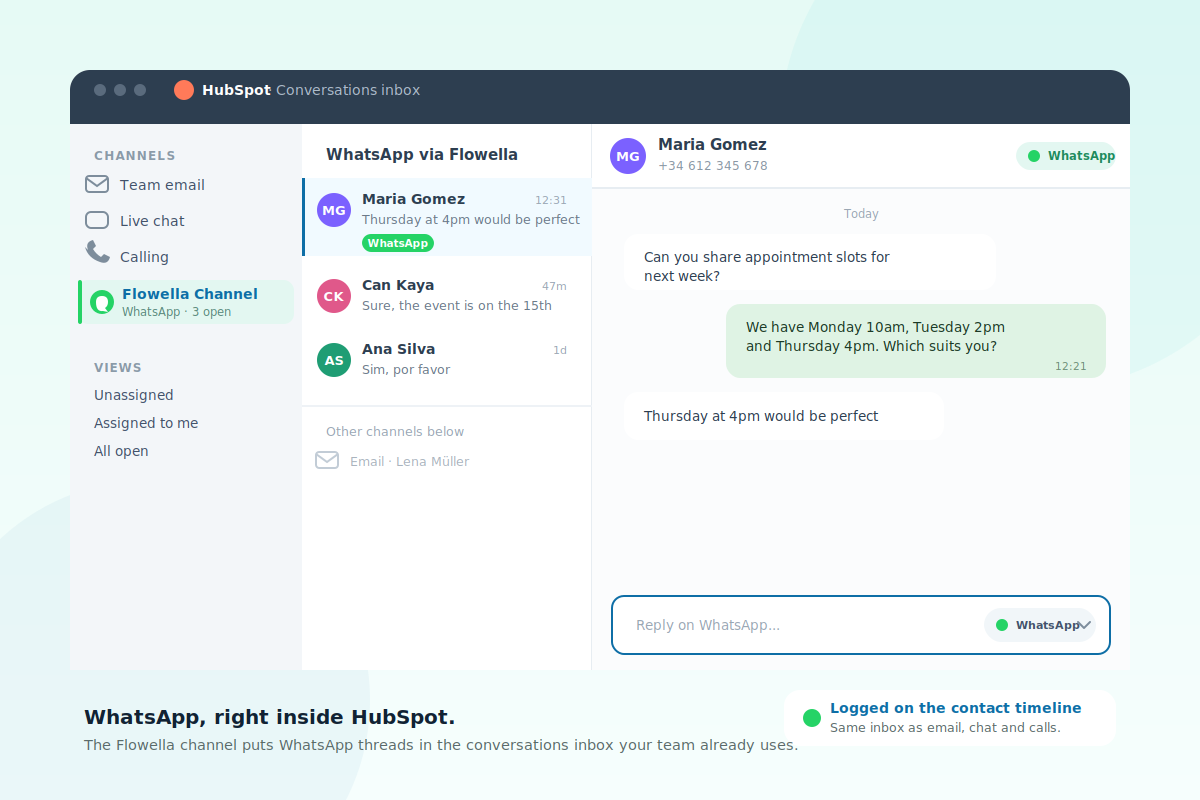
The HubSpot conversations inbox with a Flowella channel selected, showing WhatsApp threads alongside team email, live chat and calling, with a WhatsApp conversation open and a reply editor set to the WhatsApp channel
In HubSpot

Or right inside HubSpot.

If your team lives in HubSpot, add Flowella as a custom channel and your WhatsApp threads land in the HubSpot conversations inbox, next to email, chat and calls. New conversations route to the right users or teams, replies and templates are logged on the contact timeline and in reporting, and you can switch between WhatsApp and other channels mid-conversation from the reply editor.

Two inboxes, one set of conversations

Which inbox fits your team?

The same WhatsApp conversations, handled wherever suits you. Many teams use both.

The Flowella app inbox

Best when WhatsApp is the focus.

Ideal for a small team, a WhatsApp-led campaign, or anyone who wants a clean queue without opening HubSpot. Works on any plan, with nothing extra to install.

  • A dedicated, WhatsApp-only view
  • Search, filter and archive built in
  • Send and test templates from the inbox
Acme Insurance Business · online
Hi Anna 👋 just checking — are you still keen to renew your policy this year? 09:14
ohh hi yeah maybe? remind me what plan I'm on? 11:42
You're on the Standard plan. Happy to send the renewal link? 11:43
actually can we chat tomorrow? today is mad 11:46
Of course — what time works? 11:47
idk friday maybe? 😅 14:08
FOCUSED NO HUB NEEDED QUICK TO START
The HubSpot inbox

Best when your team lives in HubSpot.

Ideal for sales and service teams who already work the conversations inbox and want WhatsApp in the same place, logged and reportable. Needs a qualifying HubSpot subscription.

  • WhatsApp beside email, chat and calls
  • Routing to the right users and teams
  • Every message on the contact timeline
Cancel Renew with Acme
Hi Anna — pick the plan that suits you. We'll auto-renew and send your receipt here in WhatsApp.
  • 30 seconds · Card on file
  • With · Membership team
  • Receipt sent here after renewal

Choose your plan

  • Quarterly · £15
  • Monthly · £6
Confirm renewal

Powered by Flowella · Secure renewal

ONE INBOX ROUTING FULL CONTEXT
Side by side

What each inbox does

Both handle the day-to-day. The difference is where the conversation sits and how it is routed.

What you can doFlowella app inboxHubSpot inbox
Read and reply to WhatsApp threadsYesYes
Send template messages after the 24-hour windowYesYes
Send a test template to your own numberYesFrom Flowella
Manage opt-in and opt-out statusYesFrom Flowella
Search, filter and archive conversationsYesHubSpot views and filters
Route conversations to users or teamsManual pickupYes, with routing rules
WhatsApp beside email, chat and callsWhatsApp onlyYes
Logged on the contact timeline and reportingSynced to HubSpotNative
Requires a HubSpot subscriptionNoSales or Service Pro+
Good to know

The 24-hour window

One rule worth understanding, because it shapes how replies and templates work.

WhatsApp allows free-text replies only within 24 hours of the customer's last message. This is a WhatsApp Business Platform rule, not a Flowella or HubSpot limit, and it applies in both inboxes.

After the window closes, you reopen the conversation with an approved template message. In the Flowella app inbox a template send panel appears at the bottom of the thread; in HubSpot you pick a template from the reply editor. Either way, template variables fill automatically from the data Flowella holds for the contact.

FAQ

Straight answers.

The questions teams ask about the inbox.

Do I have to choose one inbox?

You can use either, or both. The Flowella app inbox needs no HubSpot subscription. The HubSpot inbox needs a qualifying plan, but puts WhatsApp alongside your other channels.

What do I need for the HubSpot inbox?

The HubSpot custom channel is gated by HubSpot. You need Sales Hub or Service Hub Professional or Enterprise, and a Super Admin connects the channel. HubSpot Credits may also apply.

Can I send templates from either inbox?

Yes. Both inboxes send approved templates to reopen a conversation after the 24-hour window, and variables fill from the contact's data automatically.

How are opt-outs handled?

Yes. If a contact asks to stop, mark them opted out and Flowella will not message them again, even if a workflow tries. Opt-out status is managed in Flowella and respected everywhere.

Is the inbox for bulk messaging?

No. The inbox is for one-to-one conversations. For bulk sending, use campaigns, and for automated sends, use HubSpot workflow actions.

What happens to old conversations?

In the app inbox, archive resolved chats to keep the active list tidy; they stay searchable. In HubSpot, conversations follow the inbox's own close and filter behaviour.

Next step

Handle WhatsApp wherever your team works best.

Flo, the Flowella mascot, celebrating