MULTI-CHANNEL

Many numbers and brands, one tidy org.

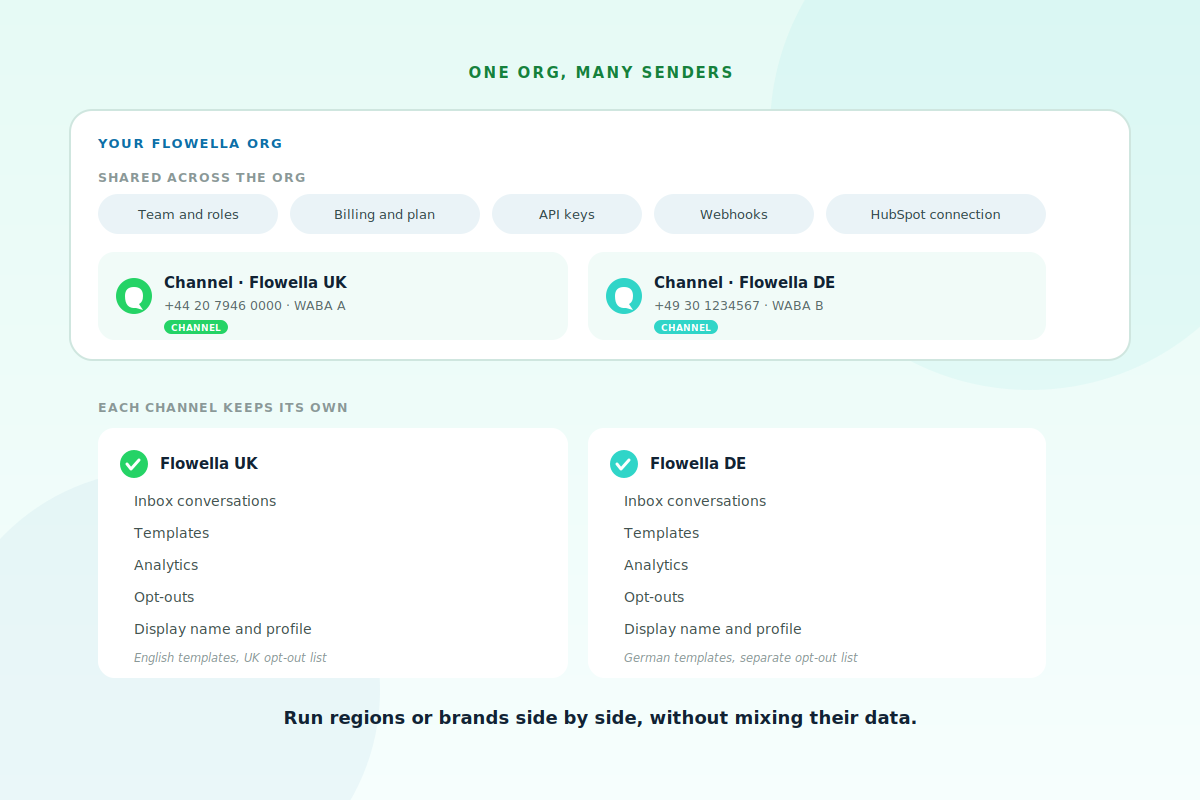
A single Flowella org can run more than one WhatsApp sender. Each sender, a WhatsApp Business Account paired with a phone number, is a channel. Switch between them in the app, keep their conversations, templates and opt-outs separate, and share the things that should be shared, like your team, billing and HubSpot connection.

A diagram of one Flowella org with team, billing, API keys, webhooks and HubSpot shared across it, and two channels, Flowella UK and Flowella DE, each keeping its own inbox, templates, analytics, opt-outs and profile
What is shared, what is not

Shared admin, separate senders.

Some things belong to the whole org, your team and roles, billing, API keys, webhooks and the HubSpot connection. Others belong to each channel, its inbox, templates, analytics, opt-outs and display name. That split is what lets you run, say, a UK number and a German number side by side: shared admin, but separate conversations, localised templates and their own opt-out lists, with no risk of mixing them up.
When to use it

Built for regions, brands and teams.

Wherever you need more than one sender, channels keep each one clean.

Multi-region

One brand, several regions.

Run a different phone number per country, each with its own display name and language, so a contact always hears from the right local sender and consent stays region-specific.

  • A number per country, localised templates
  • Right display name for each market
  • Separate opt-out list per region
Acme Insurance Business · online
Hi Anna 👋 just checking — are you still keen to renew your policy this year? 09:14
ohh hi yeah maybe? remind me what plan I'm on? 11:42
You're on the Standard plan. Happy to send the renewal link? 11:43
actually can we chat tomorrow? today is mad 11:46
Of course — what time works? 11:47
idk friday maybe? 😅 14:08
REGIONS LOCALISED COMPLIANT
Multi-brand

Several brands, or a clean split.

Give each brand its own WABA and opt-out list under one parent org, or simply separate marketing from support so templates and analytics never get mixed together.

  • A WABA per brand under one parent
  • Or split marketing and support numbers
  • Clean reporting, no crossed wires
Cancel Renew with Acme
Hi Anna — pick the plan that suits you. We'll auto-renew and send your receipt here in WhatsApp.
  • 30 seconds · Card on file
  • With · Membership team
  • Receipt sent here after renewal

Choose your plan

  • Quarterly · £15
  • Monthly · £6
Confirm renewal

Powered by Flowella · Secure renewal

BRANDS OR DEPARTMENTS TIDY
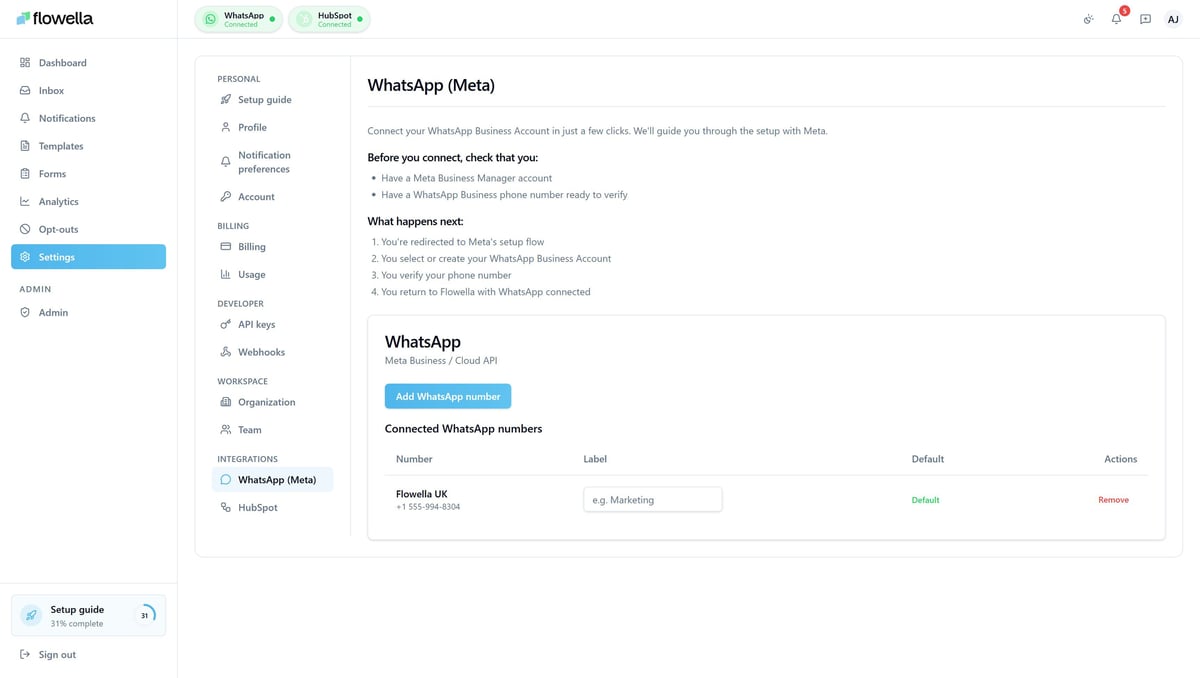
The Flowella Settings page for WhatsApp via Meta, showing an Add WhatsApp number button and a list of connected numbers with labels and a default marker
Adding a channel

Connect another number in Settings.

Add a channel from Settings, Meta. To bring on a new WhatsApp Business Account, run through Meta's embedded signup again; to add a number to an account you already have, add it in Meta Business Manager first, then refresh the channel list in Flowella. Each number gets its own display name, profile and templates, and you switch between channels from the picker in the top-left of the app. Plan limits apply at the org level, so adding channels does not multiply your allowance.

The scoping rules

Shared vs per-channel, in full

The exact split, so you always know where a setting lives.

WhatShared across the orgPer channel
Team members and rolesYes
Billing and planYes
API keysYes
Outbound webhooksYes
HubSpot connectionYes
Inbox conversationsYes
TemplatesYes
AnalyticsYes
Opt-outsYes
Display name and profileYes

— KNOWLEDGE BASE

Set up multiple channels.

The Multi-channel guide covers the channel URL pattern, switching between senders, adding a WABA or number, and the full shared-versus-per-channel scoping rules.

Read the multi-channel guide →

FAQ

Straight answers.

The questions people ask about running multiple numbers.

What is a channel?

A channel is one WhatsApp sender, a WhatsApp Business Account paired with a phone number. An org can have one channel or many, and most app pages are scoped to the channel you have selected.

How do I switch between numbers?

Use the channel switcher in the top-left of the app. Pick the account, then the number, and the page reloads scoped to that channel, with inbox, analytics and template lists all following your choice.

How do I add another number?

From Settings, Meta. Connect a new WhatsApp Business Account through Meta's signup, or add a number to an existing account in Meta Business Manager and refresh the list in Flowella.

Are templates and opt-outs shared?

Per channel. Templates are submitted to a specific account, so if you want the same template on two accounts, submit it to each. Opt-outs and analytics are also per channel.

Does each channel get its own limit?

No. Plan limits apply at the org level, so adding channels does not change your overall allowance. See plans and limits for the detail.

Next step

Run every number from one place.

Flo, the Flowella mascot, celebrating