Most businesses arrive on WhatsApp with a campaign in mind. At Meta’s WhatsApp Business Summit 2026 (EMEA), one of the questions registrants asked most often got a different answer: start with WhatsApp utility messages, the order updates, reminders and login codes you already send, and earn the right to market later. We watched every session of the summit, held in Berlin with an online replay on 27 October 2026, and this was one of the clearest pieces of advice in the whole event[1].
This guide explains why the boring message wins, what Meta’s speakers said about trust and quality, what utility messages cost today, and a five-step plan you can start this month.
The short answer. Move one message you already send by email or SMS, such as an order update, delivery window, appointment reminder or login code, to WhatsApp as a utility template. Meta’s advice was to
just pick the boring use case, because it is the message customers want and it opens the thread for everything that follows[1]. Marketing comes once people trust you in that thread.
What Meta said about WhatsApp utility messages at the summit
After each session, Meta’s experts answered the questions registrants had sent in. The answer on where to begin was blunt: Take something you’re already sending, an order update, a delivery window, an appointment reminder, or a login code, and just move it to WhatsApp.
Three reasons came with it. It usually costs less than what you’re doing today.
Customers want it: It’s the message your customers actually want, and it opens a conversation you couldn’t have had otherwise.
And it lays the ground for everything else, because the clever campaigns only work once people are already in the thread with you.
The warning was just as clear: The ones who jump straight to the clever thing end up with something impressive that nobody else is talking to.
The summary line is worth pinning above every WhatsApp plan: Start with a useful thing, earn the right to send the interesting one.
What counts as a WhatsApp utility message?
A WhatsApp utility message is a template a business sends because of something the customer did or asked for, such as an order confirmation, a delivery update, a booking reminder or an account alert. Meta checks the content: if a utility template contains marketing material, it is automatically re-categorised as a marketing template[2][3].
Tarek Abougabal, Strategic Partner Manager EMEA at Meta, split business messages into two jobs. Customer activation is marketing. Customer enablement covers utility, authentication and service messages, which he called a high-value, high-trust touchpoint
. His point was that customers who already receive useful messages from you have engaged with you before your first offer arrives[1].
| Message category | Its job | Examples given at the summit |
|---|---|---|
| Utility | Keep customers informed after an action they took | Order confirmations, bills, boarding passes, fraud alerts, appointment reminders |
| Authentication | Verify that it is really them | One-time passcodes for sign-in, password resets and payments |
| Service | Answer when the customer gets in touch | Sizes in stock, where an order is, flight changes |
| Marketing | Activate interest with offers | Digital flyers, targeted offers, abandoned-cart and back-in-stock alerts |
Source: Tarek Abougabal’s session at the WhatsApp Business Summit 2026[1]. Our WhatsApp template reference covers each category, header and button type in more detail.
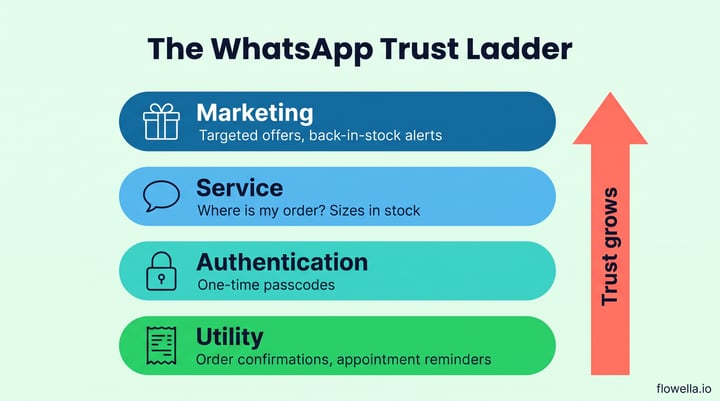
Start with a useful thing, earn the right to send the interesting one.
Why WhatsApp rewards the useful message
WhatsApp sits next to people’s family and friends, so Meta treats access to it as something you earn. In the summit Q&A the experts put it simply: So it’s an earned channel, not an open one, and WhatsApp actively protects it.
Laia Abellan, Head of Creative Shop for Central Europe at Meta, explained that Meta is rewarding quality in the messages you send out
and runs signals to prevent spam. Get the first impression wrong and, in her words, you’re not gonna get invited twice
. Tino Krause, Meta’s Country Director for DACH, added a regional warning: when you lose people with your first message, then they are probably gone for a very long time
[1].
That protection is visible in the platform. Your number carries a quality rating, and Meta can limit marketing messages to people who are not engaging, which shows up as error 131049. Starting with utility messages builds the engagement history that keeps both healthy.
What utility-first looks like at scale
The case studies Meta showed during the online replay follow the same order: useful first, promotional second[1].
- Air France sent ten million utility messages and over three million authentication messages in a year, part of more than 33 million messages with travellers. Its best-offer newsletter messages on WhatsApp then earned 4.5 times the click-through rate of the same messages by email[1][6].
- Meta itself moved one-time passcodes for account recovery from SMS to WhatsApp and reported a 20% increase in account recovery success on Instagram and 11% on Facebook[1].
- Flix, the bus and travel company, moved booking confirmations and trip reminders from SMS to WhatsApp and reported a 73% cost saving per message compared with SMS[1].
Max Motta, Enterprise Technical Sales Specialist at Meta, framed the service benefit: every proactive update answers a question before it becomes a support ticket. That is a strong internal business case for a first WhatsApp project.
What WhatsApp utility messages cost now
Utility messages are not free, so budget for them. Meta charges per delivered utility template, at rates that vary by the recipient’s country, with volume tiers for utility and authentication messages[4].
Two changes on 1 October 2026 matter here. Meta started charging for service messages, the free-form replies inside the 24-hour customer service window, and for utility templates sent in response to a customer inside that window[5]. We explain what this means for your budget, and how Flows reduce the number of messages a task needs, in WhatsApp pricing changes: how Flows save you money.
How to use this in your business: a five-step utility-first plan
- List what you already send. Pull a month of emails and SMS that are triggered by customer actions: confirmations, reminders, delivery updates, codes and alerts.
- Pick one high-volume message customers act on. Appointment reminders and delivery windows are good first choices, because a reply or a reschedule has a clear value.
- Collect WhatsApp opt-in where the action happens. Ask at checkout or in the booking form, as Flix did, and keep opt-outs simple. Our guide to managing opt-outs covers STOP keywords and re-opt-ins.
- Give the message a next step. Add a button, or attach a WhatsApp Flow so customers can reschedule, confirm or give feedback without leaving the chat. With Flowella, that Flow can be built from a form you already have, and each completed Flow is saved as a submission of that form in your CRM, such as HubSpot.
- Measure, then earn marketing. Track delivery, read and reply rates and opt-outs for a few weeks. Once the thread is working, add marketing for people who have agreed to receive it, and keep checking your quality rating.
If you send from HubSpot, the same pattern works for a WhatsApp confirmation after a form submission, which is often the easiest utility message to launch first.
WhatsApp utility messages: frequently asked questions
What is the difference between utility and marketing messages on WhatsApp?
Utility messages relate to something the customer did or asked for, such as an order, booking or account. Marketing messages promote offers, products or re-engagement. Meta categorises each template and charges a different rate for each category[3][4].
Can a utility message include a promotion?
No. If you add marketing material to a utility template, Meta automatically re-categorises it as a marketing template[2]. Keep offers for marketing templates sent to people who have opted in.
Are WhatsApp utility messages free?
No. Meta charges per delivered utility template, by country. Since 1 October 2026 it also charges for utility templates sent in reply inside the 24-hour customer service window[4][5].
Which utility message should we start with?
The one you send most often today that customers act on, such as appointment reminders or delivery updates. It gives you volume to learn from and a clear before-and-after comparison with email or SMS.
Start boring, then earn the right to market
The WhatsApp Business Summit 2026 made the order of play clear. Begin with WhatsApp utility messages customers already expect, give each one a useful next step, and protect your quality from the first send. Marketing works better in a thread that people already value. See how Flowella works with HubSpot to send your first utility message and Flow.
References
- Meta: WhatsApp Business Summit 2026 EMEA, on-demand sessions (online replay, 27 October 2026)
- Meta: Utility templates (updated 17 June 2026)
- Meta: Template categorisation guidelines
- Meta: Pricing on the WhatsApp Business Platform
- Meta: Pricing updates for Meta Business Agent, service and utility messages (updated 28 September 2026)
- WhatsApp Business: Air France success story
Send your first useful WhatsApp message
Turn the reminders and updates you already send into WhatsApp messages and Flows, on any HubSpot plan.