Turn a HubSpot form into a WhatsApp Flow, no code.
Flowella tracks the HubSpot forms you already use and builds a native WhatsApp Flow from each one. You do not rebuild anything and you do not write a line of code. One click creates or syncs the Flow, and Flowella keeps it in step with HubSpot as the form changes.
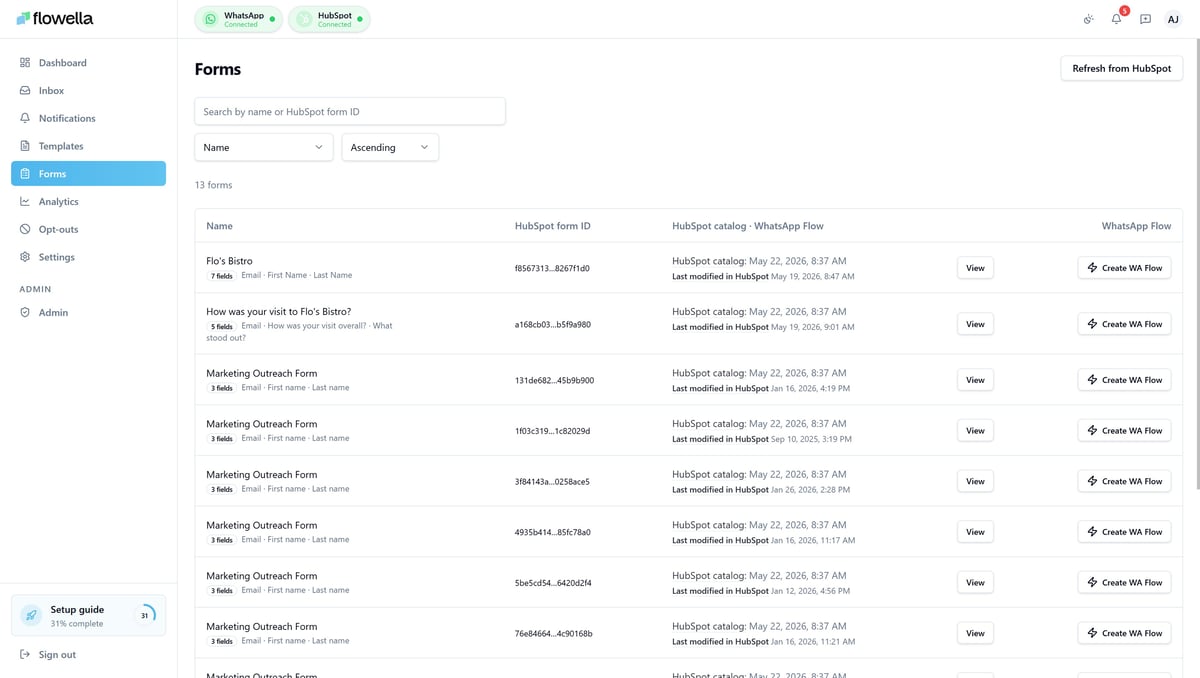
Every form, and its Flow status.
The Forms page lists every HubSpot form Flowella is tracking, with its field count, when it last changed in HubSpot, and its WhatsApp Flow status: synced, draft, or stale when HubSpot has moved on since the last sync. Search and filter to find a form, then create or sync its Flow from the same row. If you have not synced anything yet, Flowella bootstraps the list for you on first visit.
Preflight, generate, upload, done
One button does the work, and tells you clearly if anything needs your attention first.
When you click Create or Sync, Flowella runs a preflight check, confirming HubSpot is connected, the channel is verified, the form has at least one supported field, and billing is active. It then reads the latest form definition from HubSpot, generates the equivalent WhatsApp Flow, uploads it to Meta on your selected channel, and records the run. Most syncs take a few seconds.
If Meta rejects a Flow, the reason appears in plain language on the form's detail page, usually an unsupported field type, a channel verification problem, or a category mismatch. Fix the cause and retry from the same row. The detail page also shows the field-by-field mapping and the history of past sync runs.
The HubSpot form stays the source of truth.
The same form, converted rather than rebuilt, so it never falls out of step.
Build it twice, and maintain it twice.
Most tools make you recreate the form in their own builder, then remember to update both whenever something changes. The two versions drift apart, and the mapping is on you.
- Rebuild the form in another builder
- Keep two versions in step by hand
- Wire up the data mapping yourself
Build it once, in HubSpot.
Your HubSpot form stays the single source. Flowella generates the Flow, flags when HubSpot has changed, and re-syncs on a click. No second builder, no drift.
- Convert the HubSpot form in one click
- Stale status flags when a re-sync is due
- Field mapping generated for you
- ⏱️ 30 seconds · Card on file
- 👤 With · Membership team
- 📩 Receipt sent here after renewal
Choose your plan
- 🏆 Annual · £49 ✓
- 🎯 Quarterly · £15 ✓
- 📅 Monthly · £6 ✓
Powered by Flowella · Secure renewal
— KNOWLEDGE BASE
Set up form conversions, step by step.
The Forms guide covers the list and detail views, the sync lifecycle, unsupported field types, and how form conversion fits with the HubSpot integration.
Straight answers.
The questions people ask about form conversion.
Do I have to rebuild my form?
No. Flowella reads your existing HubSpot form and generates the WhatsApp Flow for you. There is nothing to rebuild and no code to write.
What happens when I edit the form in HubSpot?
The status shows as stale and the button changes to Sync needed. Click it and Flowella regenerates the Flow from the latest HubSpot definition.
Are all field types supported?
Most field types are supported. A few, such as file upload and signature, cannot be synced as-is, so adjust the form in HubSpot or skip those fields in the Flow. The button tells you if a form contains an unsupported field.
What if Meta rejects the Flow?
Flowella shows a plain-language reason on the form's detail page, usually an unsupported field, a channel verification issue, or a category mismatch. Fix it and retry from the same row.
Does it work across multiple numbers?
Yes. Forms are synced per channel, so you choose which WhatsApp number a Flow is uploaded to. See the Multi-channel page for how scoping works.