Every business that grows on WhatsApp hits the same wall: more conversations than people to answer them. Leads go cold overnight and teams burn out. At Meta's WhatsApp Business Summit 2026 (EMEA), Meta's answer was Meta Business Agent, an AI agent that answers customers inside the chat, and it was the thread running through almost every session[1].
We watched the Berlin sessions in the online replay on 27 October 2026. This post explains what Meta Business Agent is, the two ways to get it, what it costs, how it fits alongside your existing tools, and what early adopters learned. It ends with a practical plan for testing it without losing the structured data your CRM depends on.
The short answer. Meta Business Agent is Meta's own AI agent for business messaging. Small businesses can switch it on in the WhatsApp Business app; larger ones build on the Meta Business Agent Platform, which connects to their systems. More than one million businesses already use it, and on the Business Platform Meta charges roughly 4 to 5 US cents per agent message[2][3].
What is Meta Business Agent?
Meta describes it as an agent that can answer business-specific questions, recommend products from a catalogue, book appointments, qualify leads, hand over to staff when the business decides, and close sales, replying in the customer's language and the business's tone[2]. Alon Ozery, Product Marketing Lead for paid messaging in EMEA, told the summit that more than one million businesses already use these agents[1].
There are two routes in, and the summit was clear about who each is for:
| WhatsApp Business app | Meta Business Agent Platform | |
|---|---|---|
| Best for | Small businesses getting started | Businesses that need control and integration at scale |
| Set-up | Configured manually in the app, in minutes | Built with APIs, connectors and Meta's first-party intelligence |
| Connects to | Your business information in the app | Your CRM, catalogue and knowledge base; Meta names connectors such as Shopify, Zendesk and Shopee |
| Cost | Described as free on stage; Meta says paid subscriptions are coming | About 4 to 5 US cents per agent message |
Sources: Meta's summit sessions and its launch announcement[1][2]. Alon's advice to the enterprise audience was direct: If you're sitting in this room today, you want the platform.
The four layers of an AI agent
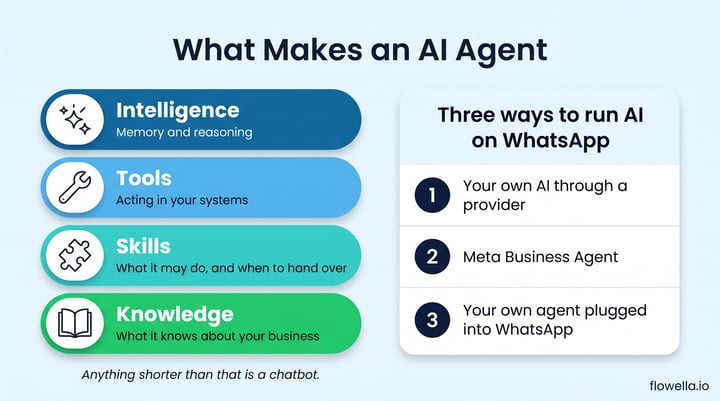
Alon gave the clearest definition we heard all day. A real agent has four layers:
- Knowledge: what it knows about you, such as your website, FAQs and sales transcripts. It answers from your business, not the open web.
- Skills: what it is allowed to do, how far it goes, and when it hands over to a person.
- Tools: the integrations that let it act in your systems, such as booking, ordering or updating a record.
- Intelligence: the underlying model, with memory and reasoning, which improves over time.
His summary: Anything shorter than that is a chatbot.
Meta also stressed that the agent is a layer on top of your systems, not a replacement: your data stays yours, and your conversations will not train our AI.
The Q&A tackled the obvious objection head on. Honestly, the thing you switched off in 2019 probably deserved it.
The difference, Meta said, is that today's agent reads from your catalogue, systems and policies, remembers the conversation, and passes the whole thread to a person when it is not sure. We made a similar case in the real problem with WhatsApp chatbots.
What Meta Business Agent costs on the Business Platform
Since 1 August 2026, Meta has charged for agent messages per token, with one charge covering both the AI processing and delivery. The rate is $2 per million tokens. A typical message uses 20,000 to 25,000 tokens, which works out at about 4 to 5 US cents per message[3].
- Simple enquiry (for example, opening hours): Meta's own example is 4 agent messages for about 16 to 20 cents.
- Complex help (for example, walking someone through an assembly step): 10 messages for about 40 to 50 cents.
- Replies only: agent messages can only answer customers inside the 24-hour customer service window; they cannot start a conversation.
- Ads still matter: messages from click-to-WhatsApp ads stay free for delivery in the free entry point window, but agent token charges still apply.
Source: Meta's pricing documentation for Meta Business Agent, service and utility messages[3]. If you use a third-party AI instead, you usually pay the AI provider and the messaging provider separately.
Three ways to run AI on WhatsApp
Many businesses already have a chatbot or an AI partner, so one of the questions registrants asked most often was whether Meta's agent replaces them. The answer in the Q&A: There are three ways to run AI on WhatsApp.
- Your own AI through a provider, which keeps working exactly as it does now.
- Meta's agent, through the app or the Business Agent Platform.
- Your own agent plugged into WhatsApp, on your own infrastructure with the model you have chosen, gaining a richer experience and a safety layer.
As Meta put it, So it was never about whose agent wins.
Two more points matter for planning. First, The agent does not replace your marketing messages or your notifications.
Your templates keep working, and every message you send becomes an opening for a conversation the agent can pick up. Second, if more than one tool answers on the same number, Meta's Conversation Routing lets the business decide which responder owns each conversation, by entry point, and hand threads between them[4].
What early adopters learned
- Delivery Hero built a proactive AI advisor for its restaurant partners on WhatsApp. In a classic A/B test, restaurants using it grew orders by more than 15%, and it now serves around 40,000 partners. Hendrik Wittrock's verdict:
Agentic AI is finally here for the B2B.
He also described two agents, theirs and a restaurant's,basically arguing with each other
. - RatePunk, from Kilo, runs a live Meta Business Agent that starts from an ad, opens with a WhatsApp Flow to capture travel preferences, shows a carousel of deals and ends at a subscribe button.
- Charles, a Berlin partner, said 30% to 50% of users ask a question even inside a sales funnel. It frames agents in three levels: answering from existing information, reasoning about a request, and acting on the customer's behalf.
Every brand should start with level one.
- Infobip and CM.com both keep a human in the loop for sensitive actions such as refunds, with clear governance over what the agent may decide.
Meta's own Max Motta added a useful counterweight in his customer service session: You don't necessarily need the agentic capability.
Guided, structured paths still solve many service journeys faster[1].
How to use this in your business
- Start at level one. Clean up the knowledge an agent would read: FAQs, policies, opening hours and your catalogue. If those are wrong, the agent will be too.
- Write the skills before you switch it on. List what the agent may do, what it must never do, and the exact moments it hands over to a person.
- Keep structured steps for data you rely on. Qualification questions, bookings and consent belong in a WhatsApp Flow, so your CRM gets clean fields rather than a transcript. With Flowella, you turn your existing forms into Flows, and each completed Flow is saved as a form submission that triggers your workflows[5][6].
- Model the cost. Estimate agent messages per conversation at roughly 4 to 5 cents each and compare with your cost per answered enquiry today[3].
- Pilot it like Delivery Hero. Run an A/B test on one journey, read the conversations every week, and only widen the audience once the numbers hold.
- Decide who owns each conversation. If you use more than one tool, set routing and handover rules before customers notice the seams.
Not sure which WhatsApp set-up you need first? Our guide to the WhatsApp Business app versus the API covers the trade-offs.
Meta Business Agent: frequently asked questions
Is Meta Business Agent free?
In the WhatsApp Business app it was described on stage as free to configure, though Meta's announcement says paid subscription offerings are coming. On the Business Platform, Meta charges $2 per million tokens, about 4 to 5 US cents per agent message, since 1 August 2026[2][3].
Does Meta Business Agent replace my chatbot or AI provider?
Not necessarily. Meta described three options: keep your own AI through a provider, use Meta's agent, or plug your own agent into WhatsApp. Conversation Routing lets more than one responder share a number with clear ownership of each conversation[4].
Will Meta use my conversations to train its AI?
At the summit, Meta said your data stays yours and your conversations will not train its AI. Check the current terms for your account before you launch.
Can Meta Business Agent hand over to a person?
Yes. Handover to staff is a core capability, and the business decides when it happens[2].
An agent is a layer, not a strategy
The lesson from the summit is that AI agents on WhatsApp are now real, affordable and already used by more than a million businesses. They work best as a layer on top of good knowledge, clear rules and structured data, not as a replacement for them. Start with one journey, keep your forms and data clean, and let the agent handle the questions your team cannot reach in time.
References
- Meta: WhatsApp Business Summit 2026 EMEA, on-demand sessions (Alon Ozery, the Q&A, Delivery Hero, Kilo, the partner panel and Max Motta)
- Meta Newsroom: Be There for Every Customer With Meta Business Agent
- Meta: Pricing updates for Meta Business Agent, service and utility messages
- Meta: Conversation Routing
- Flowella Knowledge Base: Create and sync WhatsApp Flows from your HubSpot forms
- Flowella Knowledge Base: Qualify and route new leads with WhatsApp Flows and HubSpot
Keep your data structured, whatever answers the chat
Turn your existing forms into WhatsApp Flows and save every answer to your CRM as a form submission.