



Ask what WhatsApp on HubSpot costs and you usually get one plan price. The real WhatsApp HubSpot cost has three parts: the HubSpot subscription a route needs, the WhatsApp tool you connect, and Meta’s fee for every message you send. Leave one out and the budget is wrong before your first template goes out.
This guide prices all three layers for each route: HubSpot’s own WhatsApp channel, Flowella and apps from the HubSpot Marketplace. It then works through three teams’ bills with every assumption and sum shown, so you can swap in your own numbers. All prices are as published on 25 October 2026, in US dollars, before tax.
A note before we start: Flowella publishes this blog and is one of the routes below. We’ve used each vendor’s published prices, linked every source and said where the others do more.
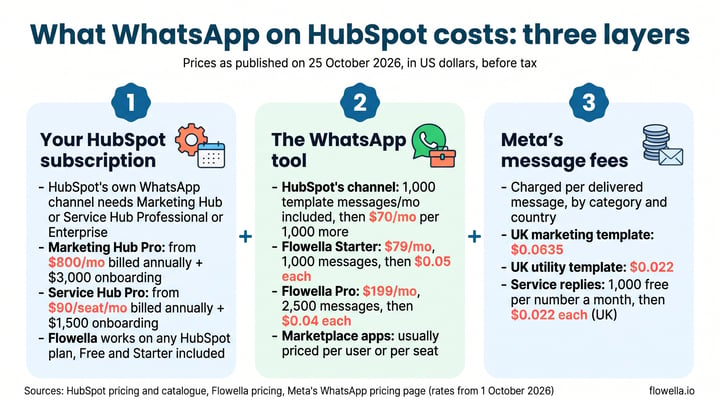
The short answer. HubSpot’s own WhatsApp channel needs Marketing Hub or Service Hub Professional or Enterprise. Marketing Hub Professional starts at $800 a month and Service Hub Professional at $90 a seat a month, both billed annually and both with a one-time onboarding fee. The channel includes 1,000 template messages a month, with more at $70 a month per 1,000[1][2][3][4]. On any HubSpot plan, Free and Starter included, Flowella costs $79 a month for 1,000 billable messages, plus Meta’s per-message fees, which Meta bills you directly at its list rates[5][6].
The three layers of WhatsApp HubSpot cost
Every route to WhatsApp on HubSpot is built from the same three layers. What changes is which layer carries the weight.
- Your HubSpot subscription: some routes need a particular HubSpot plan. HubSpot’s own channel needs Professional or Enterprise; Flowella and several Marketplace apps work on any plan.
- The WhatsApp tool: the software that connects WhatsApp to HubSpot. That’s HubSpot’s built-in channel, Flowella or a Marketplace app, each priced its own way.
- Meta’s message fees: Meta charges for each delivered message, by message category and the recipient’s country[7]. Who passes that bill to you depends on the route.
Layer 1: the HubSpot plan each route needs
HubSpot lists its WhatsApp integration only on the Professional and Enterprise editions of Marketing Hub and Service Hub. Its catalogue shows no WhatsApp integration on Starter[3][8]. So if you’re on Free or Starter today, this layer is the big one for HubSpot’s own channel.
| HubSpot plan | Price (US dollars, before tax) | One-time onboarding | HubSpot’s own WhatsApp channel |
|---|---|---|---|
| HubSpot’s free tools | $0, free for up to 2 users | None | Not included |
| Starter | From $20 a month per Core Seat (catalogue list price) | None | Not included |
| Marketing Hub Professional | From $800 a month billed annually ($890 paying monthly), with 3 Core Seats; more seats from $45 a month ($50 monthly) | $3,000 | Included, 1,000 template messages a month |
| Service Hub Professional | From $90 a seat a month billed annually ($100 paying monthly) | $1,500 | Included, 1,000 template messages a month |
Sources: HubSpot’s Marketing Hub and Service Hub pricing pages and its product catalogue[1][2][8]. Enterprise editions include the channel too, at higher prices. HubSpot’s pricing page sometimes shows a lower introductory Starter price for new customers; we’ve used the catalogue’s list price. The same page labels Professional’s pay-monthly option “Commit annually”, so check the term in your quote.
Flowella works on every HubSpot plan, Free and Starter included[6]. Its five HubSpot workflow actions need Professional or Enterprise, because that’s where HubSpot workflows live[9]. On Free or Starter you send from Flowella itself: bulk send (one approved template to up to 50,000 contacts from a CSV or Excel file)[10], templates, and WhatsApp Flows built from your HubSpot forms, with each completed Flow saved as a submission of that same form.
Layer 2: HubSpot WhatsApp pricing and the alternatives
HubSpot’s own WhatsApp channel
This is everything HubSpot’s pages say about WhatsApp messages[3][4]:
- 1,000 template messages a month are included, shared by all your connected WhatsApp Business accounts. The limit resets on the day of the month you first bought your Marketing Hub or Service Hub Professional or Enterprise subscription.
- More messages cost $70 a month per 1,000, through the WhatsApp Message Limit Increase.
- HubSpot doesn’t charge for free entry point conversations.
HubSpot’s pages don’t spell out how Meta’s own per-message fees are handled on this channel. Ask HubSpot for that line in writing before you budget. We haven’t assumed either way in the examples below.
What you get: chats land in the conversations inbox or help desk, replies can carry images, documents, meeting links and quotes, and conversations log on the contact record when the phone number matches[3]. One limit to know: HubSpot doesn’t support syncing templates that use flow buttons, so its channel doesn’t send WhatsApp Flows[11].
Flowella
- Starter, $79 a month: 1,000 billable messages, then $0.05 each.
- Pro, $199 a month: 2,500 billable messages, then $0.04 each, plus priority support.
- Enterprise: priced with you, for 100,000 or more billable messages a month.
Every plan includes unlimited WhatsApp Flows, and there’s a 14-day free trial with up to 5,000 messages and no card[5]. A billable message is one WhatsApp marks as chargeable: a template, a Flow or a charged reply each counts once, and messages your customers send never count. There’s no hard stop at the allowance; overage is billed at the end of the cycle[12].
On price alone, Starter is cheaper below 7,000 billable messages a month and Pro above it. At exactly 7,000 both cost $379: $79 + 6,000 × $0.05 on Starter, or $199 + 4,500 × $0.04 on Pro.
Meta’s fees are a separate bill. Meta charges them directly to your WhatsApp Business Account at its list rates, and Flowella doesn’t mark them up or resell them[5][12]. See how Flowella works with HubSpot or the plans and limits guide for the detail.
Marketplace apps
The HubSpot Marketplace lists many WhatsApp apps, and most price per user or per seat. Two examples, with prices checked on 25 October 2026:
- HelloSend: its HubSpot Marketplace listing prices an “SMS + WhatsApp Plan” at $10 a user a month with 1,000 messages (listing pricing last updated 8 August 2025)[13]. Its own pricing page sells a Standard plan at $75 a month for three users with 10,000 messages ($60 a month billed yearly), plus $25 for each further user. HelloSend says Meta’s fees are billed separately, with no hidden mark-ups[14]. It also covers SMS and calls, which Flowella doesn’t.
- TimelinesAI: $35 a seat a month on Starter ($28 billed yearly) and $49 on Pro ($39 billed yearly), with a seat for each user and each connected number. Automated and campaign messages use credits, 50 a seat a month on Starter and 500 on Pro, with more at $4 per 100 a month. Meta bills its own per-message fees for template messages[15]. TimelinesAI can also sync reps’ own WhatsApp chats, group chats included, which Flowella doesn’t do.
Both apps list HubSpot’s free tools as a compatible plan[13][16]. Some apps connect a phone’s own WhatsApp by QR code as well as Meta’s platform; our guide to personal WhatsApp, the Business App and the API explains the difference. For line-by-line comparisons, see Flowella compared with other WhatsApp tools.
Layer 3: Meta’s fees, the WhatsApp Business API cost on any route
Meta charges for each message a business delivers, by category and by the recipient’s country calling code. It doesn’t charge for messages your customers send you[7]. These are Meta’s UK list rates from 1 October 2026, in US dollars:
| Message category | What it’s for | UK rate per delivered message |
|---|---|---|
| Marketing template | Offers, announcements, re-engagement | $0.0635 |
| Utility template | Transactional or informational updates | $0.022 |
| Authentication template | One-time passcodes | $0.022 |
| Service message | Replies that aren’t templates, inside the 24-hour customer service window | $0.022 after the first 1,000 a month per number |
Rates vary a lot by country. A marketing template costs $0.1365 to Germany, $0.025 to North America and $0.0118 to India[7].
Meta lists two cases where it doesn’t charge[7]:
- Free entry point window: when someone messages you from an ad that clicks to WhatsApp and you reply within the customer service window, the messages that follow are free for up to 7 days (Meta Business Agent messages excepted). Our guide to website to WhatsApp ads shows how to start those conversations.
- Free service tier: each business phone number gets 1,000 free service messages a month, and Meta charges from the 1,001st. This started on 1 October 2026, when Meta resumed charging for service messages.
Two more things for your budget: utility and authentication rates fall with volume tiers, and Meta changes prices only on the first day of a quarter, with at least a month’s notice for rate changes[7]. We covered what the 1 October changes mean in WhatsApp pricing changes: how Flows save you money.
Worked examples: what three teams would pay
The same rules apply to all three: UK numbers, Meta’s list rates from 1 October 2026, every message delivered and none in a free entry point window, replies kept within Meta’s 1,000 free service messages, and HubSpot’s annual-billing prices. Prices as published on 25 October 2026, in US dollars, before tax.
Example 1: a three-person team on HubSpot Starter, 1,000 marketing templates a month
Assumptions: Marketing Hub Starter with three Core Seats at the catalogue’s $20 each, so $60 a month today (3 × $20)[8].
HubSpot’s own channel. Starter doesn’t include it, so the team moves to Marketing Hub Professional, which includes three Core Seats. Service Hub Professional is a cheaper way to get HubSpot’s channel: from $90 a seat a month billed annually plus a one-time $1,500 onboarding fee, so about $270 a month more and $4,740 more in year one for three seats[2]. That’s before any change to the Starter seats under HubSpot’s rule that prices every Core Seat at the highest tier you hold[18].
- Subscription: $800 a month, up from $60, so $740 a month more ($800 minus $60).
- Onboarding: $3,000, once.
- Messages: 1,000 template messages included, so no add-on.
- Meta’s fees: not stated on HubSpot’s pages, so ask HubSpot.
- Year one: $740 × 12 + $3,000 = $11,880 more than today.
That $740 buys the whole of Marketing Hub Professional, not just WhatsApp. If you were upgrading anyway, HubSpot’s published WhatsApp charges add nothing at this volume.
Flowella. The HubSpot plan stays at $60 a month.
- Flowella Starter: $79 a month, with 1,000 billable messages included.
- Meta’s fees: 1,000 × $0.0635 = $63.50 a month, billed by Meta.
- Total: $79 + $63.50 = $142.50 a month, or $1,710 a year ($142.50 × 12).
The trade-off: without HubSpot workflows, this team sends from Flowella rather than from workflow actions. Because each completed Flow is saved as a submission of the HubSpot form, the simple form automations HubSpot includes on every plan can run on it too[17].
Example 2: a team already on Service Hub Professional, 3,000 utility templates a month
Assumptions: the Service Hub Professional subscription is already paid and doesn’t change on either route, so only WhatsApp costs count. The 3,000 messages are utility templates, such as appointment reminders and case updates.
HubSpot’s own channel.
- Included: 1,000 template messages.
- Add-ons: 2,000 more = 2 × $70 = $140 a month, or $1,680 a year.
- Meta’s fees: not stated on HubSpot’s pages, so ask HubSpot.
Flowella.
- Flowella Starter: $79 + 2,000 × $0.05 = $179 a month. Pro would be $199 + 500 × $0.04 = $219, so Starter is lower.
- Meta’s fees: 3,000 × $0.022 = $66 a month.
- Total: $179 + $66 = $245 a month, or $2,940 a year.
On published charges, HubSpot’s own channel is the lower figure here: $140 against $179 for Flowella’s tool. If your service team only needs WhatsApp chats in the help desk, that’s a fair reason to choose it. Flowella earns its place when you want WhatsApp Flows from your HubSpot forms, which HubSpot’s channel can’t send. If the 3,000 were marketing templates, Meta’s line would be 3,000 × $0.0635 = $190.50, and the Flowella total $369.50.
Example 3: a team on Marketing Hub Professional, 10,000 marketing templates a month
Assumptions: Marketing Hub Professional is already paid and doesn’t change on either route.
HubSpot’s own channel.
- Included: 1,000 template messages.
- Add-ons: 9,000 more = 9 × $70 = $630 a month, or $7,560 a year.
- Meta’s fees: not stated on HubSpot’s pages, so ask HubSpot.
Flowella.
- Flowella Pro: $199 + 7,500 × $0.04 = $499 a month. Starter would be $79 + 9,000 × $0.05 = $529.
- Meta’s fees: 10,000 × $0.0635 = $635 a month.
- Total: $499 + $635 = $1,134 a month, or $13,608 a year.
On the tool line, Flowella is $131 a month lower ($630 minus $499). At this volume Meta’s fees are the largest line on the Flowella route, so ask HubSpot how they’re handled on its route before you compare totals.
The three examples side by side
| Team and monthly volume (UK) | HubSpot’s own channel: published charges | Flowella plan | Meta’s fees, billed by Meta (Flowella route) | Flowella route total |
|---|---|---|---|---|
| 1. Marketing Hub Starter, 3 users, 1,000 marketing templates | $740 a month more for Marketing Hub Professional, plus $3,000 onboarding; messages included. Service Hub Professional costs less: about $270 a month more for three seats, plus $1,500 onboarding | Starter, $79 | $63.50 | $142.50 a month |
| 2. Service Hub Professional, 3,000 utility templates | $140 a month in add-ons | Starter, $179 | $66 | $245 a month |
| 3. Marketing Hub Professional, 10,000 marketing templates | $630 a month in add-ons | Pro, $499 | $635 | $1,134 a month |
HubSpot’s pages don’t say how Meta’s fees are handled on its channel, so that column shows HubSpot’s published charges only. Prices as published on 25 October 2026, in US dollars, before tax.
The costs people forget
- Onboarding fees. Professional comes with a required, one-time onboarding fee: $3,000 for Marketing Hub and $1,500 for Service Hub[1][2].
- Seats repriced when you upgrade a hub. If you hold a mix of Starter, Professional and Enterprise products, HubSpot prices all your Core Seats at the highest level you hold[18]. Adding one Professional hub can raise the price of every Core Seat, so ask for the full quote, not just the new hub.
- Overage. HubSpot sells extra WhatsApp messages in blocks of 1,000 at $70 a month, so a month of 1,001 to 2,000 messages needs one block[4]. Flowella bills overage per message at the end of the cycle with no hard stop, so a big campaign shows up on the next invoice rather than being blocked[12].
- Service message charges. Since 1 October 2026, Meta charges for replies beyond 1,000 a month per phone number. A UK support number sending 2,500 replies a month pays for 1,500 of them: 1,500 × $0.022 = $33. Without a payment method on your account, Meta stops delivering replies once the free 1,000 are used[7]. Flowella counts charged replies towards your allowance[12].
- Seats that grow with the team. Per-user and per-seat apps cost more as you add people, and TimelinesAI also counts each connected number as a seat[15].
- Flowella inside HubSpot’s inbox. Flowella’s channel in HubSpot’s conversations inbox needs Sales Hub or Service Hub Professional or Enterprise, and HubSpot Credits may also be required[19]. The Flowella app inbox doesn’t need either.
WhatsApp on HubSpot: frequently asked questions
What is the HubSpot WhatsApp integration price?
HubSpot doesn’t sell it separately. Its WhatsApp integration comes with Marketing Hub and Service Hub Professional and Enterprise and includes 1,000 template messages a month. Marketing Hub Professional starts at $800 a month billed annually and Service Hub Professional at $90 a seat a month, each with a one-time onboarding fee. More messages cost $70 a month per 1,000[1][2][4].
Can I use WhatsApp with HubSpot Free or Starter?
Not with HubSpot’s own channel, which needs Professional or Enterprise. Flowella works on every HubSpot plan, Free and Starter included, from $79 a month plus Meta’s fees. HelloSend and TimelinesAI also list HubSpot’s free tools as compatible[6][13][16].
Does Meta charge for WhatsApp replies?
Yes, since 1 October 2026, once a business phone number has used its 1,000 free service messages for the month. In the UK each further reply costs $0.022. Messages your customers send are free, and messages in a free entry point window after a Click to WhatsApp ad are free for up to 7 days[7].
Does Flowella mark up Meta’s WhatsApp fees?
No. Meta bills its fees directly to your WhatsApp Business Account at its list rates. Your Flowella bill covers your plan and any overage only[5].
When is Flowella Pro cheaper than Starter?
Above 7,000 billable messages a month. At 7,000 both cost $379; at 10,000, Starter costs $529 and Pro $499[5].
Do messages sent from the WhatsApp Business App count towards HubSpot’s limit?
No. With coexistence, which keeps the same number in the WhatsApp Business App and HubSpot, HubSpot says free-text messages sent from the phone don’t count towards its limit; only template messages sent from HubSpot do[20].
Work out your own WhatsApp HubSpot cost
Price all three layers before you choose: the HubSpot plan a route needs, the tool, and Meta’s fees for your mix of countries and message categories. If you’re already on Marketing Hub or Service Hub Professional and want WhatsApp chats in your help desk, HubSpot’s own channel may be the cheaper tool. If you’re on Free or Starter, or want WhatsApp Flows from your HubSpot forms, Flowella starts at $79 a month, with Meta billing you directly. See the full breakdown on our pricing page.
References
- HubSpot pricing: Marketing Hub (checked 25 October 2026)
- HubSpot pricing: Service Hub (checked 25 October 2026)
- HubSpot Knowledge Base: Connect a WhatsApp channel to the conversations inbox (last updated 20 October 2026)
- HubSpot Product & Services Catalog: Add-ons, WhatsApp Message Limit Increase (checked 25 October 2026)
- Flowella pricing (checked 25 October 2026)
- Flowella on the HubSpot Marketplace (checked 25 October 2026)
- Meta: Pricing on the WhatsApp Business Platform (updated 30 September 2026; rates effective 1 October 2026)
- HubSpot Product & Services Catalog: Products (checked 25 October 2026)
- Flowella Knowledge Base: HubSpot workflow actions (checked 25 October 2026)
- Flowella Knowledge Base: Bulk send (checked 25 October 2026)
- HubSpot Knowledge Base: Customize and manage WhatsApp message templates (last updated 3 September 2026)
- Flowella Knowledge Base: Plans, pricing, allowances and the free trial (last modified 24 October 2026)
- SMS & WhatsApp by HelloSend on the HubSpot Marketplace (checked 25 October 2026; listing pricing last updated 8 August 2025)
- HelloSend pricing (checked 25 October 2026)
- TimelinesAI pricing (checked 25 October 2026)
- WhatsApp Integration by TimelinesAI on the HubSpot Marketplace (checked 25 October 2026)
- HubSpot Knowledge Base: Form automations (last updated 28 September 2026)
- HubSpot Product & Services Catalog: Pricing overview, HubSpot Seats (checked 25 October 2026)
- Flowella Knowledge Base: HubSpot custom channel (checked 25 October 2026)
- HubSpot Knowledge Base: Connect a WhatsApp number to HubSpot using coexistence (last updated 20 October 2026)
Try Flowella free for 14 days
Turn your HubSpot forms into WhatsApp Flows on any HubSpot plan. No card needed, and Meta bills its fees to you directly.
Start your free trial or book a demo and bring your numbers.


 Get it on the HubSpot Marketplace