Most paid social traffic still ends the same way: someone taps an ad, lands on a web page, skims it on a small screen and leaves. The ones who were interested often wanted to ask a question first, and a contact form felt like too much effort. Website to WhatsApp ads close that gap. Meta now lets you send ad traffic to your own landing page and add a Chat on WhatsApp button on top of it, so a curious visitor can start a conversation without leaving the page[1].
In this guide we explain what Website to WhatsApp ads are, how they differ from Click-to-WhatsApp ads, how to set them up in Ads Manager, and how to pair them with Flowella so every conversation becomes a qualified, structured lead in HubSpot rather than another unread chat.
What Are Website to WhatsApp Ads?
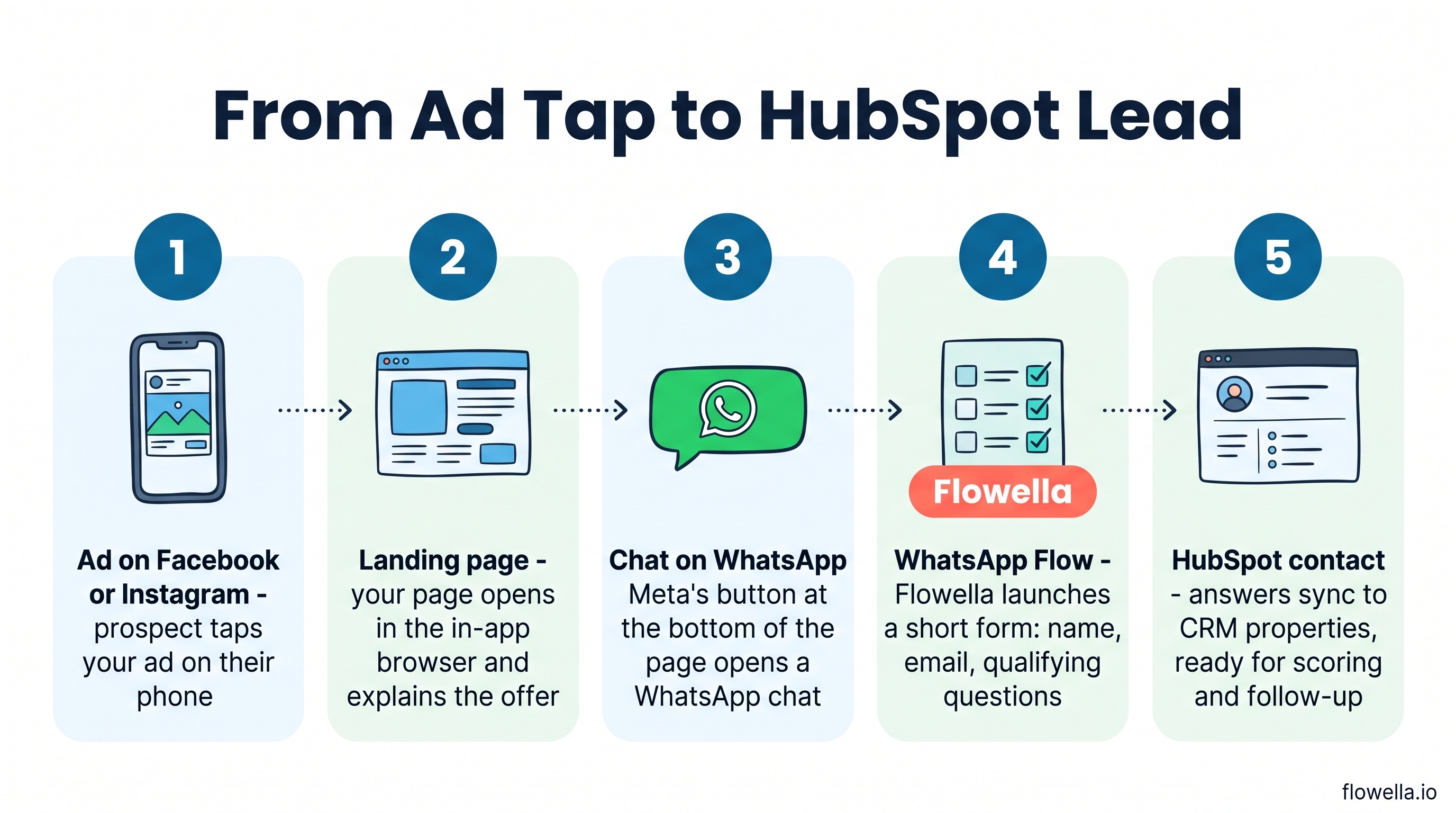
Website to WhatsApp ads are Meta ads that use your website as the destination and add WhatsApp as an extra way to get in touch. When someone taps the ad on a phone, your page opens inside the Facebook or Instagram in-app browser, and Meta shows a Chat on WhatsApp button at the bottom of the screen[1].
You do not need to add any code or widget to your site. The button is a browser add-on that Meta overlays on your page for people arriving from the ad. That has two practical consequences:
- It only appears for ad traffic on mobile - organic visitors, desktop users and anyone who opens your page in Safari or Chrome will not see Meta's button.
- Your page does the selling first - prospects read your offer, pricing or case study before they message you, so the chats you receive are better informed.
It is the same idea Meta already uses for its instant form browser add-on, applied to messaging. If you are new to WhatsApp advertising, our overview of WhatsApp Business ads covers the wider landscape.
Website to WhatsApp vs Click-to-WhatsApp Ads
Both formats aim to start a WhatsApp conversation. The difference is what happens between the tap and the chat.
| Click-to-WhatsApp ads | Website to WhatsApp ads | |
|---|---|---|
| Where the tap goes | Straight into a WhatsApp chat | Your landing page, with a Chat on WhatsApp button |
| Best for | Simple offers and impulse enquiries | Considered purchases that need explaining first |
| Campaign objectives | Messaging-focused objectives | Awareness, traffic, engagement, leads or sales |
| Website measurement | None, the visitor never reaches your site | Meta Pixel and analytics track visits, including people who never chat |
| Free entry point pricing | Yes, on the WhatsApp mobile app | Not confirmed in Meta's documentation, so test it |
That last row matters more since 1 October 2026. Meta now charges for service replies beyond the free 1,000 per number each month, but replies inside a free entry point window stay free for up to seven days[2]. Meta's pricing documentation describes that window for ads that click to WhatsApp[2], while its Website to WhatsApp setup guide does not say whether those chats qualify[1]. Check your WhatsApp Manager billing after a small test before you plan a large budget around it. Our guide to WhatsApp pricing changes explains why this matters for your cost per lead.
How to Set Up Website to WhatsApp Ads in Ads Manager
You need a phone number connected to a WhatsApp Business account, and that number needs to be linked to your Facebook Page[1]. If you are running Flowella, this is the same number your WhatsApp Flows already run on, so there is nothing new to provision.
- Create the campaign - In Ads Manager, click Create and choose awareness, traffic, engagement, leads or sales.
- Choose Website as the conversion location - Then set your budget, audience and placements as usual.
- Add your landing page - In the Destination section of the ad, select Website and enter the page URL.
- Switch on the WhatsApp add-on - For sales campaigns, open Personalised destinations, choose the Browser add-ons tab and select WhatsApp. For every other objective, use the Browser add-ons section, pick Messaging app and choose WhatsApp from the options.
- Connect the number if prompted - If your WhatsApp number is not yet linked to the Page, click Connect account.
- Preview and publish - Check the mobile preview shows the button, then publish.
Website to WhatsApp ads open your site in the Facebook and Instagram in-app browser on mobile, where customers see a Chat on WhatsApp button at the bottom of the page.
Source: Meta Business Help Centre
Using Website to WhatsApp Ads with Flowella
Meta gets the prospect into a chat. What it does not do is turn that chat into anything your sales team can use. Without a plan, you end up with a phone number, a vague first message and a rep typing the same five qualifying questions by hand. This is where WhatsApp Flows come in.
1. Launch a Flow the moment the chat opens
Flowella starts a Flow Template when it recognises the opening message of a conversation[3]. Instead of a free-text back-and-forth, the prospect gets a short, tappable form inside WhatsApp: name, email and one or two qualifying questions. Flowella already has their phone number from WhatsApp, so they never type it.
Practical tip: before you spend, tap your own ad on a phone and note exactly what message arrives in WhatsApp. If it is a generic greeting such as "Hi", Flowella cannot reliably tell it apart from other chats, so use a distinctive pre-filled message where Ads Manager allows one and set that as the Flow trigger.
2. Send clean, structured data to HubSpot
Every answer maps to a HubSpot contact property, so the lead arrives in your CRM ready for scoring, routing and workflows. No copy and paste from chat transcripts. See connecting Flowella to HubSpot for the setup.
3. Catch the visitors Meta's button misses
Because the Meta button only appears inside the Facebook and Instagram in-app browser, add your own WhatsApp button or QR code to the landing page as well. A Flowella entry point gives you a tracked link with its own trigger phrase, so desktop visitors, retargeted users and organic traffic land in the same Flow, and you can see clicks per source. Our WhatsApp link generator shows how pre-filled messages work.
4. Optimise for leads, not just conversations
In a Meta experiment across 116,000 messaging campaigns, optimising for leads rather than conversations gave a 24% lower cost per qualified lead[4]. On Click-to-WhatsApp ads, Flowella can send a Lead event back to Meta when a Flow is completed, giving the algorithm a better signal than "someone said hello"[3]. Check in a test whether your Website to WhatsApp chats carry the same ad click ID before relying on it. Combined with Meta Pixel data from your landing page, you can judge the campaign on qualified leads and revenue in HubSpot rather than chat volume.
When Should You Choose Website to WhatsApp?
Use this format when the prospect needs context before they are ready to talk:
- Education and courses - let applicants read entry requirements, then start an enquiry Flow that captures course interest and start date.
- Events and attractions - show the programme and ticket options, then let visitors ask about group bookings in WhatsApp.
- B2B services - share a case study or pricing page, then qualify company size and timeline in a Flow before booking a meeting.
- Property and finance - publish the details that build trust, then collect budget and requirements in a structured form.
Stick with Click-to-WhatsApp ads when the offer is simple and you are confident the free entry point window applies. Many teams will run both and compare cost per qualified lead in HubSpot. For more ideas, read how to turn WhatsApp into a lead acquisition channel.
Key Takeaways
- Website to WhatsApp ads add a Meta-provided Chat on WhatsApp button to your landing page for mobile ad traffic, with no code required.
- They suit considered purchases where a landing page needs to inform the prospect before the conversation starts.
- Test the pricing: Meta has not confirmed that these chats receive free entry point pricing, so verify it in WhatsApp Manager.
- Flowella turns the chat into a lead: a WhatsApp Flow qualifies the prospect and the answers sync straight to HubSpot.
References
- Meta Business Help Centre: How to set up website to WhatsApp ads in Ads Manager
- Meta for Developers: Pricing on the WhatsApp Business Platform
- Flowella Knowledge Base: Run Click-to-WhatsApp ad campaigns with Flowella
- Meta: WhatsApp Conversations 2026 recap (Meta internal experiment data, November 2024)
Turn Ad Clicks into Qualified Leads
Website to WhatsApp ads give your landing pages a direct line into WhatsApp. Flowella makes sure that line leads somewhere: a structured WhatsApp Flow that qualifies every prospect and writes the answers into HubSpot automatically. Try Flowella free or read how to set up a Flowella entry point for your landing page.