Most contact centres wait for something to go wrong. A parcel goes missing, a payment fails or a flight moves, and the customer has to come looking for you. At Meta's WhatsApp Business Summit 2026 (EMEA), Max Motta from Meta's enterprise technical team set out a different model for WhatsApp customer service: reach the customer first, solve the issue inside the chat, and bring in a person only when it really needs one[1].
We watched the Berlin sessions in the online replay on 27 October 2026. This post walks through Max's three-step framework, the three use cases he showed on stage, and how to apply the same thinking to your own service team this quarter.
The short answer. Proactive WhatsApp customer service means sending a useful update before the customer has to ask, then resolving whatever follows inside the same thread. Meta's framework has three steps: define what a resolved issue looks like, choose your entry and re-entry points, then design the in-chat experience to route, resolve and escalate[1].
Why reactive customer service costs more than it should
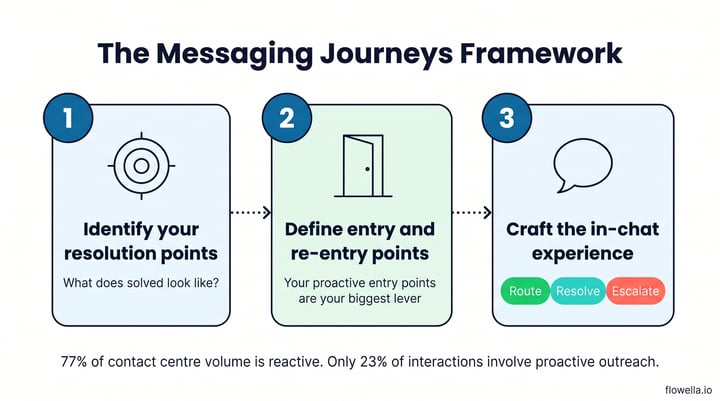
Max opened with the balance most service teams live with. Only 23% of customer interactions involve proactive outreach, so 77% of contact centre volume is reactive: customers getting in touch because something has already gone wrong. His slide credited Gartner's 2025 State of Customer Survey[1].
He added that when customers do reach out, they end up jumping between channels 73% of the time: a website, then another page, then a phone number. Each hop costs you money and costs the customer patience. Another Gartner slide placed proactive outreach third on customers' list of priorities, behind first-contact resolution and easy access to a human agent[1].
The payoff from changing the model can be large. Max shared the example of a European bank that added WhatsApp to its contact centre:
- 10x cost reduction in its contact centre
- +19% NPS
- 4x preference: customers who chose WhatsApp used it four times more than any other channel
His reason is simple. People open WhatsApp around 30 times a day, so a message there meets them where they already are[1].
Meta's three-step framework for WhatsApp customer service
Max called it the Messaging Journeys Framework: a repeatable way to move one service journey at a time onto WhatsApp, from proactive outreach to resolution to follow-up.
- Identify your resolution points. Define success from the customer's side, not as "tickets closed faster". For a shipping query, resolution is knowing where the parcel is from dispatch to doorstep. For a billing issue, it is a charge confirmed, explained or reversed. Max suggests mapping your top five contact drivers on a worksheet.
- Define your entry and re-entry points. Inbound entry points are where customers start a chat with you: a website button, a QR code, a social profile. Outbound entry points are the messages you send first. His slide put it plainly: your proactive entry points are your biggest lever.
- Craft the in-chat experience. Once the customer is in the thread, every conversation needs three layers: route, resolve and escalate.
Route: get the intent right first
Routing is AI-enabled triage. High-confidence intents go to an automated path, while low-confidence or emotional signals, such as an angry customer, go to a person. Max called routing quality the single best predictor of your automation success
, and warned that weak intent classification creates more friction than it removes.
Resolve: guided paths beat open-ended chat
Resolution means walking the customer from problem to fix with a structured path and branching logic. Max was clear that this does not need an AI agent: You don't necessarily need the agentic capability.
He said structured paths are currently the biggest automation lift. That is exactly what WhatsApp Flows are built for: short, guided screens inside the chat that collect a confirmation, a new date or an updated address in one go[5].
Escalate: no repetition, no starting over
When a customer needs a person, the handoff should carry the full conversation history so nobody repeats themselves. Max also pointed to voice inside the same thread through the WhatsApp Business Calling API, which lets customers call a business within the hours the business sets[3].
Three proactive use cases Meta showed
Max illustrated the framework with three journeys. Each one starts with a message the business sends first.
| Use case | What the customer gets | Example from the session |
|---|---|---|
| Proactive customer support | The answer before the question: shipping updates, appointment confirmations, account alerts | A check-in alert showing flight details, delays and cancellations |
| Intelligent self-service | A fix in the thread with no hold time or phone tree | A fraud alert the customer confirms or denies in a tap |
| Payment support | A reminder before the deadline, with the details and the next step in one place | A university reminding students that tuition fees are due |
The idea behind all three was on his slide: every proactive message is a ticket that never gets created. Max described proactive billing as one of the simplest deflection plays
and said it works for anything recurring: subscriptions, insurance, utilities and education.
Education is a good test of the idea. Students live on WhatsApp, and a missed deadline turns into a call, an email and a stressed enquiry. Our Oaklands College case study shows how a college used WhatsApp Flows to keep applicants moving.
These first messages are usually utility templates, which Meta defines as messages sent in response to a user action or request, such as an order update[2]. Budget for them: Meta charges per delivered utility message, and since 1 October 2026 it also charges for service replies inside the 24-hour customer service window[4]. Our guide to WhatsApp pricing changes explains how to keep that bill down.
How to use this in your business
Max's advice was to resist moving everything at once: My recommendation is always not to start with everything.
Here is a practical first project built on his framework.
- Pull your top five contact reasons from last quarter, by volume and by cost to serve.
- Write the resolution for each in one sentence. "The customer knows their new delivery slot" beats "ticket closed".
- Pick one you can predict, such as a delivery window, an appointment, a renewal or a payment date, and send it as a utility message before anyone asks. Our recipes for order and shipping updates and appointment reminders show how to trigger these from your CRM[6][7].
- Give the message a next step. Add a button that opens a WhatsApp Flow to confirm, reschedule or update details. With Flowella, you turn the form you already use for that job into a Flow, and each completed Flow is saved as a submission of that form, so your existing workflows run unchanged[5].
- Set your escalation rules. Decide which intents go straight to a person and make sure the agent sees the whole thread.
- Measure deflection. Track contacts per order or per customer before and after. Max said enterprise clients often start at around 10% proactive and build towards 15% to 20% from there.
Once the first journey works, repeat the framework for the next driver on your list. For more ideas, see our nine no-code WhatsApp automations.
WhatsApp customer service: frequently asked questions
What is proactive customer service on WhatsApp?
It is sending customers a useful update on WhatsApp before they need to contact you, such as a delivery window, a payment reminder or a fraud alert, and resolving any follow-up inside the same chat. The aim is fewer inbound contacts and faster resolution, because the customer already has what they need.
Does WhatsApp customer service need an AI agent?
Not for most journeys. Meta's Max Motta said structured, guided paths currently deliver the biggest automation lift, and that many issues can be solved in three or four messages without agentic AI. Agents help with open questions; structured Flows suit confirmations, changes and data collection.
Can customers still reach a person on WhatsApp?
Yes. A good set-up hands the conversation to an agent with its full history. Businesses can also accept voice calls inside WhatsApp through the Calling API, within the calling hours they configure[3].
What does proactive WhatsApp messaging cost?
Meta charges per delivered message, by message category and the recipient's country. Utility templates are charged, and since 1 October 2026 service replies inside the 24-hour window are charged too[4]. Compare that with the cost of the inbound contact it prevents.
Start with one proactive message
The lesson from the summit is that the cheapest support ticket is the one that never gets created. Define resolution, send the first message yourself and resolve the rest inside the thread with guided steps, escalating with full context when needed. Max's advice to the room was to start building now
: the enterprises that began a year ago are already on later generations of their WhatsApp contact centre.
References
- Meta: WhatsApp Business Summit 2026 EMEA, on-demand sessions (Max Motta, "Transforming customer service on WhatsApp")
- Meta: Utility templates
- Meta: User-initiated calls with the WhatsApp Business Calling API
- Meta: Pricing updates for Meta Business Agent, service and utility messages
- Flowella Knowledge Base: Create and sync WhatsApp Flows from your HubSpot forms
- Flowella Knowledge Base: Send WhatsApp order and shipping updates from HubSpot
- Flowella Knowledge Base: Send WhatsApp appointment reminders with HubSpot workflows
Turn your next service form into a WhatsApp Flow
Send the update first, then let customers confirm, reschedule or update details inside WhatsApp, with every answer saved to your CRM.