Seven in ten online baskets are abandoned[1], a return still starts with an email chain, and "where is my order?" fills the support inbox. WhatsApp Flows for ecommerce give shoppers a short, structured form inside the chat they already use, and the answers can go straight to the store that holds the order.
Most WhatsApp tools for online stores stop at basket reminders and shipping notifications. This guide goes further: six journeys step by step, how to connect a Flow to Shopify or WooCommerce through an API, n8n or an AI assistant, and the rules that keep a store on the right side of WhatsApp's policies.
The short answer. A WhatsApp Flow collects a return request, a product preference or a delivery change as taps inside WhatsApp. The answers arrive as structured data, so your store can raise the return, pick the products or update the order, and the result comes back in the same chat. Start with returns or a product finder, and connect it to the store API you already have.
First, WhatsApp Flows are not "chatbot flows"
The word "flow" is doing a lot of work in ecommerce. Shopify Flow is an automation tool. Several WhatsApp vendors call their chatbot builders or message sequences "flows". Meta's WhatsApp Flows are something else: native forms that open inside the chat, with option lists, dropdowns, date pickers, text fields and photo upload.
The difference matters when you compare tools. A chatbot asks one question at a time and leaves you with a conversation to interpret. A Flow returns one field per answer. We set out the trade-offs in the real problem with WhatsApp chatbots.
| Name you will see | What it is | What the shopper sees |
|---|---|---|
| WhatsApp Flows (Meta) | A native form inside WhatsApp | A screen with options to tap and one Submit button |
| Chatbot or automation "flows" | A scripted sequence of messages | Questions and buttons, one message at a time |
| Shopify Flow | Automation inside Shopify's admin | Nothing: it runs behind the scenes |
Beyond the order confirmation
Meta's own guide to connecting WhatsApp and Shopify, published in March 2023, shows how to send an order confirmation when Shopify reports a new order[2]. It is a useful start, and it is one-way: the store talks and the shopper reads. It was written before WhatsApp Flows launched later that year.
The results Meta has published since suggest the bigger gain is in what shoppers can do, not only what they are told. Turkish fashion retailer Sefamerve used Flows for account creation, product search and adding to the basket, and reported a 158% increase in conversions[3]. Lenovo Indonesia moved service bookings into Flows and reported 8.2 times the conversion of its website[3].
Six WhatsApp Flows for ecommerce, step by step
Each journey follows the same shape: something starts it, a Flow collects the facts, your store does the work, and the shopper gets the result in the chat.
1. A product finder that leads to a first order
- The start. A shopper taps a Click to WhatsApp ad or scans a QR code on packaging.
- The Flow. Three screens ask what they need: taste, size, budget or skin type. Meta's "personalised offer" guide uses the same pattern of budget, size and purpose[4].
- The picks. Your catalogue returns three products that fit. They arrive as a carousel of cards, each with its own image and link.
- The record. Every answer is saved against the customer, so the next message can be about the roast, shade or size they chose.
2. Returns and exchanges in two taps
- The start. The day after delivery, a message confirms the order arrived and offers a button if anything needs to go back. A QR code on the packing slip does the same job.
- The Flow. Why are you returning it, and what would you like: an exchange, store credit or a refund?
- The return. Your store or returns platform raises the return and issues the label. An exchange or credit keeps the sale, and a refund is always one tap away.
- The signal. The reason is stored as data. Ten "runs small" answers against one product is a sizing note worth acting on.
3. Delivery changes before the van arrives
- The start. Your carrier marks the parcel as out for delivery.
- The Flow. A safe place, a neighbour or another day, chosen from a short list.
- The update. The choice goes to your order or delivery system, and the shopper gets a confirmation.
4. Back-in-stock sign-up with the right size
- The start. A "Tell me when it's back" link on the product page opens WhatsApp.
- The Flow. Size, colour and consent to be messaged.
- The message. One message when stock returns, sent only to people waiting for that size.
5. Reviews that catch problems first
- The start. A few days after delivery.
- The Flow. A rating in one tap, and a sentence if they want to add one.
- The branch. Happy customers are invited to leave a public review. Unhappy ones go to a person first. Our reviews and recovery guide has the workflow.
6. Warranty and product registration
- The start. A QR code in the box.
- The Flow. Serial number, purchase date and a photo of the receipt.
- The record. The registration is filed against the customer, with consent for care tips and recalls.
How to connect a WhatsApp Flow to Shopify or WooCommerce
Flowella does not have a native Shopify app today. What it has is a WhatsApp Flow builder, a native HubSpot integration, an open REST API and signed webhooks, which is enough to connect any store that has an API of its own. The pattern is the same for every journey above.
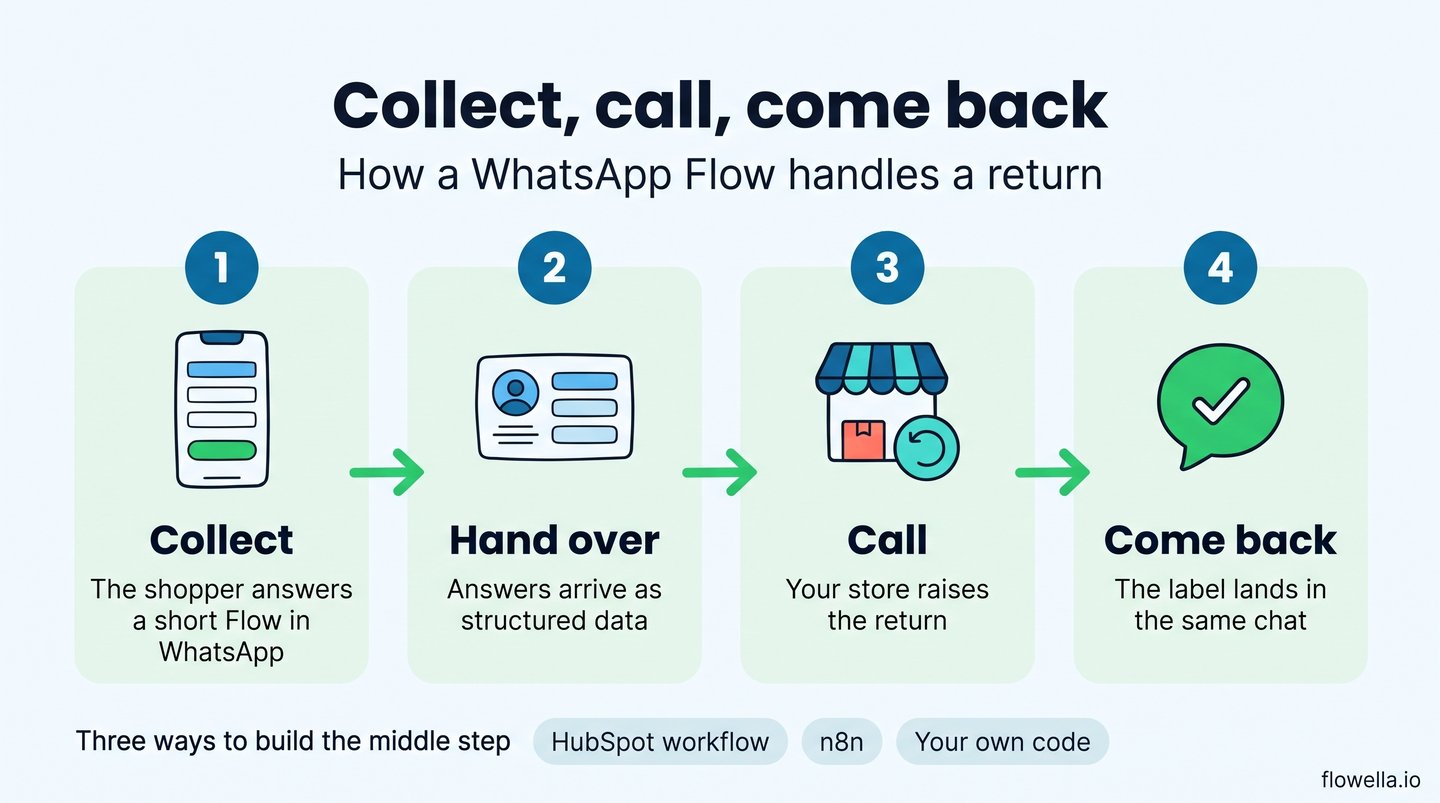
Collect, call, come back
- Collect. A Flow built in Flowella, from a HubSpot form or through the Flowella API, gathers the answers.
- Hand over. The answers are saved as a HubSpot form submission, which can start a workflow. A Flow created through the API can post its answers to your own web address as a signed request.
- Call. Your middleware calls the store: look up the order, raise the return, tag the customer or fetch three products.
- Come back. The result is sent to the chat through the Flowella API, as a message, a carousel or a button for the next step.
Meta also lets a Flow call your server between screens, to show live data such as the items in an order. It is powerful, and Meta's own advice is to use it only when live data is required: your endpoint has to answer within seconds every time, or Meta limits and then blocks the Flow[5]. For most stores the simpler pattern is the right place to start.
The store calls each journey needs
| Journey | Shopify | WooCommerce |
|---|---|---|
| Product finder | Read products from the Admin or Storefront API, and tag the customer with their answers | Read products and update the customer through the REST API |
| Returns | The returnRequest call in the Admin GraphQL API raises a return for the merchant to approve. Only fulfilled items can be returned |
Add an order note and create a refund through the REST API, or call your returns platform |
| Delivery changes | A fulfilment webhook starts the message. The change goes to your carrier or delivery tool | An order status webhook starts the message |
| Back in stock | An inventory webhook tells your middleware when stock returns | A product webhook does the same |
Shopify documents its returns calls and webhooks for app developers[6], and WooCommerce documents orders, order notes, refunds and customers in its REST API[7].
Three ways to build the middle step
- A HubSpot workflow. The Form Completed event starts a workflow, a Send a webhook step calls your store, and Flowella's Send WhatsApp Template action replies. Our order and shipping updates guide shows the HubSpot side.
- n8n. A Webhook node receives the answers and HTTP Request nodes call the store and the Flowella API. n8n's built-in Shopify node covers orders and products, so returns go through an HTTP Request to Shopify's GraphQL API[8]. There is no native Flowella node yet. It is on our roadmap.
- Your own code. Your service verifies Flowella's signed webhook, calls the store and uses the REST API to reply[9].
A request that tells a shopper their return is set up looks like this:
POST https://api.flowella.io/v1/templates/send
Authorization: Bearer flo_your_api_key

{
  "templateId": "your_return_exchange_template_id",
  "whatsappChannelId": "your_whatsapp_number_id",
  "recipients": [
    {
      "phone": "+447700900417",
      "bodyParameters": ["Maya", "1042"]
    }
  ]
}
If HubSpot is your CRM
HubSpot's own Shopify sync brings orders and abandoned checkouts into HubSpot and matches customers by email address[10]. WhatsApp identifies people by phone number. Ask for the email address in the customer's first Flow, or make sure the phone number on the Shopify order reaches the HubSpot contact, so the two records meet. HubSpot's built-in WhatsApp channel cannot use templates with Flow buttons[11], which is the gap Flowella fills.
Where AI assistants and MCP fit
Two different things share the label. Shopify's agent tools let an AI assistant search a catalogue and build a basket, but its order tool only covers orders placed through that assistant, so it is not a way to answer "where is my order?"[12]. Flowella's MCP server lets assistants such as Claude, ChatGPT and Cursor work with your Flowella account[13]: drafting the returns messages, creating the Flow, checking which templates Meta has approved and reporting on delivery, with a confirmation before anything is sent or changed. It is a building and operations tool. The order lookup still belongs to your store.
Rules worth knowing before you launch
- Check your products are allowed. WhatsApp's commerce rules bar some categories outright, including alcohol, tobacco, medicines and medical products[14].
- Take payment on your store. Never ask for card numbers in a chat. WhatsApp's in-chat payments are documented for India and Brazil only, so UK and European stores should link to their own checkout.
- Get opt-in inside the Flow. A tick box that names your brand, stored with the answers.
- Choose the right message category. A delivery update is a utility message. A basket reminder or a back-in-stock alert is marketing, which costs more and needs marketing consent.
- Budget for replies. Since 1 October 2026 Meta charges for replies beyond 1,000 free service messages per number each month, while messages in the window opened by a Click to WhatsApp ad stay free[15]. Our guide to what WhatsApp on HubSpot really costs has the detail.
- Never make the refund hard to find. Offer the exchange first, and keep the refund one tap away.
What results to expect
Meta's published stories are self-reported, so read them as direction, not a forecast:
- Sefamerve (Turkey): Flows for product search and adding to the basket, a 158% increase in conversions[3].
- Vessi (Norway, skincare, nine European markets): Flows with service and utility messages, 37% lower cost per conversation[16].
- Golden Tree (Slovenia): order notifications read by 81.5% of customers in an A/B test[17].
- Clarins (France): a 90% open rate on a WhatsApp campaign, and seven times the conversion of the same email[18].
We have not found a published case study of a returns Flow from a named brand. If you run one, measure the share of returns that become exchanges or credit against your current returns page.
A 30-day pilot for WhatsApp Flows in ecommerce
- Pick one journey. Returns if support is stretched, a product finder if acquisition is the goal.
- Agree the measure. Exchange rate on returns, or orders from finder completions.
- Build the Flow from the form you already use. Keep it to one or two screens.
- Connect one store call. Raise the return, or fetch three products.
- Run it for a month beside your current process, then compare.
WhatsApp Flows for ecommerce: frequently asked questions
Does Flowella work with Shopify?
Through its API, yes. There is no native Shopify app today. A Flow's answers reach Shopify through a HubSpot workflow, n8n or your own code, using Shopify's Admin API.
Can customers start a return inside WhatsApp?
Yes. A Flow collects the reason and the outcome they want, and your store or returns platform raises the return and sends the label.
Can shoppers pay inside a WhatsApp Flow?
Not in the UK or Europe. Send shoppers to your own checkout with a link or a product card.
Do we need HubSpot?
No. HubSpot is Flowella's native integration, and Flows can be built from HubSpot forms on any plan. Other systems connect through the REST API and signed webhooks.
Can a WhatsApp Flow recommend products?
Yes. The Flow collects preferences, your catalogue chooses the products, and the picks arrive as a carousel in the same chat.
Start where shoppers already get stuck
Basket reminders and shipping updates are the easy part of WhatsApp for a store. The harder and more valuable part is letting shoppers do things: find the right product, send one back, move a delivery. A WhatsApp Flow turns each of those into a form that takes seconds, and your store's own API does the rest.
References
- Baymard Institute: cart abandonment rate statistics (70.22% average)
- Meta for Developers: Integrating WhatsApp into Shopify (2023)
- WhatsApp Business: Introducing WhatsApp Flows
- Meta for Developers: Use Case Guide, Personalised Offer
- Meta for Developers: Flows best practices
- Shopify: build returns apps
- WooCommerce: REST API documentation
- n8n: Shopify node
- Flowella: REST API reference
- HubSpot: connect HubSpot and Shopify
- HubSpot: use WhatsApp message templates
- Shopify: Order MCP
- Flowella: connect AI assistants with MCP
- WhatsApp Business Messaging Policy
- Meta for Developers: WhatsApp Business Platform pricing
- Meta: Vessi success story
- Meta: Golden Tree success story
- Meta: Clarins France success story
See a returns or product finder Flow connected to your store
Flowella turns your store's forms into WhatsApp Flows, with an open API for the systems that hold your orders.