Handing customers your personal mobile number feels wrong, but carrying a second phone just for work feels worse. The good news: you can run personal and business WhatsApp on the same phone. The catch is that the right setup depends on which number you want to use for business, and whether anyone else on your team needs to answer it.
It matters because your customers are already there. Ofcom reports that 90% of UK online adults use WhatsApp[1], so the question is rarely whether to offer it, but how to do it without mixing work into your private chats.
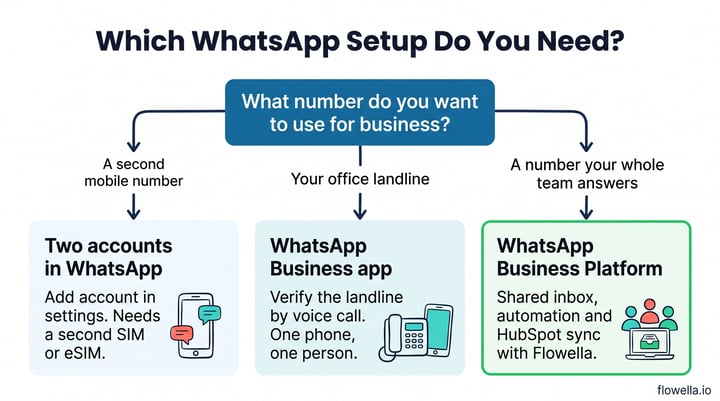
There are three ways to do it: two accounts in the WhatsApp app (for a second mobile number), WhatsApp plus the WhatsApp Business app (for a business landline), or the WhatsApp Business Platform (for a number your whole team answers). This guide explains each one, including the landline trap we hit when we tested it ourselves.
Three ways to run personal and business WhatsApp on the same phone
| Setup | Business number it suits | Office landline? | Team access and CRM |
|---|---|---|---|
| Two accounts in the WhatsApp app | A second mobile number (SIM or eSIM) | No | No, one person's phone |
| WhatsApp + WhatsApp Business app | A mobile or landline number | Yes, verified by voice call | Limited, still tied to one account holder |
| WhatsApp Business Platform with Flowella | Mobile, landline or VoIP, if it can take calls or SMS | Yes | Yes, shared inbox and HubSpot sync |
Option 1: two WhatsApp accounts in one app
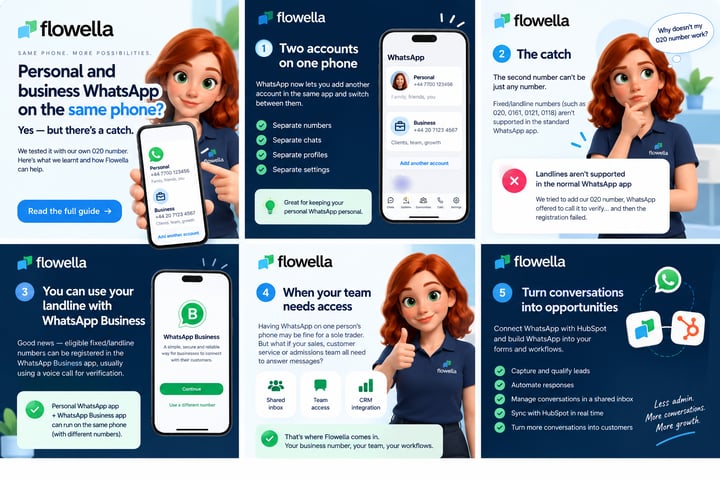
WhatsApp now lets you stay logged in to two accounts at the same time and switch between them without logging out. It has been available on Android since late 2023 and reached iPhone in March 2026[2].
Each account keeps its own chats, profile, notifications and privacy settings. To set it up, open WhatsApp settings, tap the arrow next to your name and choose Add account. You will need, in WhatsApp's words, "a second phone number and SIM card, or a phone that accepts multi-SIM or eSIM"[3].
For a sole trader with a spare mobile number, this is the simplest answer. No second handset, no new app.
Why your office landline won't work here
We tested this with our own 020 London business number. WhatsApp offered to verify it by phone call, then the registration failed. That is expected behaviour, not a glitch:
"Unsupported phone numbers, such as VoIP, landlines, toll-free, paid premium numbers, universal access numbers (UAN), shared cost, and personal numbers can't be registered on WhatsApp."
Source: WhatsApp Help Center[4]
So if the number your customers know is an 020, 0161, 0121, 0118 or any other UK geographic number, adding it as a second account in the standard app is a dead end.
Option 2: WhatsApp for personal, WhatsApp Business for work
The same Help Center page gives the fix: "You can only register a landline on the WhatsApp Business App, where you will receive the code via your landline number"[4]. Install both apps on one phone and you get:
- Personal mobile number - in WhatsApp, for friends and family
- Business landline - in WhatsApp Business, for customers
To make verification go smoothly, choose the voice call option, make sure the line accepts international calls, and switch off call forwarding or any phone menu for a few minutes. An automated call can't press "2 for sales". Our guide to using your existing business phone number with WhatsApp covers number types in more detail.
This works well for one person. The limits show up as soon as the business grows: the account belongs to whoever set it up, conversations sit on their handset, and nothing reaches your CRM.
When your team needs the business WhatsApp number
If sales, customer service or an admissions team all need to reply, the business number shouldn't live on anyone's phone. That is the job of the WhatsApp Business Platform.
Meta's eligibility rules are broad. A number must be owned by you, have a country and area code, be able to receive voice calls or SMS, and not already be in use on WhatsApp (Co-existence, below, is the exception). Fixed lines verify by voice call[5]. Once registered, the number still works for ordinary calls and texts, so your office phone keeps ringing.
With Flowella on top, you get:
- A shared inbox - the whole team works from the Flowella Inbox, so conversations don't leave when an employee does
- HubSpot sync - every conversation and answer is linked to the right contact record
- Automation - send a WhatsApp message after a form submission, route enquiries and run follow-ups from HubSpot workflows
- Structured data - collect details with WhatsApp Flows instead of free-text chat
Already using the WhatsApp Business app?
You don't have to give it up. With Co-existence, you keep using the WhatsApp Business app on your phone for one-to-one chats while Flowella handles automation, templates and Flows on the same number[6]. We explained how it works when Flowella launched Co-existence.
Keep your personal number out of customer conversations
The biggest misconception we hear is that offering WhatsApp means handing out a personal mobile number. It doesn't. Whichever option you choose, customers message a business account, not you.
Two more things help keep work and home separate:
- Business usernames - WhatsApp is rolling out usernames during 2026, and businesses have been able to reserve one since 29 June, so customers can find you by name[7]. See our guide to reserving your WhatsApp business username.
- Verification - a verified WhatsApp Business account reassures customers they are talking to the real company.
The right setup depends on your number
Yes, you can have personal and business WhatsApp on the same phone. Use two accounts if you have a second mobile number. Use the WhatsApp Business app if your business number is a landline. And when more than one person needs to answer, move to the WhatsApp Business Platform so conversations belong to the business and flow into HubSpot.
Not sure which applies to you? Book a Flowella demo and tell us which number you use today, or start a free trial and check whether your existing number qualifies. Our phone number guide has the full checklist.
References
- Ofcom: From apps to AI search, how the UK goes online in 2025 (Online Nation 2025)
- Meta Newsroom: WhatsApp adds new features to simplify storage, switch accounts and more (March 2026)
- WhatsApp Blog: Multiple accounts coming to WhatsApp
- WhatsApp Help Center: Can't complete registration
- Meta for Developers: Business phone numbers (eligibility and number types)
- Flowella Knowledge Base: WhatsApp Co-existence
- Meta for Developers: Business-scoped user IDs and usernames