Part 3 of our six-part series on Meta's State of Business Messaging research. Previously: why WhatsApp broadcasts are holding your business back.
Customer experience usually breaks in the gaps between systems: the reminder that went to spam, the dietary note scribbled on a pad, the feedback card nobody fills in. Each gap is small. Together they decide whether a customer comes back.
This article follows one restaurant booking through five WhatsApp moments to show how WhatsApp Flows transform the customer experience, turning each touchpoint into something useful for the customer and structured data for the business. The pattern applies to any business that runs on bookings, appointments or orders.
Why transactional moments suit WhatsApp
Meta's research with Kantar asked people how much they enjoy different activities over messaging. The transactional ones scored highest, all around 90%[1].
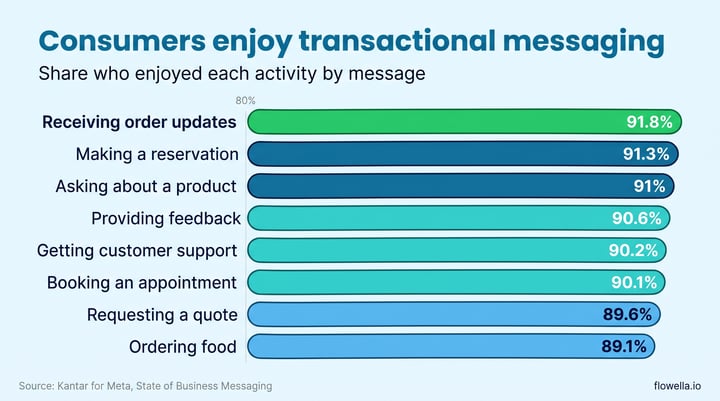
These are not chatty conversations. They are short, structured tasks with a clear outcome, which is exactly what a WhatsApp Flow is designed for: a guided form inside the chat, with buttons, dropdowns and date pickers, whose answers arrive in your CRM ready to use.
One booking, five WhatsApp moments
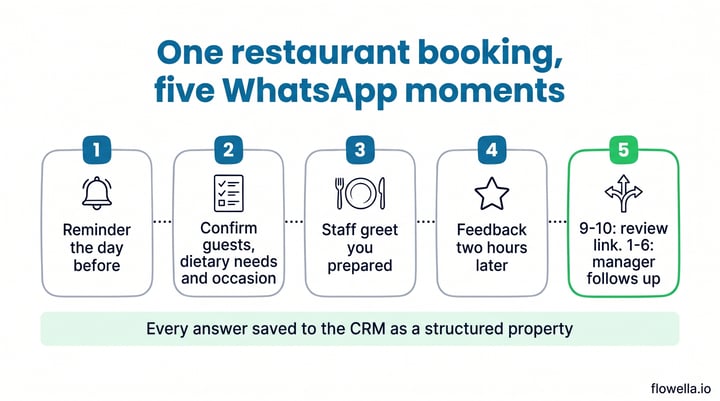
1. A reminder the day before
Twenty-four hours before the reservation, a HubSpot workflow sends a utility template: "Hi Sarah, looking forward to seeing you tomorrow at 7.30pm. Tap below to confirm your booking." One button opens a Flow.
2. Confirm guests, dietary needs and occasion
The Flow asks four quick questions: confirm, change or cancel; number of guests; dietary requirements as tick-boxes; and whether it is a special occasion. It takes about 20 seconds. Each answer lands on the contact in HubSpot, and a cancellation releases the table immediately.
3. Staff greet the guests prepared
The front-of-house team sees the requirements before the guests arrive. The kitchen knows about the nut allergy; the server knows it is a birthday. The customer experiences a restaurant that remembered, with no extra effort from anyone.
4. Feedback two hours later
After the meal, a second message asks for a 0 to 10 score and one optional comment, again inside a Flow. A paper feedback card is completed by a small fraction of diners; a two-tap question on the phone they are already holding is far easier.
5. Act on the score automatically
Because the score arrives as a number in HubSpot, the workflow branches. Guests scoring 9 or 10 receive a link to leave a public review. Anyone scoring 6 or below triggers a task for the manager to call them the next morning. The rest receive a thank-you and join a nurture list for future events.
How this compares with the usual approach
| Moment | Typical approach | With WhatsApp Flows |
|---|---|---|
| Reminder | Email or SMS, often unread; no-shows go unnoticed | WhatsApp reminder with one-tap confirm or cancel |
| Requirements | Phone calls or notes in a booking system | Structured fields saved to the guest's record |
| Feedback | Paper cards or a survey link few people open | A two-tap score inside WhatsApp |
| Follow-up | Manual, if it happens at all | Automatic review requests and recovery calls |
Beyond restaurants: where else WhatsApp Flows transform the customer experience
The same five-moment pattern of remind, confirm, deliver, ask and act fits almost any service business:
- Clinics and salons - appointment reminders that capture medical or service preferences before the visit.
- Colleges and universities - open-day reminders, then a Flow to capture course interest. Oaklands College lifted same-day applications by 160% with WhatsApp; see how Oaklands redefined FE recruitment.
- Property - viewing confirmations followed by a structured feedback Flow after the visit.
- Events and attractions - ticket reminders, access requirements and post-visit surveys.
The Flowella knowledge base has ready-made recipes for appointment reminders and guest feedback after a stay or visit.
Setting it up with HubSpot
You need three things: a HubSpot form for each Flow, an approved WhatsApp template with a Flow button, and a HubSpot workflow to send it and branch on the answers. Flowella turns the HubSpot form into a WhatsApp Flow in a click, and completed Flows return to HubSpot as normal form submissions, so your existing properties, reports and workflows keep working. Our guide to building your first WhatsApp workflow walks through it step by step.
Keep reminders and confirmations clearly transactional so they qualify as utility templates. Review requests and offers count as marketing, which is priced differently and subject to Meta's per-user marketing limits[2].
The bottom line
Great customer experience is mostly about remembering what the customer told you and acting on it at the right moment. WhatsApp Flows make that automatic: every reminder, confirmation and rating becomes structured data, and every piece of data triggers the right next step. Next in the series: the real problem with WhatsApp chatbots.
References
- Meta and Kantar: State of Business Messaging (11,056 adults in 22 markets)
- Flowella Knowledge Base: WhatsApp template categories and recategorisation
Design your first customer journey on WhatsApp
Start a 14-day free trial of Flowella and build your first reminder and feedback Flows from HubSpot forms, or book a demo.