
Keep members before the date. Renewals that start a month early on WhatsApp.
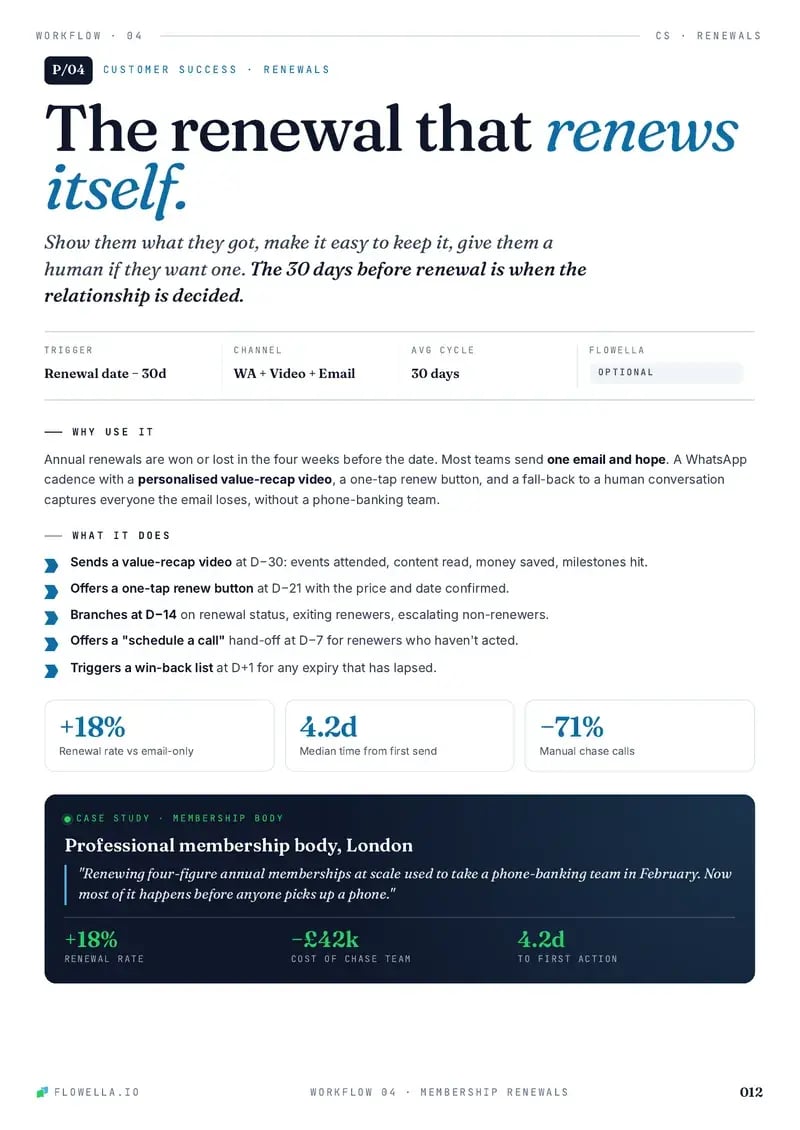
A month before renewal, send a WhatsApp reminder with a one-screen Flow. Members who want to stay get the link to your renewal page, and anyone unsure hears from a person before the date.

Renew in a few taps, or talk to a person.
- Trigger
- 30 days before renewal, or a member’s question
- Channel
- WhatsApp, with each choice in HubSpot
- Workflow
- 3 templates, 1 Flow, 1 branch
- Needs
- HubSpot workflows, on Professional or Enterprise
Step through the play as the member.
Grace, a member, is a month from renewal, or asks how to renew in the chat. Each step shows what she sees on WhatsApp and what lands on her HubSpot record, from the reminder to the renewal. Your answers in the Flow decide which way the branch goes.
Renewals start a month out, or when a member asks. Pick one.
Renewals start a month out, or when a member asks. Pick one. A month before the date, the reminder lands on WhatsApp. Grace asked first, so the reminder goes back at once. Answer as Grace. Your taps decide the branch. Her choice and what she values, on the record. 100 points. 60 or more, so the renewal link goes. 100 points. Under 60, so a person calls. The renewal link is in the chat. A confirmation follows. Chris calls before the date, not after it lapses.
-
Yes, 60 or more: send the renewal link
No, under 60: a person calls
-
Renew:
renewal_link, then a confirmationCall:
renewal_callbackand an owner
A
Acme InstituteBusiness account
Sample dataToday
The opener lands here
GB
Grace Bello
+44 7700 900427
Sample dataProperties
renewal_trigger - renewal_reminderrenewal_reminder30 days before renewal30 days before renewal
renewal_choice - No valuethinking_of_leaving
member_benefit - No valuemember_rates
member_feedback - No valueTwo lines of text, the most this row shows of a longer answer
renewal_score - No value6060 for choice, 0
renewal_status - due_in_30_daysrenewal_link_sent
hubspot_owner_ id - No valueChris LeeRotated to member services
Activity
2 of 7 properties written
Step 1 of 5, the trigger: Grace’s renewal_date is 30 days away, so the workflow enrols her.
Workflow triggers and actions need HubSpot Professional or Enterprise. Workflow actions guide
Try a live Flow
Scan the code with your phone to open one in WhatsApp. It’s Flowella’s own Flow, not this playbook.
Open it in WhatsApp (opens in a new tab)Hi, how do I renew my membership?
Your membership renews soonHi Grace, your Professional membership renews on 14 November. Tell us how you’d like to continue: it takes two taps.Reply STOP to opt out
Your renewal
Renew in a minuteThanks, Grace. You can renew on our secure page below, yearly or monthly. It takes about a minute, and we’ll confirm here when it’s done.Reply STOP to opt outRenew now
Thanks for telling us, Grace. Chris from member services will call you this week. If another time suits you better, pick one below.Pick a time
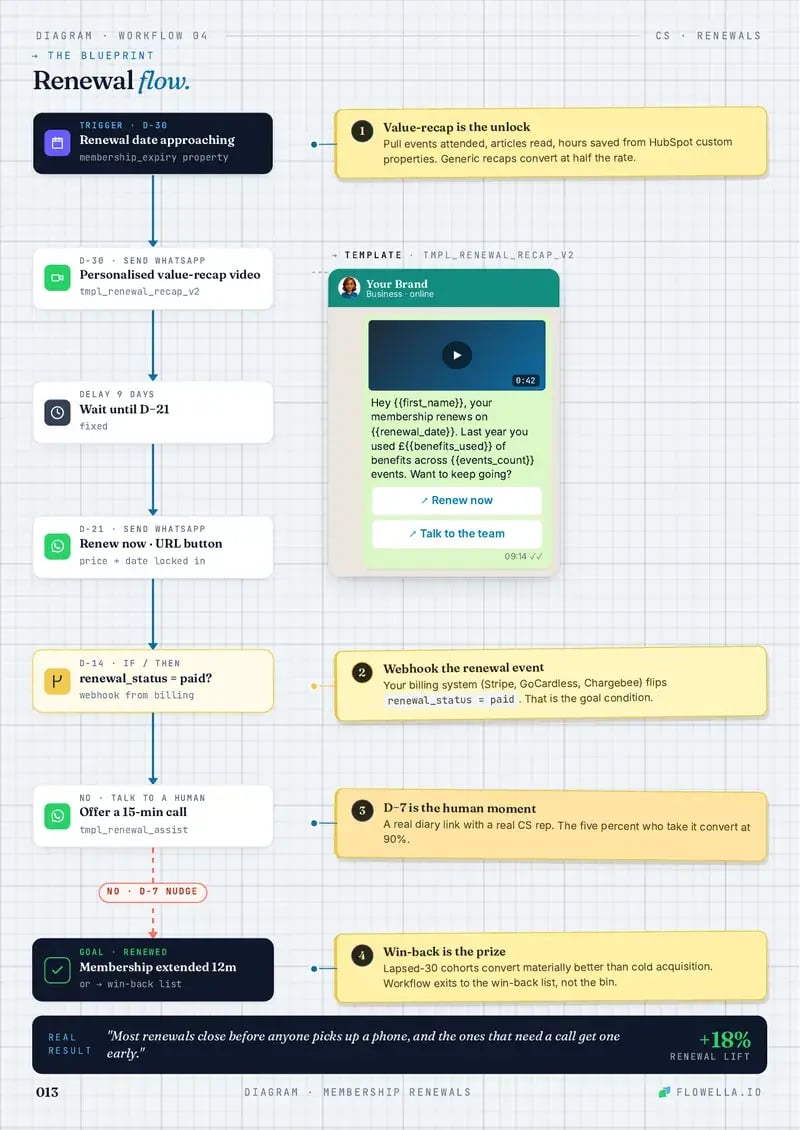
The membership renewal blueprint.
A month out, a reminder and a one-screen Flow, then one branch: members who stay get the renewal link, and anyone unsure gets a person before the date. You build it in a HubSpot workflow, from Flowella’s WhatsApp triggers and actions.
- Trigger
- Send WhatsApp
- Delay
- Branch
- Goal
- 1Numbered note
-
1Enrolment trigger30 days before
renewal_dateA date-based trigger that re-enrols every year, or a member asking in the chat.
1Re-enrol every yearTurn on re-enrolment, so the same workflow runs every renewal cycle.
-
Send WhatsApp TemplateThe reminder
renewal_reminder, with plan, date and the Flow button “Choose how to renew”. -
2Delay until event happensForm Completed, up to 14 days
The answers land as
renewal_choice,member_benefitandmember_feedback.No answer in 14 days: a lighter reminder, then one at 7 days.
2Remind lightlyTwo quieter reminders at 14 and 7 days, then the date. No daily chasing.
-
3BranchIs
renewal_score60 or more?Either renewal option scores 60. Updating details or leaving scores 0.
3Unsure means a personMembers thinking of leaving want to be heard. A call before the date beats a reminder after.
-
Yes4Send WhatsApp TemplateThe renewal link
renewal_link, to your own secure renewal pageDelay until event happensRenewal recorded, up to 7 daysYour billing system writes the renewal to HubSpot
Not renewed in 7 days: a person calls.
GoalRenewedA confirmation in the chat, and the date rolls forward
NoRotate record to ownerMember servicesA named person, before the renewal date
Send WhatsApp TemplateThe callrenewal_callback, with a round-robin meetings link that puts the owner firstGoalKept, or a clean goodbyeLapsed members join a win-back list the day after expiry
4Payment off the chatRenewal and payment happen on your own secure page, never in WhatsApp.
Workflow triggers and actions need HubSpot Professional or Enterprise. The answers land as contact properties on every HubSpot plan, Free included. Workflow actions guide
Copy that keeps members.
Three WhatsApp templates and the Flow they open carry the renewal. Payment stays on your own renewal page, and every variable comes from the HubSpot record.
-
renewal_reminderMarketingEnglish (UK)Sample dataSends 30 days before
renewal_date, or straight back to a questionYour membership renews soonHi {{first_name}}, your {{plan_name}} membership renews on {{renewal_date_text}}. Tell us how you’d like to continue: it takes two taps.Reply STOP to opt outChoose how to renewYour membership renews soonHi Grace, your Professional membership renews on 14 November. Tell us how you’d like to continue: it takes two taps.Reply STOP to opt outChoose how to renewPlan, date and two taps, a month before the date, while there’s time to act.
-
renewal_flowWhatsApp Flow1 screenSample dataOpens from the reminder’s button, synced from your HubSpot form
Your renewal1 of 1Your membership renews next month. Tell us how you’d like to continue, and what you value most.
What would you like to do?
Renew for another yearRenew, paying monthlyUpdate my details firstI’m thinking of leavingWhat do you value most?
EventsTrainingMember ratesAnything we could do better? (optional)SubmitYour renewal1 of 1Your membership renews next month. Tell us how you’d like to continue, and what you value most.
What would you like to do?
Renew for another yearRenew, paying monthlyUpdate my details firstI’m thinking of leavingWhat do you value most?
EventsTrainingMember ratesAnything we could do better? (optional)SubmitThe Flow, Your renewal: what would you like to do (renew for another year, renew paying monthly, update my details first, I’m thinking of leaving), what do you value most (events, training, member rates) and an optional question, anything we could do better.
Grace’s Flow, with renew for another year and events chosen, and the optional question left blank.
Their choice as one tap, what they value as another, feedback optional.
-
renewal_linkMarketingEnglish (UK)Sample dataSends when
renewal_scoreis 60 or moreRenew in a minuteThanks, {{first_name}}. You can renew on our secure page below, yearly or monthly. It takes about a minute, and we’ll confirm here when it’s done.Reply STOP to opt outRenew nowRenew in a minuteThanks, Grace. You can renew on our secure page below, yearly or monthly. It takes about a minute, and we’ll confirm here when it’s done.Reply STOP to opt outRenew nowOne tap to your own renewal page, and a confirmation in the same chat.
-
renewal_callbackUtilityEnglish (UK)Sample dataSends when
renewal_scoreis under 60Thanks for telling us, {{first_name}}. {{rep_name}} from member services will call you this week. If another time suits you better, pick one below.Pick a timeThanks for telling us, Grace. Chris from member services will call you this week. If another time suits you better, pick one below.Pick a timeA named person before the date, not another reminder.
Sample templates. Meta approves each template before it can send, and the Send WhatsApp Template action maps HubSpot properties to its variables.
Five things that tell you who will renew.
The play captures all five. The answers land in custom properties the play creates, next to Flowella’s own events, so a workflow can read them.
| Signal | At risk | Renewing | Lands in HubSpot as |
|---|---|---|---|
| Their renewal choiceA choice in the chat tells you who to confirm and who to call. | Thinking of leaving | Another year | renewal_choice |
| How fast they open itFlowella logs how long the reminder took to read. Minutes beat days. | Read days later | Read in minutes | timeToReadSecondsOn the Message read event |
| Whether they finishOnly a finished Flow fires Form Completed. No answer means the lighter reminders, not a guess. | Opened, then left | Every question done | Form CompletedThe Flowella trigger |
| What they’d changeFeedback in their own words before they decide, not in an exit survey. | Left blank | A named fix | member_feedback |
| Whether the renewal landsA renewal your billing system writes to HubSpot stops every reminder. | No renewal yet | Renewal recorded | renewal_status |
Why WhatsApp renewals work.
Renewal is a memory problem before it’s a payment problem. A reminder they read, a choice in two taps and a person for anyone unsure keeps members who would have drifted.
-
Why speed matters
A month before the date there’s still time to act. A reminder read the same day, and a call within the week for anyone unsure, beats chasing a membership that has already lapsed.
-
How to enhance it
Add what each member used this year to the reminder, offer a pause or a lighter plan to anyone leaving, send a different message to members on auto-renew, and start a win-back list after expiry.
-
Gotchas
Send the date as text: a raw HubSpot date arrives as 14.11.2026 00:00. Offer only options you can honour, keep payment on your own page, and skip members who have already renewed.
The point: remind members why they joined before you ask them to pay again.
Every play, in one playbook.
The HubSpot + WhatsApp Playbook, Vol. 01, puts each play on a two-page spread: why and when it works on the left, the blueprint on the right, and the WhatsApp copy ready to paste. Membership Renewals is one of them.
- Leave your WhatsApp number. Four fields, and no sales call attached.
- A short Flow arrives. It’s a live Flowella Flow, so you see one working.
- The playbook lands in the same chat.
Free. Reply STOP at any time to stop the messages.
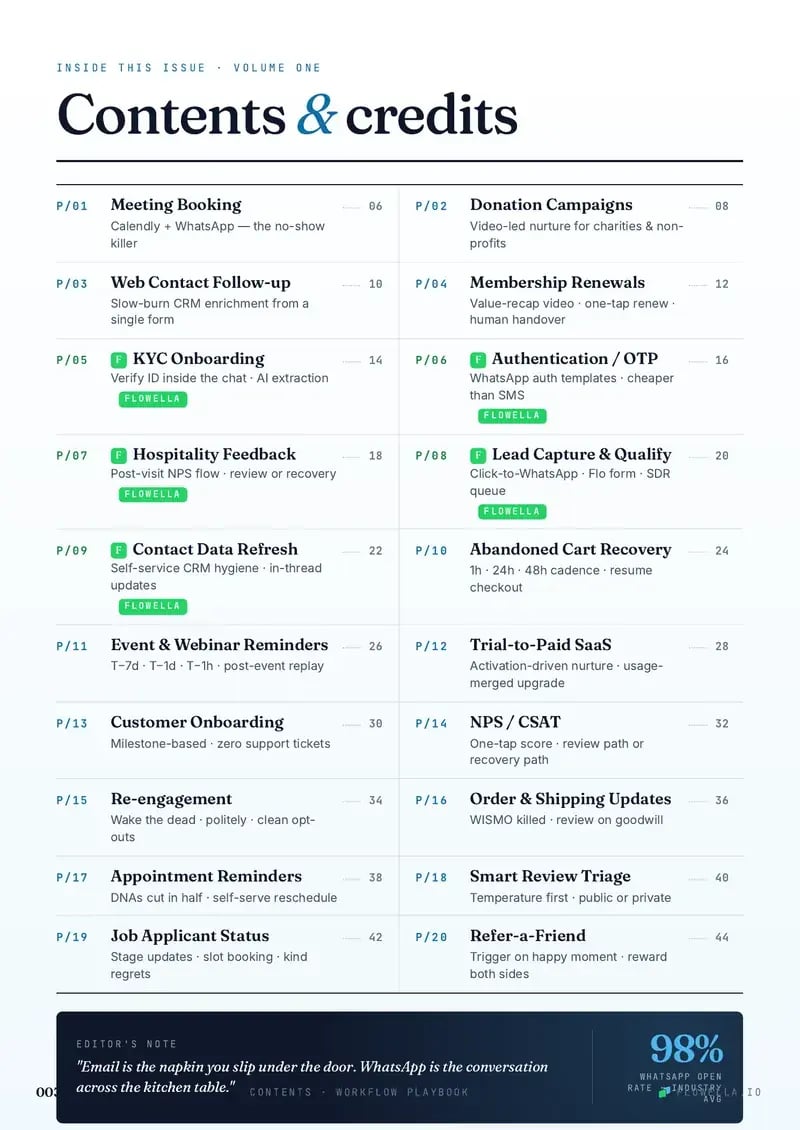
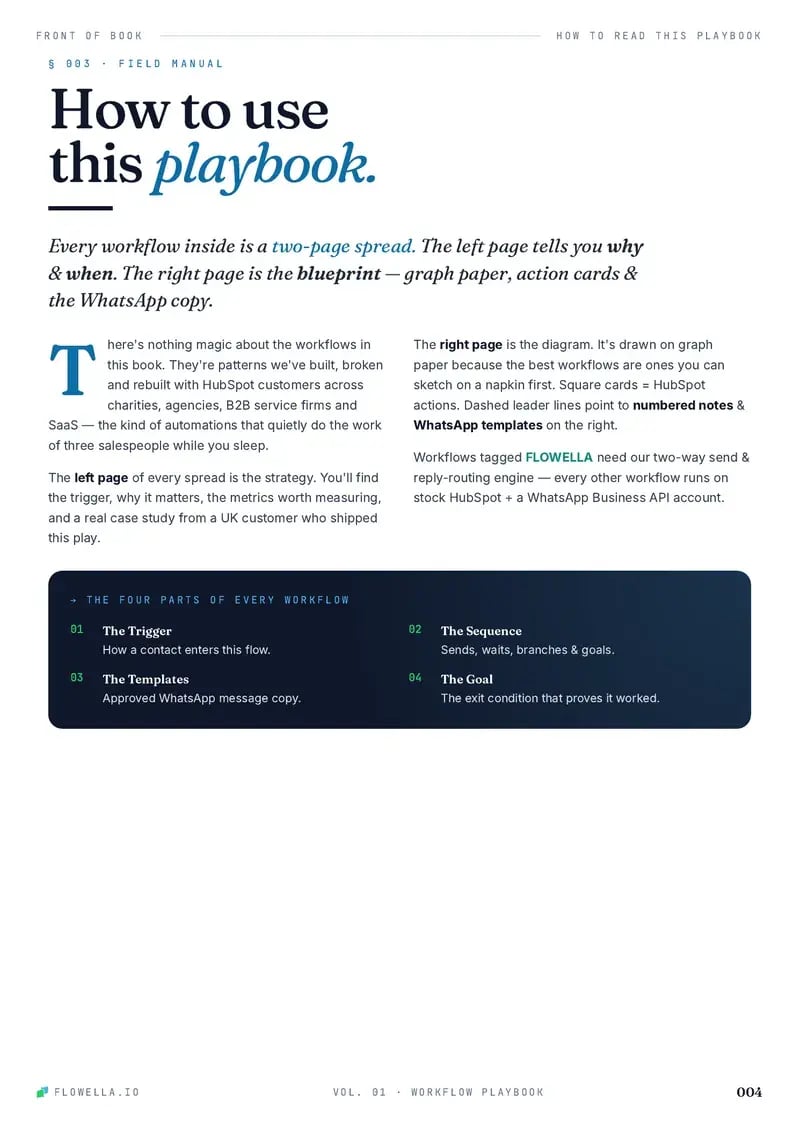

Page 1 of 5The coverPage 1 of 5The coverPage 2 of 5ContentsPage 3 of 5How to read a playPage 4 of 5This play: Membership RenewalsPage 5 of 5The blueprint: Membership Renewals
Browse playbooks by what you do.
Twenty plays, each a working blueprint. These six sit closest to renewals.
This play is filed under Customer success Keep customers Professional Services Charity & Non-profit
-
Re-engagement
Wake dormant contacts with a WhatsApp preference prompt, branch interest, snooze, and opt-out paths, and clean HubSpot automatically.
- Marketing
- Customer success
-

Donation Campaigns
Raise more from supporters: video-led WhatsApp donation campaigns from HubSpot, exit on first donation, never ask twice.
- Fundraising
-
Customer Onboarding
Guide new customers to first value with milestone WhatsApp prompts, setup nudges, support rescue, and HubSpot onboarding status updates.
- Support
- Customer success
-
NPS / CSAT
Collect two-tap CSAT or NPS answers on WhatsApp, thank happy customers, and route every unhappy one to a person and a HubSpot ticket.
- Support
- Customer success
-
Contact Data Refresh
Refresh stale CRM records with WhatsApp confirmations, structured corrections, one reminder, and a clear freshness flag.
- Support
- Customer success
-

Event & Webinar Reminders
Fill events and webinars with a WhatsApp invite, a three-tap booking Flow, timed reminders, and the recording for anyone who can’t make it.
- Sales
- Marketing

Run your next renewal on WhatsApp.
Turn the month before renewal into a reminder, a two-tap Flow and a person for anyone unsure. Start free today, or book a 30-minute demo and we’ll map this play to your members.
Or book a 30-minute demo