What date suits you? What time? Can I take your name? And your number? WhatsApp appointment booking done over free-text chat turns a two-minute task into a slow exchange, and every extra message is another chance for the customer to put the phone down and forget about you.
At Meta's WhatsApp Business Summit 2026 (EMEA), held in Berlin and replayed online on 27 October 2026, Meta's product team put a number on that problem and offered a clear fix: WhatsApp Flows. We watched the sessions, pulled out what they showed about booking, and turned it into a plan you can use in your own business.
The short answer. Meta says booking over chat can take six messages of back-and-forth. A WhatsApp Flow collects the same details in one structured screen inside the chat, and Meta's case study from Lenovo Indonesia showed 8.2 times higher conversion to appointment bookings when customers booked through Flows[1].
Why booking over chat breaks down
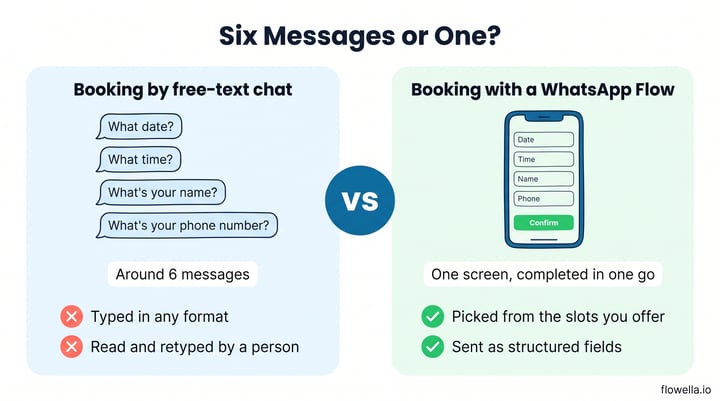
Alon Ozery, who works on product marketing for paid messaging at Meta in EMEA, described the problem plainly. Booking a meeting over chat could easily take you six messages of back and forth
: What date? What time? What's your name? What's your phone number?
That back-and-forth costs you in three ways:
- Drop-off. Each question waits on a reply. If the customer gets distracted at message three, the booking never happens.
- Messy data. Free-text answers such as "next Tues maybe after lunch" need a person to read, interpret and retype them.
- Staff time. Someone has to keep the conversation moving, often outside office hours.
We've written before about the real problem with WhatsApp chatbots: open-ended conversation is great for questions and poor for collecting the same five details every time.
What WhatsApp Flows change for WhatsApp appointment booking
WhatsApp Flows are structured screens that open inside the chat, with date pickers, dropdowns, choices and text fields[2]. Alon's summary at the summit: With WhatsApp Flows, you could set up a streamlined form that the user could fill in at one go.
Or, as he put it more briefly, No ping pong, no long conversation, no hustle.
| What happens | Booking by free-text chat | Booking with a WhatsApp Flow |
|---|---|---|
| Messages to book | Around six, each waiting on a reply | One screen, completed in one go |
| Date and time | Typed in any format | Picked from the slots you offer |
| Getting details into your CRM | Read and retyped by a person | Sent as structured fields |
| Out of hours | Waits until someone replies | Completed whenever the customer is ready |
What the summit showed: the proof behind Flows
Lenovo Indonesia: 8.2 times more bookings
The online replay opened with customer case studies. Lenovo Indonesia wanted to make booking product repair appointments easier, so it let customers manage appointments directly in WhatsApp using Flows. Meta reported 8.2 times higher conversion to appointment bookings and a 44.5% uplift in customers engaging on WhatsApp[1].
RatePunk: an AI agent that still starts with a Flow
Liutauras Dockevičius from Kilo showed RatePunk, a flight-deal service running Meta Business Agent on WhatsApp. Even this AI-led journey starts with a WhatsApp Flow that asks for the customer's travel preferences, then shows a carousel of deals and a subscribe button[1]. Structured questions first, open conversation after.
Meta's own advice: structure before AI
Max Motta, from Meta's enterprise technical team, made the same point for customer service. Structured, guided paths are where most of the automation gain sits today, and for many journeys You don't necessarily need the agentic capability.
The partner panel added a familiar example: a car buyer asks to test drive a new model, and the business books the slot and sends a reminder.
How to use WhatsApp Flows for booking in your business
You don't need a new booking system to start. Most businesses already have a booking or enquiry form on their website. Here's how to bring it into WhatsApp:
- Pick one high-volume form. Choose the booking, viewing or consultation request that drives the most revenue, or the one with the worst completion rate.
- Trim the questions. Keep only what you need to confirm the slot. Our guide to designing forms that read well as WhatsApp Flows covers question order and field types.
- Turn it into a Flow. With Flowella, your existing HubSpot form becomes a WhatsApp Flow, and each completed Flow is saved as a submission of that same form, so the workflows, lead scoring and reports you already run keep working.
- Open the door. Send the Flow after a website enquiry, from an ad that clicks to WhatsApp, or from a QR code in your shop or on your printed materials.
- Confirm and remind. Follow up with a confirmation and a reminder before the appointment. See our recipes for booking links and call reminders and appointment reminders.
The same pattern works across sectors: property viewings for estate agents, open-day places for colleges, table bookings for restaurants, consultations for clinics and test drives for car dealers. Oaklands College used WhatsApp Flows to rethink further education recruitment, which you can read about in our case study.
WhatsApp appointment booking: frequently asked questions
Can customers book appointments inside WhatsApp?
Yes. A WhatsApp Flow opens inside the chat and can collect a date, a time slot and contact details on one screen, without sending the customer to a website[2].
Do I need an AI agent to take bookings on WhatsApp?
Not usually. Meta's own team said many journeys don't need agentic AI. A structured Flow is often the faster, more reliable way to collect the same details every time, and you can add an agent later for open questions[1].
How do booking details from a Flow reach my CRM?
The answers arrive as structured fields rather than free text. With Flowella, a completed Flow is saved as a submission of the HubSpot form it came from, so your existing automation runs as if the customer had filled in the form on your website.
One screen beats six messages
The case Meta made at the WhatsApp Business Summit 2026 was simple: customers want to book in the chat they already use, and they don't want an interview to do it. Replace the back-and-forth with one WhatsApp Flow, send the details straight to your CRM, and let your team spend their time on the conversations that need a person.
References
- Meta: WhatsApp Business Summit 2026 EMEA, on-demand sessions (watched 27 October 2026)
- Meta for Developers: WhatsApp Flows overview
Turn your booking form into a WhatsApp Flow
Flowella turns the HubSpot forms you already use into WhatsApp Flows on any HubSpot plan, with every booking saved straight to your CRM.