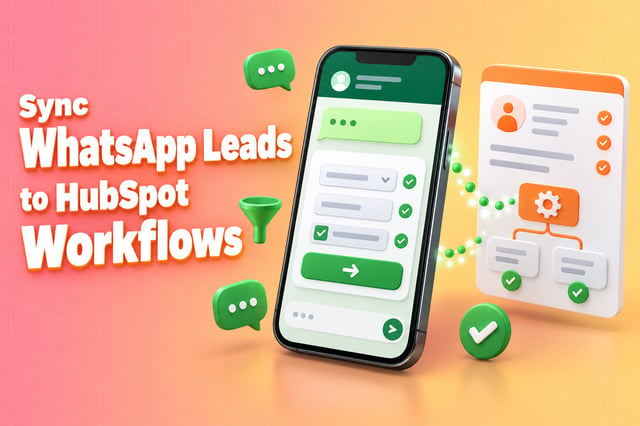
Your forms work fine on a laptop. On a phone, people abandon them halfway, and the follow-up email asking them to finish sits unread. WhatsApp Flows fix that by putting the form inside the chat, but building them the native way means encryption keys, a secure server and ongoing monitoring. That is where most marketing teams stall.
This guide explains what WhatsApp Flows are, why DIY projects get stuck, and how Flowella turns the HubSpot forms you already have into WhatsApp Flows that come back as real HubSpot form submissions, with no endpoints to write and no keys to manage.
Why move your forms into WhatsApp?
Reach is the obvious reason. More than 3 billion people use WhatsApp every month, Meta reported in April 2025[1], and 90% of UK online adults use it[2].
Response is the better one. A form sent inside WhatsApp arrives in the same app people use all day, opens without a browser, and can be completed in a few taps. If your "update your details", "book a slot" or "finish onboarding" journeys live behind a mobile web form, you are leaving completions on the table.
What are WhatsApp Flows?
WhatsApp Flows are multi-screen, form-like experiences that open inside a WhatsApp chat. Meta introduced them in 2023 so customers could book, order and choose without leaving the conversation[3].
A Flow can include text fields, dropdowns, date pickers, checkboxes and several screens with branching logic[4]. Validation happens on the customer's phone, so you get clean, structured answers instead of free-text chat you have to tidy up later.
Why WhatsApp Flows projects stall at the pilot stage
A simple Flow is easy to prototype. A production Flow that talks to your systems is a different job. Meta's developer guide sets out what you have to build and run[5]:
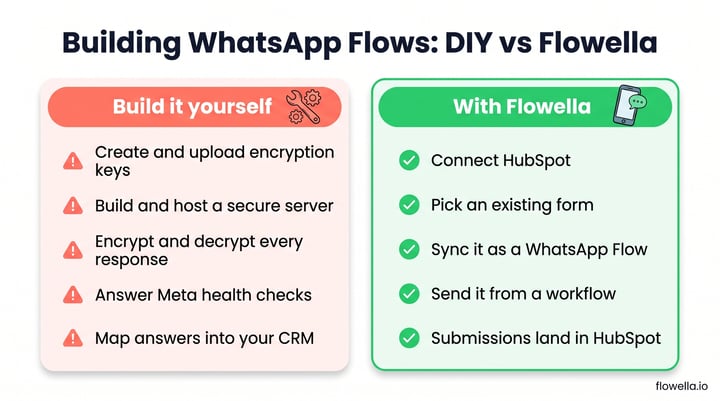
- Encryption keys - create a key pair and upload the public key for each WhatsApp Business Account, then re-upload it whenever certain changes happen.
- A secure server - an HTTPS endpoint with a valid certificate that receives every request from the Flow.
- Encryption on every exchange - each request arrives encrypted and every response has to be encrypted before it goes back.
- Health checks - WhatsApp pings your endpoint periodically and expects a correct reply.
Then there is performance. Meta monitors error rates, latency and availability, and recommends responding in under a second[6]. If those numbers slip, the Flow is throttled to 10 messages per hour, and if they keep slipping it is blocked from being sent or opened at all[6].
"Flows with an endpoint must meet both reliability and performance requirements."
And none of that yet gets the answers into your CRM. You still have to map every field, handle failures and keep it all in step as your forms change. That is a small platform to own, which is why so many teams run a pilot and stop.
How Flowella turns HubSpot forms into WhatsApp Flows
Flowella takes a different route. Instead of designing Flows from scratch, you start from a HubSpot form you already use:
- Connect HubSpot - a secure OAuth connection, set up in minutes with the onboarding guide.
- Pick a form - Flowella reads the latest form definition from HubSpot, including field labels, options and required fields[7].
- Sync it as a Flow - Flowella generates the equivalent WhatsApp Flow and uploads it to Meta on your number[7].
- Send it - from a HubSpot workflow, or let people start it from a link, QR code or Click-to-WhatsApp ad that opens the chat.
- Get real submissions back - answers attach to the right HubSpot contact and update its properties, so your existing workflows, lists and reports just work.
Flowella handles the keys, the secure exchange, the health checks and the field mapping behind the scenes. Your WhatsApp Flows behave like your existing HubSpot forms, so marketing operations, reporting and governance don't need to change.
What to know before you sync
- Form sources - Flowella is built for HubSpot, so you sync the HubSpot forms you already use.
- Field types - file upload and signature fields can't be synced into a Flow, so keep those on the web[7].
- Form design - short labels and fewer fields per screen work best on a phone. See the form design best practices.
Use cases for WhatsApp Flows with HubSpot
| Use case | What the Flow asks | What lands in HubSpot |
|---|---|---|
| Lead qualification | Needs, budget, timescale, request a call | Qualified contact routed to the right owner |
| Appointment booking | Purpose, preferred date, confirmation | Booking request plus WhatsApp reminders |
| Contact detail update | Email, phone and address, then confirm | Updated properties, no portal log-in needed |
| Surveys and NPS | Score, reason, comment | NPS and feedback properties |
| Event registration | Event, attendees, dietary and access needs | Registration plus reminder schedule |
| Onboarding | Personal details, preferences, consent | Complete record ready for the next stage |
For worked examples, see WhatsApp lead generation, WhatsApp for estate agents and sending a WhatsApp confirmation after a HubSpot form. A Flow also collects every answer from a single message, which matters now that WhatsApp pricing is changing.
Security and governance your IT team will ask about
Flowella runs entirely in Microsoft Azure's UK South region. Data is encrypted at rest with AES-256 and in transit with TLS, and by default Flowella passes message content through to your connected platform rather than storing it[8]. Access is role-based with multi-factor authentication for all administrative access[8].
On your side, a short checklist keeps things tidy:
- Collect only what you need - don't mirror your entire CRM in a Flow.
- Capture opt-in - Meta requires opt-in before you message people on WhatsApp, naming your business clearly[9].
- Use approved templates - Flows sent outside a customer conversation go out in a Meta-approved template.
- Keep an audit trail - submissions sit on the contact record in HubSpot, alongside your web forms.
How to measure whether it's working
Hold WhatsApp Flows to the same standard as any other conversion point:
- Completion rate - how many people finish the Flow once they open it.
- Time to complete - how long people take from send to submission.
- Data quality - are HubSpot records cleaner than those from your web forms?
- Speed to action - time from submission to booking, owner assigned or follow-up sent.
- Opt-in growth - WhatsApp opt-ins gained through the journey.
For a fair test, run the same journey as a mobile web form and as a WhatsApp Flow for a few weeks and compare. Use Flowella's channel analytics for delivery and read rates, and track completions in HubSpot with the Flowella Form Completed event and HubSpot reporting.
Getting started this week
- Pick one journey with known drop-off, such as contact updates, a short survey or event registration.
- Connect HubSpot and sync the existing form as your first WhatsApp Flow.
- Pilot with a small slice of your audience, around 5 to 10%.
- Measure and refine - shorten screens, tighten validation and improve the copy.
- Scale to workflows, ads and QR codes once the numbers hold up.
Our guide to your first WhatsApp workflow in 30 minutes walks through the setup step by step.
Frequently asked questions
Do I need developers to use WhatsApp Flows?
Not with Flowella. You start from a HubSpot form, and Flowella handles the encryption, hosting and data mapping that a native build requires.
Is it secure?
Yes. Flowella runs in the UK on Microsoft Azure, encrypts data at rest and in transit, and by default passes message content through rather than storing it[8].
Which form tools does Flowella support?
HubSpot forms. Flowella syncs them to WhatsApp Flows and submits the answers back to HubSpot[7].
Do I need Meta approval?
You need a WhatsApp Business Platform number and approved templates to start conversations. Our guide to getting a WhatsApp Business number covers the steps.
Who is behind Flowella?
Flowella is built by the team behind Discover Digital, a HubSpot Platinum Partner based in Newbury, UK.
Turn WhatsApp Flows into HubSpot form submissions
WhatsApp Flows turn forms into something people actually finish, but a native build turns a marketing idea into an engineering project. Flowella removes that barrier: pick a HubSpot form, sync it as a WhatsApp Flow and get real submissions back in your CRM, with no endpoints and no encryption code.
Start a free trial and sync your first HubSpot form today, or book a demo and we'll build it with you.
References
- Meta: Q1 2025 earnings call transcript
- Ofcom: From apps to AI search, how the UK goes online in 2025 (Online Nation 2025)
- Meta Newsroom: Creating new experiences for people and businesses on WhatsApp (September 2023)
- Meta for Developers: WhatsApp Flows components
- Meta for Developers: Implementing Endpoint for Flows
- Meta for Developers: Flows health and monitoring
- Flowella Knowledge Base: Flows
- Flowella Knowledge Base: Data security
- Meta for Developers: Get opt-in for WhatsApp