The phone number you choose for WhatsApp is the one customers will save, search for and recognise for years. Pick the wrong one, such as a salesperson's personal mobile or a switchboard that cannot receive a verification call, and you are either stuck with it or starting again.
This guide explains how to get a WhatsApp Business number: the two ways to run WhatsApp for business, which number types Meta accepts, how verification works, when you can keep the number you already use, and how to choose.
The two ways to run WhatsApp for business
Before choosing a number, decide how you will run WhatsApp:
- The WhatsApp Business app - a free app on one phone, with up to a few linked devices. Good for a sole trader replying by hand. No CRM integration or automation at scale.
- The WhatsApp Business Platform - Meta's service for businesses that want automation, CRM integration, team inboxes and messaging at scale. You use it through a provider such as Flowella, and it is what connects WhatsApp to HubSpot.
This guide focuses on the Platform, because that is where structured automation and WhatsApp Flows live. You no longer have to choose one or the other: with coexistence, a number can stay in the Business app and connect to the Platform at the same time.
What makes a number eligible for a WhatsApp Business number
Meta accepts a phone number for the WhatsApp Business Platform if it[1][2]:
- belongs to your business,
- is a full number with a country and area code (short codes are not supported),
- can receive an SMS or a voice call for verification, including from abroad, and
- is not already in use with WhatsApp, unless you connect it with coexistence.
Once registered, the number still makes and receives ordinary calls and texts. It just cannot be used in the consumer WhatsApp app.
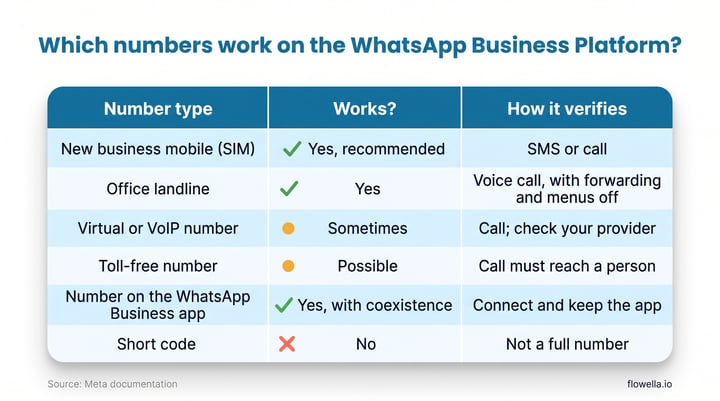
Your options, compared
A new business mobile
Meta's recommended choice, and the simplest. A dedicated SIM for the business verifies by SMS in minutes and is easy to hand over when people change roles. Avoid using anyone's personal mobile: the number becomes tied to one person and their phone.
Your office landline or main number
Ideal if customers already know the number from your website and signage. Landlines verify by an automated voice call rather than SMS, so turn off call forwarding and any menu system while you verify, and make sure someone can answer and note the code[2]. Voice calls to the line keep working as normal afterwards.
A virtual or VoIP number
Numbers from cloud phone providers often work, but not always. Check that your provider accepts calls and SMS from abroad, because Meta's verification may come from another country.
The number you already use on the WhatsApp Business app
If customers already message you on the Business app, you can keep that number and connect it to the Platform with coexistence. Your team can keep using the app for one-to-one chats while Flowella sends templates and Flows from the same number. One caution: replies sent from the app do not appear in Flowella or HubSpot, so agree which tool the team replies from[3]. Our guide to using your existing business number with WhatsApp Business covers this in more detail.
How to choose the right number
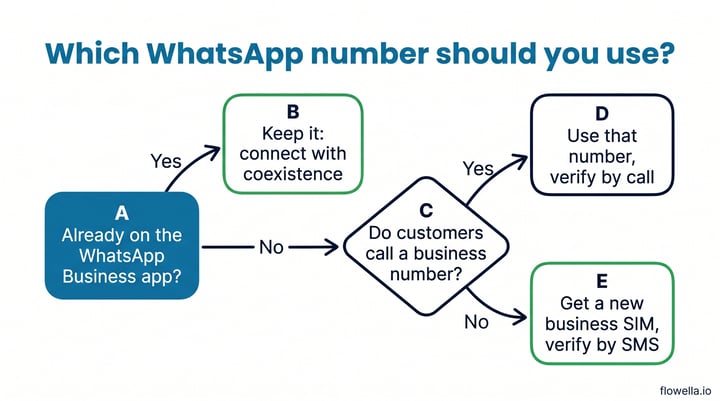
| If you are... | Use | Why |
|---|---|---|
| Already chatting on the Business app | That number, with coexistence | Keeps your chat history and the number customers know |
| Known by a published main number | Your landline or main number | Customers recognise it instantly |
| Starting fresh | A new business mobile | Quickest to verify and easy to hand over |
| Running separate teams or brands | One number per team or brand | Each gets its own display name and inbox |
How verification and setup work
- Connect through your provider - in Flowella, go to Settings → WhatsApp (Meta) and select Add WhatsApp number. Meta's sign-up window opens.
- Create or choose your WhatsApp Business Account - the account in Meta that holds your numbers and templates.
- Enter the number and display name - the name customers see. It must match your brand; Meta reviews it.
- Verify with a six-digit code - sent by SMS or voice call. Have the phone to hand.
- Set a two-step verification PIN - keep it safe; you need it to move the number later.
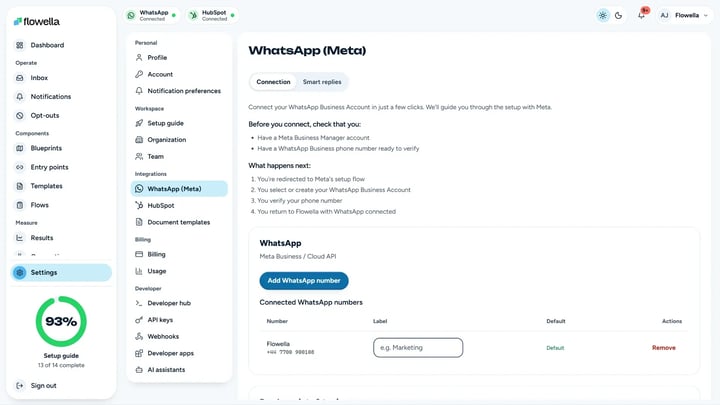
A new business portfolio can register two numbers at first, rising to up to 20 once your business is verified or your messaging limit increases[1]. Our knowledge base walks through the full Meta setup sequence.
Getting your number is just the beginning
Once the number is live, three things make the biggest difference to how customers see you:
- Verify your business with Meta - it unlocks WhatsApp Flows and higher messaging limits. See how to get a verified WhatsApp Business account.
- Complete your profile and reserve a username - a logo, description and website build trust, and a username such as @yourbrand makes you easier to find. See our guide to WhatsApp usernames.
- Tell customers - add the number to your website and email signature with a click-to-chat link.
The bottom line
Most business numbers can become a WhatsApp Business number, as long as they belong to the business and can receive a verification SMS or call. Keep your Business app number with coexistence if customers already use it, use your main number if they already know it, and otherwise start with a dedicated business mobile. Whichever you choose, choose it once and build on it.
References
- Meta for Developers: Business phone numbers
- Flowella Knowledge Base: WhatsApp business phone numbers, what works and what fails
- Flowella Knowledge Base: WhatsApp coexistence
Ready to go live on WhatsApp?
Start a 14-day free trial of Flowella and connect your number to HubSpot in minutes, or book a demo and we will help you choose.