For years, a WhatsApp conversation has started with a phone number, and most CRMs use that number to match a chat to a customer. That assumption is ending. WhatsApp usernames are switching on country by country, and customers who adopt one can hide their phone number from businesses they have not been in touch with.
This guide explains what has changed, what business-scoped user IDs (BSUIDs) are, when you still receive a customer's number, how to reserve your own business username, and the practical steps that keep your CRM matching conversations to the right contact.
What WhatsApp usernames change for businesses
Usernames are optional handles, such as @sarah.k, that WhatsApp shows instead of a phone number. For consumers, they are a privacy feature: someone can message your business without revealing their number. For businesses, they are a way to be found without sharing a number at all.
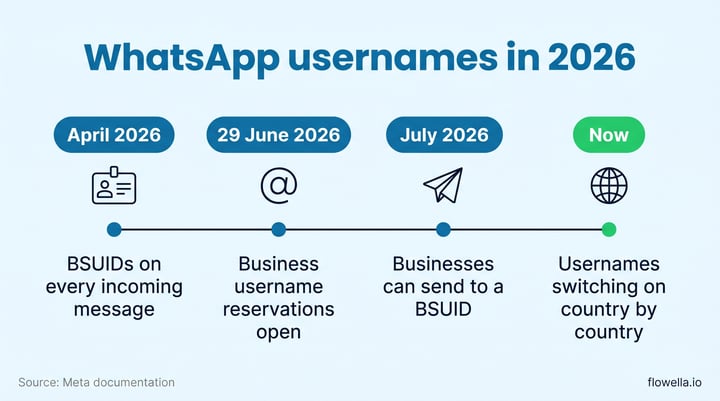
Meta has introduced the change in stages[1][2]:
- April 2026 - every incoming message carries a business-scoped user ID, for every customer.
- 29 June 2026 - businesses on the WhatsApp Business Platform can reserve a username for each number.
- July 2026 - businesses can send messages to a BSUID instead of a phone number.
- Now - usernames are switching on country by country.
What is a BSUID?
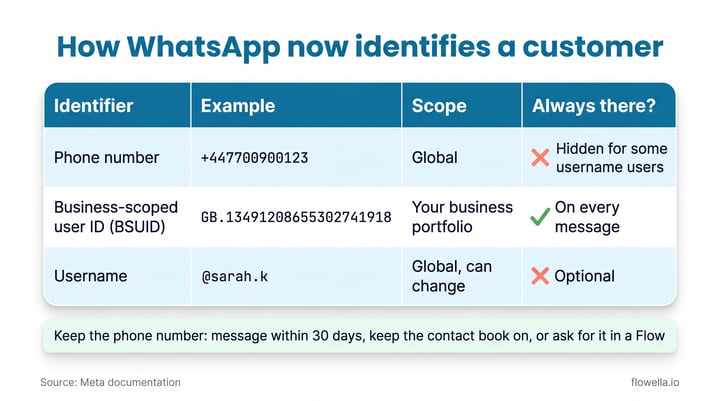
A business-scoped user ID is an identifier Meta gives each customer that is unique to your business portfolio. It looks like GB.13491208655302741918: a country code, a full stop and a long string. It has three properties worth knowing[1]:
- It is scoped to your business - any of your numbers can use it, but another business cannot.
- It survives username changes - if a customer changes their username, the BSUID stays the same.
- It changes if the phone number changes - Meta sends a system message when that happens.
When you still receive the customer's phone number
This is the part most businesses worry about, and the reality is reassuring. Customers without a username always arrive with their phone number. For customers with a username, Meta still includes the number when any of these is true[1]:
| Condition | What it means for you |
|---|---|
| You messaged or called them in the last 30 days | Active customers keep arriving with their number. |
| They messaged or called you in the last 30 days | Ongoing conversations are unaffected. |
| They are in your portfolio's contact book | Meta records numbers you have exchanged messages with, across all your numbers. |
| They shared their number with you | For example, by tapping a request contact info button. |
The customers most likely to arrive without a number are brand-new contacts who have adopted a username and message you for the first time. That makes your first reply more important than ever.
What your business needs to do now
- Leave the contact book switched on - it keeps numbers flowing for customers you have already spoken to.
- Collect the phone number in your forms and Flows - for any process that depends on it, such as deliveries or call-backs, ask for it. A short WhatsApp Flow on first contact captures it cleanly along with the rest of the enquiry.
- Keep in touch with active customers - customers you have messaged in the last 30 days keep arriving with their number.
- Check your integrations - anything that reads WhatsApp data should store the BSUID and should not assume every message has a phone number.
- Reserve your business username - see below.
How to reserve your WhatsApp Business username
Business usernames are first come, first served, and free. Meta holds handles you already use on your Facebook Page or Instagram account for a limited time so you can claim them[2].
- Open WhatsApp Manager and select your phone number.
- Go to the Username section and enter the handle you want.
- Link your Facebook Page or Instagram account if the handle is in use there; Meta requires the link before it will save.
- Repeat for each number - each phone number has its own username.
A business username does not hide your business phone number, and there is no directory: customers must type your exact handle. Once your display name is approved, customers who have not saved your number see that name rather than your username.
Source: Flowella Knowledge Base: Reserve your WhatsApp Business username
Once your username is active, add it wherever you share your number: website, email signatures, social profiles and printed material. Click-to-chat links still open a chat with your phone number, so keep using them; our free WhatsApp link generator builds them for you.
What WhatsApp usernames mean for your CRM
Most CRMs, HubSpot included, match WhatsApp conversations to contacts by phone number. That still works for the large majority of conversations. The gap is first-time contacts who arrive with only a username and a BSUID.
Flowella currently identifies every contact by phone number and sends only to phone numbers. If Meta delivers a message without a number, Flowella cannot match it to a contact[1]. In practice, most customers are not affected today, and the steps above keep it that way. For processes that must reach someone reliably, capture the number explicitly, ideally in the first Flow you send, so it lands on the HubSpot contact as a property you control.
It is also a good moment to look at how many of your contacts have a usable WhatsApp number at all. We cover that in your CRM has thousands of email addresses, how many WhatsApp numbers does it have?
The bottom line
WhatsApp usernames shift identity from phone numbers to handles and business-scoped IDs. For most conversations nothing changes, as long as you keep the contact book on, stay in touch with active customers and capture numbers where processes depend on them. Reserve your own username now, before someone else takes it.
References
- Flowella Knowledge Base: WhatsApp user IDs, phone numbers, BSUIDs and usernames
- Flowella Knowledge Base: Reserve your WhatsApp Business username
- Meta for Developers: Business-scoped user IDs
Keep every WhatsApp conversation matched to the right contact
Start a 14-day free trial of Flowella and capture phone numbers and enquiry details in a single WhatsApp Flow, or book a demo.