If your team answers customer questions on WhatsApp, the free lunch is over. From 1 October 2026, Meta charges for the replies a business sends inside the 24-hour customer service window, which had been free since November 2024, once a number has used its 1,000 free service messages for the month[1]. The WhatsApp pricing changes in October 2026 turn a habit most teams never think about, asking customers one question at a time, into a line on the invoice.
This post explains what has changed and why the number of messages you send is now your biggest cost driver. It then shows two ways to bring that number down: WhatsApp Flows, which ask five, ten or twenty questions inside one message, with Flowella writing the answers straight into HubSpot, and carousel templates, which put up to ten offers in front of a customer for the price of one marketing message.
What the WhatsApp pricing changes for October 2026 mean
Meta moved the WhatsApp Business Platform from conversation-based pricing to per-message pricing on 1 July 2025[2]. Until 30 September 2026, that model had a generous exception: any non-template message you sent inside an open customer service window was free, and so was any utility template sent inside that window.
Meta's non-template pricing page sets out the timeline[1]:
| Date | What changes | How it is charged |
|---|---|---|
| 1 July 2026 | Meta Business Agent Platform launches | No charge yet |
| 1 August 2026 | Replies generated by Meta Business Agent become chargeable | Per token, $2.00 per million tokens, roughly 4 to 5 US cents per message |
| 1 October 2026 | Service messages (any human or third-party AI reply inside the 24-hour window) become chargeable | Per message, at the same rate as utility and authentication in that market, with no volume tiers |
| 1 October 2026 | Utility templates sent inside an open 24-hour window become chargeable | Per message, at the utility rate |
Some things still work in your favour. Inbound messages from customers remain free, and each business phone number gets 1,000 free service messages a month[2]. The free entry point window has also got longer. It opens when someone messages you from a Click-to-WhatsApp ad and you reply within 24 hours, and since 28 September 2026 it can stay open for up to 7 days instead of 72 hours. Messages you send inside it are free, apart from replies generated by Meta Business Agent[2][7]. Service messages are charged at the utility rate for each market, so check the official rate card for the countries you message before you budget.
Meta's own worked example
Meta illustrates the impact with a single one-hour interaction: a cart abandonment reminder, two AI answers to product questions, one reply from a human agent and an order confirmation.
In July 2026 that interaction incurred one charge, for the marketing template. From August it incurs three (one marketing, two Meta Business Agent). From 1 October it incurs five: one marketing, two Meta Business Agent, one service and one utility.
Same conversation, same customer, five times as many charges. The rate per message may be small, but the multiplier is what hurts.
Why per-message pricing punishes question-by-question data collection
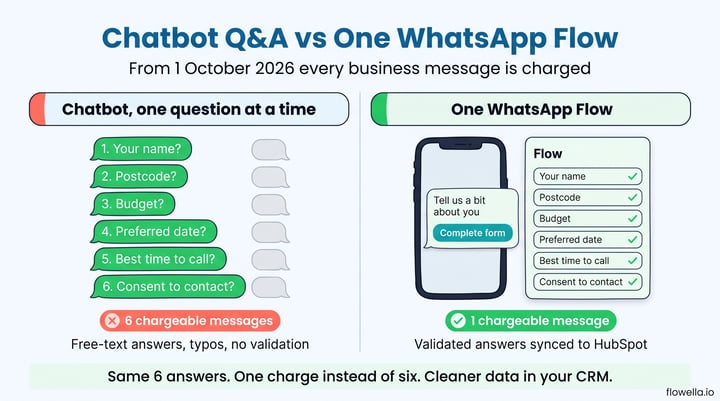
Most WhatsApp chatbots and inbox workflows gather information the way a person would: one question, wait for the answer, next question. Name. Postcode. Budget. Preferred date. Best time to call. Consent. That is six business messages before a salesperson has anything useful, and each one is now a service charge[1].
If you have switched those replies to Meta Business Agent, the cost per message is higher still. Meta's estimate is around 20,000 to 25,000 tokens per message, so a simple "what time do you open" exchange comes to roughly 16 to 20 US cents and a ten-message support conversation to 40 to 50 cents[1].
There is a second cost that never appears on the Meta invoice. Free-text answers arrive as typos, half-answers and "yeah that one". Someone has to clean them before they are worth anything in the CRM. We covered why that matters for lead quality in The Real Problem with WhatsApp Chatbots.
A worked comparison
Take a lead qualification exchange with six questions, sent to 5,000 contacts a month. Meta's own Brazil example uses a delivery rate of 0.68 US cents per service message and 2 to 9 cents per message for third-party AI on top[1]. The exact figures will differ by market, but the shape of the maths does not.
| Approach | Business messages per contact | Chargeable messages per month (5,000 contacts) | Data quality |
|---|---|---|---|
| Chatbot, one question at a time | 6 service messages | 30,000 | Free text, unvalidated |
| One WhatsApp Flow | 1 template message | 5,000 | Validated, mapped to CRM fields |
That is an 83 per cent reduction in chargeable messages before you count the AI cost you avoid, and before you count the hours nobody spends tidying up postcodes.
How WhatsApp Flows cut the message count to one
WhatsApp Flows are native, form-like screens that open inside the WhatsApp chat. Instead of a conversation, the customer sees a structured form with text fields, dropdowns, date pickers, checkboxes and multi-step screens with branching logic. They complete it, tap submit, and the whole response comes back to you at once.
From a pricing point of view, the important parts are:
- One message carries the whole form - a Flow is attached to a single template (or a single interactive message inside the service window). You pay for that one message, however many questions it contains.
- The completed form is an inbound message - the customer's submission comes back to you as a user message, and inbound messages are not charged[2].
- Validation happens on the customer's phone - required fields, email and phone formats, and date ranges are enforced before submission, so there is no second message asking them to try again.
- Branching replaces follow-up questions - a "How many people?" answer can reveal the right next screen without another billable round trip.
The lead capture and qualification workflow guide in the Flowella knowledge base shows this end to end: a short qualification form over WhatsApp, responses scored, high-fit leads routed to sales. Every question in that form rides on one template send.
Which template category should you use?
Sending a Flow outside the 24-hour window means sending a template, and the template's category sets the price[2]. A form that follows a customer action (confirming a booking, completing onboarding, collecting KYC documents) usually qualifies as utility, the cheaper category. A form sent to a cold list is marketing. The Flowella guide to pricing and WhatsApp message categories explains how Meta decides, and why a mis-categorised template can quietly change your unit cost mid-campaign.
If the customer messages you first, you can send the Flow as a reply inside the window. That reply is now one service charge, which is still one charge instead of six.
What this means for your Flowella allowance
Flowella plans include a monthly allowance of billable messages, and one unit is one message that WhatsApp marks as billable. Until 30 September, replies inside the 24-hour window were free and did not use your allowance. From 1 October those replies are billable once your number has used Meta’s 1,000 free service messages for the month, and from then on each one counts as one unit. Past that point, a six-question chatbot exchange uses six units of your allowance; the same answers collected with a Flow use one.
The knowledge base guide to pricing and WhatsApp message categories walks through a worked example, and the Usage page in Flowella shows your billable messages broken down by WhatsApp category.
Flowella: your HubSpot form in, a WhatsApp Flow out, answers back in the CRM
Building Flows by hand means designing screens in Meta's Flow Builder, then writing something to catch the submission and push it into your CRM. Flowella removes both steps. It takes the HubSpot forms you already have and turns each one into a native WhatsApp Flow, keeping your field names, options and required flags[3].
When a customer submits the Flow, Flowella writes the answers to the matching HubSpot contact properties and logs a form submission on the timeline, so every workflow, list and report you already run on web form submissions works on WhatsApp submissions too. There is no export, no spreadsheet and no free-text parsing. If you have ever wondered whether HubSpot can send a WhatsApp confirmation after a form submission, this is the same plumbing running in the other direction.
In practice the cost-saving setup looks like this:
- Consolidate your questions - move every question your chatbot or inbox team asks in sequence into one HubSpot form. Flowella's form design best practices cover label limits and which question types render best on a phone.
- Sync the form - Flowella publishes it to Meta as a WhatsApp Flow from the Flows page.
- Attach it to one template - send the Flow from a HubSpot workflow, a bulk send or a Click-to-WhatsApp ad, so the Flow arrives in the message that starts the conversation.
- Let HubSpot do the rest - score, route and follow up on the submitted properties with the workflows you already use, as described in the HubSpot workflow actions guide.
Because the answers land as structured properties rather than chat transcripts, you also get the reporting your WhatsApp lead generation deserves: conversion by source, time to qualify, and cost per qualified lead, all inside HubSpot.
Cut marketing charges with WhatsApp carousel templates
Flows reduce the cost of the questions you ask. The second lever is the content you push out. Many campaigns still go out as a run of separate marketing templates: one per product, property, event or offer, often spaced across a week. Under per-message pricing each of those is its own marketing charge, and marketing is typically the highest rate on Meta's card[2].
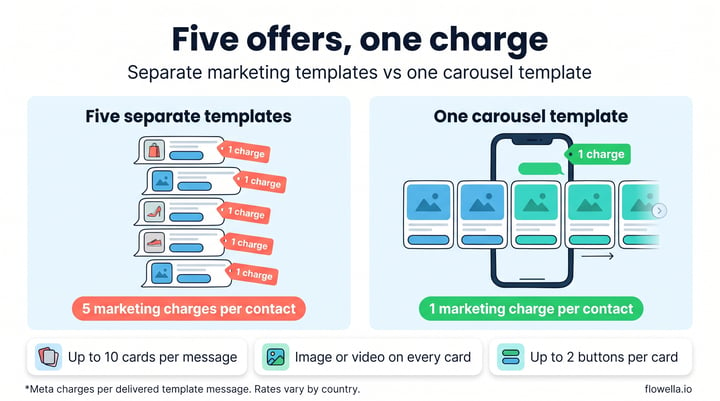
A media card carousel template puts up to ten of those in one message. The customer sees your message text followed by a row of cards they swipe sideways, and Meta charges for one delivered marketing template, not ten[2][5].
A carousel template is a single marketing template made up of message body text and between two and ten media cards. Each card has an image or video header, optional card text and up to two buttons, which can be any mix of quick reply, phone number and URL buttons.
What each card can do
- Image or video on every card - show the product, the room, the venue or the course. All cards in one template use the same media type.
- Up to two buttons per card - for example "Book a viewing" and "Call the branch". Every card uses the same button types in the same order, but each card can have its own labels, links and phone numbers.
- Short text under each image - up to 160 characters per card, with personalisation variables, so a price, date or location sits right under the picture[5].
- Quick replies tell you which card won - when someone taps "Tell me more" on the third card, you know exactly which offer they mean without reading free text.
A worked comparison
Take 5,000 opted-in contacts and five offers you want each of them to see this month.
| Approach | Marketing messages per contact | Marketing charges per month (5,000 contacts) | Customer experience |
|---|---|---|---|
| Five separate templates | 5 | 25,000 | Five notifications competing for attention |
| One carousel with five cards | 1 | 5,000 | One message, swipe to browse |
That is an 80 per cent reduction in marketing charges for the same reach. Sending fewer marketing messages per person also makes you less likely to run into Meta's per-user limit on marketing templates, which can block delivery even on a first message. The Flowella guide to healthy ecosystem engagement explains how that limit works.
Where carousels fit, and where they do not
- Marketing only - carousels are a marketing template type, so they need marketing opt-in and are charged at the marketing rate[5]. They will not make order updates or reminders cheaper.
- The card count is fixed at approval - a template approved with five cards always sends five, so build one template for each layout you use regularly.
- URL buttons leave WhatsApp - a URL button opens the customer's browser. To keep the next step in the chat, use a quick reply button and follow up with a Flow that collects the booking or enquiry details for the card they picked.
That last point is where the two savings stack: the carousel shows every option for one marketing charge, and a single Flow gathers everything you need about the option the customer chose.
Building carousels in Flowella
Flowella now supports media card carousels. In Templates, choose New template, then Build your own and Carousel. Add between two and ten cards, upload an image (JPEG or PNG up to 5 MB) or a video (MP4 up to 16 MB) for each, preview the swipeable strip and submit it to Meta. Once approved, you can send it from test sends, bulk sends, the Inbox, the Flowella API and HubSpot[6]. The template reference covers the rules, and the templates guide shows how to test and bulk send.
Good first candidates are anything you currently send as a series: new listings for an estate agent (see our guide to WhatsApp for estate agents), a season of events for a venue, a product range for a retailer, or course options for a college.
What to do now the new pricing is live
Here is the short list.
- Count your messages per conversation - pull a sample of last month's WhatsApp conversations and count business messages per contact. Anything above two is a candidate for a Flow.
- Check the rates for your markets - Meta publishes rate cards by currency on the pricing page. Service messages match the utility rate in each market[1].
- Review any AI agent you run on WhatsApp - whether it is Meta Business Agent or a third-party bot, its replies now cost money. Meta Business Agent replies are charged from the first one, and a third-party bot’s replies once your number has used its 1,000 free service messages for the month. Give it a Flow to hand out instead of a script of questions.
- Move sequential questions into forms - start with the highest-volume conversation type: lead qualification, appointment booking, or onboarding.
- Bundle related marketing sends - if the same list receives several offers in a week, test one carousel in their place and compare clicks and replies.
- Keep the free entry point working for you - when someone messages you from a Click-to-WhatsApp ad and you reply within 24 hours, the conversation can stay free for up to 7 days[2][7]. Sending a Flow as the first reply inside that window costs nothing at all, and neither do the follow-ups you send while it stays open. The Click-to-WhatsApp ads guide shows how to trigger a Flow from a keyword.
- Watch your usage - Flowella's Usage page splits billable messages by WhatsApp category, and channel analytics show template performance, so you can see the mix that drives your Meta bill.
Fewer messages, lower Meta fees
Since 1 October 2026, almost every message your business sends on WhatsApp costs money. The businesses that feel it least will be the ones that send fewer, richer messages. A WhatsApp Flow gathers a whole form's worth of answers in one chargeable message, validates them on the customer's phone and, with Flowella, writes them straight into HubSpot properties. A carousel template puts up to ten offers in front of a customer for the price of one marketing message. Together they cut your Meta charges and give your sales team data it can use the moment it arrives.
Start a free Flowella trial and turn your first HubSpot form into a WhatsApp Flow or build your first carousel today, or book a demo and we will walk through your highest-volume conversation with you.
References
- Meta for Developers: Pricing for non-template messages (updates effective 1 August and 1 October 2026)
- Meta for Developers: Pricing on the WhatsApp Business Platform (per-message pricing, template categories, free entry point windows)
- Flowella Knowledge Base: What is Flowella? HubSpot-powered WhatsApp Flows for marketers
- Flowella Knowledge Base: Pricing and WhatsApp message categories
- Meta for Developers: Media card carousel templates
- Flowella Knowledge Base: WhatsApp template reference, carousel templates
- Meta for Developers: WhatsApp changelog (free entry point window extended to up to 7 days, 28 September 2026)