Se il vostro team risponde alle domande dei clienti su WhatsApp, i tempi d’oro sono finiti. A partire dal 1° ottobre 2026, Meta addebiterà le risposte inviate da un’azienda entro la finestra temporale di 24 ore dedicata al servizio clienti, che era gratuita dal novembre 2024, una volta che un numero avrà esaurito i 1.000 messaggi di servizio gratuiti mensili[1]. Le modifiche alle tariffe di WhatsApp in vigore da ottobre 2026 trasformano un’abitudine a cui la maggior parte dei team non pensa mai, ovvero porre ai clienti una domanda alla volta, in una voce della fattura.
Questo post spiega cosa è cambiato e perché il numero di messaggi inviati è ora il principale fattore di costo. Illustra poi due modi per ridurre tale numero: WhatsApp Flows, che consentono di porre cinque, dieci o venti domande all’interno di un unico messaggio, con Flowella che registra le risposte direttamente in HubSpot, e i modelli a carosello, che presentano fino a dieci offerte a un cliente al prezzo di un solo messaggio di marketing.
Cosa significano le modifiche ai prezzi di WhatsApp per ottobre 2026
Il 1° luglio 2025[2] Meta ha fatto passare la piattaforma WhatsApp Business da un modello di tariffazione basato sulle conversazioni a uno basato sui singoli messaggi. Fino al 30 settembre 2026, tale modello prevedeva una generosa eccezione: qualsiasi messaggio non basato su un modello inviato all’interno di una finestra di assistenza clienti aperta era gratuito, così come qualsiasi modello di utilità inviato all’interno di quella finestra.
La pagina di Meta dedicata alle tariffe per i messaggi non basati su modelli illustra la tempistica[1]:
| Data | Cosa cambia | Come viene addebitato |
|---|---|---|
| 1° luglio 2026 | Lancio della piattaforma Meta Business Agent | Ancora nessun costo |
| 1° agosto 2026 | Le risposte generate da Meta Business Agent diventano a pagamento | Per token, 2,00 $ per milione di token, circa 4-5 centesimi di dollaro USA per messaggio |
| 1° ottobre 2026 | I messaggi di servizio (qualsiasi risposta umana o fornita da IA di terze parti entro la finestra temporale di 24 ore) diventano a pagamento | Per messaggio, alla stessa tariffa applicata per i servizi di utilità e autenticazione in quel mercato, senza fasce di volume |
| 1° ottobre 2026 | I modelli di utilità inviati entro una finestra aperta di 24 ore diventano a pagamento | Per messaggio, alla tariffa di servizio |
Alcuni aspetti continuano a giocare a tuo favore. I messaggi in entrata dai clienti rimangono gratuiti e ogni numero di telefono aziendale ha a disposizione 1.000 messaggi di servizio gratuiti al mese[2]. Anche la finestra di accesso gratuito è stata estesa. Si apre quando qualcuno ti invia un messaggio da un annuncio “Click-to-WhatsApp” e tu rispondi entro 24 ore; dal 28 settembre 2026 può rimanere aperta fino a 7 giorni anziché 72 ore. I messaggi inviati all’interno di questa finestra sono gratuiti, ad eccezione delle risposte generate da Meta Business Agent[2][7]. I messaggi di servizio vengono addebitati in base alla tariffa standard di ciascun mercato, quindi controlla il listino ufficiale dei paesi in cui invii messaggi prima di definire il tuo budget.
Esempio pratico fornito da Meta
Meta illustra l’impatto con una singola interazione della durata di un’ora: un promemoria per un carrello abbandonato, due risposte fornite dall’IA a domande sui prodotti, una risposta da parte di un operatore umano e una conferma d’ordine.
Nel luglio 2026 tale interazione comportava un unico addebito, relativo al modello di marketing. A partire da agosto ne comporta tre (uno di marketing, due di Meta Business Agent). Dal 1° ottobre ne comporta cinque: uno di marketing, due di Meta Business Agent, uno di servizio e uno di tariffa base.
Stessa conversazione, stesso cliente, cinque volte più addebiti. La tariffa per messaggio può essere modesta, ma è il moltiplicatore a incidere pesantemente.
Perché la tariffazione per messaggio penalizza la raccolta dati domanda per domanda
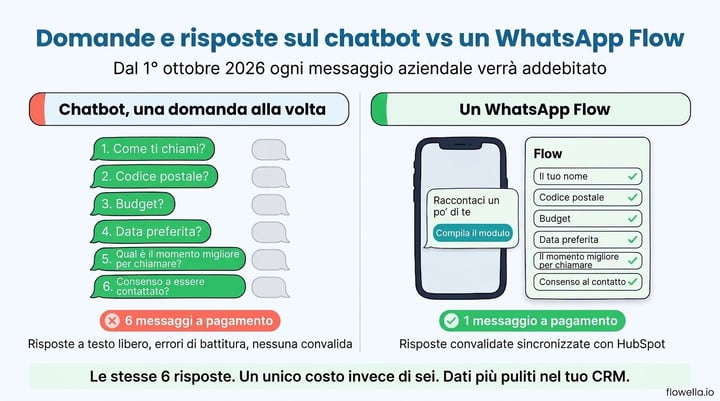
La maggior parte dei chatbot di WhatsApp e dei flussi di lavoro nella casella di posta raccoglie informazioni proprio come farebbe una persona: una domanda, attesa della risposta, domanda successiva. Nome. Codice postale. Budget. Data preferita. Orario migliore per chiamare. Consenso. Si tratta di sei messaggi commerciali prima che un venditore abbia qualcosa di utile, e ognuno di essi ora comporta un costo[1] di servizio.
Se avete trasferito tali risposte a Meta Business Agent, il costo per messaggio è ancora più elevato. Secondo le stime di Meta, si tratta di circa 20.000-25.000 token per messaggio, quindi un semplice scambio del tipo “a che ora aprite?” costa all’incirca 16-20 centesimi di dollaro, mentre una conversazione di assistenza di dieci messaggi arriva a 40-50 centesimi[1].
C’è un secondo costo che non compare mai sulla fattura di Meta. Le risposte in formato testo libero arrivano piene di errori di battitura, risposte incomplete e frasi del tipo “sì, proprio quella”. Qualcuno deve sistemarle prima che abbiano un valore nel CRM. Abbiamo spiegato perché questo è importante per la qualità dei lead nell’articolo “Il vero problema dei chatbot di WhatsApp”.
Un confronto pratico
Prendiamo come esempio uno scambio di qualificazione dei lead con sei domande, inviato a 5.000 contatti al mese. L’esempio fornito dalla stessa Meta per il Brasile utilizza una tariffa di consegna di 0,68 centesimi di dollaro USA per messaggio di servizio e da 2 a 9 centesimi per messaggio per l’IA di terze parti in aggiunta[1]. Le cifre esatte varieranno a seconda del mercato, ma il calcolo rimane lo stesso.
| Approccio | Messaggi aziendali per contatto | Messaggi fatturabili al mese (5.000 contatti) | Qualità dei dati |
|---|---|---|---|
| Chatbot, una domanda alla volta | 6 messaggi di servizio | 30.000 | Testo libero, non convalidato |
| Un WhatsApp Flow | 1 modello di messaggio | 5.000 | Convalidati, mappati ai campi CRM |
Si tratta di una riduzione dell’83% dei messaggi a pagamento, senza contare il costo dell’IA che si evita e le ore che nessuno deve dedicare alla correzione dei codici postali.
Come le WhatsApp Flows riducono il numero di messaggi a uno
WhatsApp Flows sono schermate native simili a moduli che si aprono all’interno della chat di WhatsApp. Invece di una conversazione, il cliente vede un modulo strutturato con campi di testo, menu a tendina, selettori di data, caselle di controllo e schermate a più passaggi con logica di ramificazione. Una volta compilato il modulo, basta toccare “Invia” e l’intera risposta ti viene restituita in un colpo solo.
Dal punto di vista dei prezzi, gli aspetti importanti sono:
- Un unico messaggio contiene l’intero modulo: un Flow è associato a un singolo modello (o a un singolo messaggio interattivo all’interno della finestra di servizio). Si paga per quel singolo messaggio, indipendentemente dal numero di domande che contiene.
- Il modulo compilato è un messaggio in entrata: l’invio del cliente ti viene restituito come messaggio utente, e i messaggi in entrata non vengono addebitati[2].
- La convalida avviene sul telefono del cliente: i campi obbligatori, i formati di e-mail e numero di telefono e gli intervalli di date vengono verificati prima dell’invio, quindi non c’è un secondo messaggio che chieda di riprovare.
- I rami sostituiscono le domande di follow-up: una risposta a «Quante persone?» può far apparire la schermata successiva corretta senza un altro scambio di messaggi a pagamento.
La guida al flusso di lavoro per l’acquisizione e la qualificazione dei lead nella knowledge base di Flowella illustra l’intero processo: un breve modulo di qualificazione su WhatsApp, le risposte valutate, i lead altamente idonei indirizzati al reparto vendite. Ogni domanda di quel modulo è contenuta in un unico invio del modello.
Quale categoria di modello dovresti utilizzare?
L’invio di un flusso al di fuori della finestra di 24 ore comporta l’invio di un modello, e la categoria del modello ne determina il prezzo[2]. Un modulo che segue un’azione del cliente (conferma di una prenotazione, completamento dell’onboarding, raccolta di documenti KYC) rientra solitamente nella categoria “utilità”, quella più economica. Un modulo inviato a una lista di contatti freddi rientra nella categoria “marketing”. La guida di Flowella sui prezzi e sulle categorie dei messaggi WhatsApp spiega come Meta decide e perché un modello classificato in modo errato può modificare silenziosamente il tuo costo unitario nel bel mezzo della campagna.
Se è il cliente a inviarti per primo un messaggio, puoi inviare il Flow come risposta entro tale finestra temporale. Tale risposta comporta ora un unico costo di servizio, che rimane uno solo anziché sei.
Cosa significa questo per il tuo traffico incluso in Flowella
I piani Flowella includono un credito mensile di messaggi fatturabili, e un’unità corrisponde a un messaggio che WhatsApp contrassegna come fatturabile. Fino al 30 settembre, le risposte inviate entro la finestra temporale di 24 ore erano gratuite e non consumavano il tuo credito. A partire dal 1° ottobre, tali risposte saranno fatturabili una volta che il tuo numero avrà esaurito i 1.000 messaggi di servizio gratuiti mensili di Meta; da quel momento in poi, ciascuna risposta conterà come un’unità. Superato tale limite, uno scambio con un chatbot di sei domande consumerà sei unità del tuo credito; le stesse risposte raccolte tramite un Flow ne consumeranno una sola.
La guida della knowledge base sui prezzi e sulle categorie dei messaggi WhatsApp illustra un esempio pratico, mentre la pagina "Utilizzo" in Flowella mostra i messaggi a pagamento suddivisi per categoria WhatsApp.
Flowella: il tuo modulo HubSpot in entrata, un WhatsApp Flow in uscita, le risposte di ritorno nel CRM
Creare i Flows manualmente significa progettare schermate nel Flow Builder di Meta, quindi scrivere del codice per intercettare l’invio e inserirlo nel tuo CRM. Flowella elimina entrambi i passaggi. Prende i moduli HubSpot che già possiedi e trasforma ciascuno di essi in un WhatsApp Flow, mantenendo i nomi dei campi, le opzioni e i flag[3] obbligatori.
Quando un cliente invia il flusso, Flowella registra le risposte nelle proprietà corrispondenti del contatto HubSpot e registra l’invio del modulo sulla timeline, così ogni flusso di lavoro, elenco e report che già esegui sugli invii dei moduli web funziona anche sugli invii di WhatsApp. Non c’è bisogno di esportazioni, fogli di calcolo né analisi del testo libero. Se ti sei mai chiesto se HubSpot possa inviare una conferma via WhatsApp dopo l’invio di un modulo, questo è lo stesso meccanismo che funziona nella direzione opposta.
In pratica, la configurazione che consente di risparmiare sui costi si presenta così:
- Consolida le tue domande: sposta in sequenza in un unico modulo HubSpot tutte le domande poste dal tuo chatbot o dal team che gestisce la casella di posta. Le best practice di Flowella per la progettazione dei moduli tengono conto dei limiti delle etichette e dei tipi di domanda che si visualizzano meglio su uno smartphone.
- Sincronizza il modulo: Flowella lo pubblica su Meta come “WhatsApp Flow” dalla pagina “Flows”.
- Associatelo a un modello: inviate il Flow da un flusso di lavoro HubSpot, da un invio in massa o da un annuncio “Click-to-WhatsApp”, in modo che il Flow arrivi nel messaggio che avvia la conversazione.
- Lascia che HubSpot si occupi del resto: valuta, indirizza e dai seguito alle proprietà inviate con i flussi di lavoro che già utilizzi, come descritto nella guida alle azioni dei flussi di lavoro di HubSpot.
Poiché le risposte vengono registrate come proprietà strutturate anziché come trascrizioni di chat, ottieni anche i report che la tua generazione di lead su WhatsApp merita: conversione per fonte, tempo necessario per la qualificazione e costo per lead qualificato, il tutto all’interno di HubSpot.
Riduci i costi di marketing con i modelli a carosello di WhatsApp
I flussi riducono il costo delle domande che poni. La seconda leva è il contenuto che diffondi. Molte campagne vengono ancora lanciate come una serie di modelli di marketing separati: uno per prodotto, proprietà, evento o offerta, spesso distribuiti nell’arco di una settimana. Con la tariffazione per singolo messaggio, ciascuno di questi comporta un costo di marketing a sé stante, e il marketing è in genere la tariffa più alta applicata[2] da Meta.
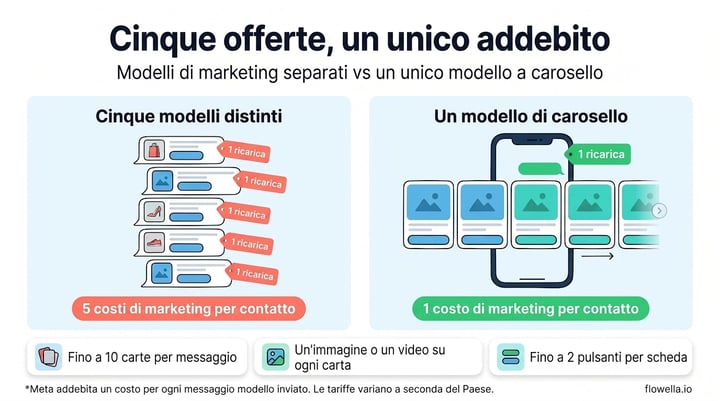
Un modello a carosello con schede multimediali riunisce fino a dieci di questi elementi in un unico messaggio. Il cliente vede il testo del messaggio seguito da una serie di schede che può scorrere lateralmente, e Meta addebita un solo modello di marketing consegnato, non dieci[2][5].
Un modello a carosello è un unico modello di marketing composto dal testo del corpo del messaggio e da un numero di schede multimediali compreso tra due e dieci. Ogni scheda presenta un’immagine o un video come intestazione, un testo facoltativo e fino a due pulsanti, che possono essere una combinazione qualsiasi di pulsanti di risposta rapida, numero di telefono e URL.
Fonte: Meta for Developers, Modelli di carosello con schede multimediali
Cosa può fare ogni scheda
- Immagine o video su ogni scheda: mostra il prodotto, la stanza, la sede o il corso. Tutte le schede di un unico modello utilizzano lo stesso tipo di contenuto multimediale.
- Fino a due pulsanti per scheda: ad esempio "Prenota una visita" e "Chiama la filiale". Ogni scheda utilizza gli stessi tipi di pulsanti nello stesso ordine, ma ciascuna scheda può avere le proprie etichette, i propri link e i propri numeri di telefono.
- Breve testo sotto ogni immagine: fino a 160 caratteri per scheda, con variabili di personalizzazione, in modo che un prezzo, una data o una località compaiano proprio sotto l’immagine[5].
- Le risposte rapide indicano quale scheda ha avuto la meglio: quando qualcuno tocca “Dimmi di più” sulla terza scheda, si sa esattamente a quale offerta si riferisce senza dover leggere il testo libero.
Un confronto pratico
Prendi 5.000 contatti che hanno acconsentito a ricevere comunicazioni e cinque offerte che vuoi che ciascuno di loro veda questo mese.
| Approccio | Messaggi di marketing per contatto | Costi di marketing al mese (5.000 contatti) | Esperienza del cliente |
|---|---|---|---|
| Cinque modelli distinti | 5 | 25.000 | Cinque notifiche in competizione per attirare l'attenzione |
| Un carosello con cinque schede | 1 | 5.000 | Un unico messaggio, scorri per visualizzarlo |
Si tratta di una riduzione dell’80% dei costi di marketing a parità di copertura. Inviare un numero inferiore di messaggi di marketing per persona riduce inoltre il rischio di raggiungere il limite per utente imposto da Meta sui modelli di marketing, che può bloccare la consegna anche del primo messaggio. La guida di Flowella su un coinvolgimento sano nell’ecosistema spiega come funziona tale limite.
Quando i caroselli sono adatti e quando non lo sono
- Solo marketing: i caroselli sono un tipo di modello di marketing, quindi richiedono l’opt-in per il marketing e vengono addebitati alla tariffa[5] di marketing. Non rendono più economici gli aggiornamenti sugli ordini o i promemoria.
- Il numero di schede è fisso al momento dell’approvazione: un modello approvato con cinque schede ne invia sempre cinque, quindi crea un modello per ogni layout che utilizzi regolarmente.
- I pulsanti URL portano fuori da WhatsApp: un pulsante URL apre il browser del cliente. Per mantenere il passaggio successivo nella chat, usa un pulsante di risposta rapida e fai seguito con un Flow che raccolga i dettagli della prenotazione o della richiesta relativi alla scheda che hanno scelto.
È proprio in quest’ultimo punto che si sommano i due risparmi: il carosello mostra tutte le opzioni con un unico costo di marketing, mentre un singolo Flow raccoglie tutte le informazioni necessarie relative all’opzione scelta dal cliente.
Creazione di caroselli in Flowella
Flowella ora supporta i caroselli con schede multimediali. In "Modelli", seleziona "Nuovo modello", poi "Crea il tuo" e "Carosello". Aggiungi da due a dieci schede, carica un'immagine (JPEG o PNG fino a 5 MB) o un video (MP4 fino a 16 MB) per ciascuna, visualizza l'anteprima della striscia scorrevole e inviala a Meta. Una volta approvato, potrai inviarlo tramite invii di prova, invii in massa, la Posta in arrivo, l’API di Flowella e HubSpot[6]. La documentazione sui modelli illustra le regole, mentre la guida ai modelli spiega come effettuare i test e gli invii in massa.
Ottimi candidati iniziali sono tutti i contenuti che attualmente inviate sotto forma di serie: nuovi annunci per un'agenzia immobiliare (consultate la nostra guida a WhatsApp per agenti immobiliari), una stagione di eventi per una struttura ricettiva, una gamma di prodotti per un rivenditore o le opzioni dei corsi per un istituto di istruzione superiore.
Cosa fare ora che i nuovi prezzi sono attivi
Ecco un breve elenco.
- Conta i messaggi per conversazione: estrai un campione delle conversazioni WhatsApp dell’ultimo mese e conta i messaggi aziendali per contatto. Qualsiasi numero superiore a due è un candidato per un Flow.
- Controlla le tariffe per i tuoi mercati: Meta pubblica i listini prezzi per valuta nella pagina dedicata. I messaggi di servizio seguono la tariffa di base in ogni mercato[1].
- Rivedi qualsiasi agente AI che utilizzi su WhatsApp: che si tratti di Meta Business Agent o di un bot di terze parti, le sue risposte ora hanno un costo. Le risposte di Meta Business Agent vengono addebitate a partire dalla prima, mentre quelle di un bot di terze parti vengono addebitate una volta che il vostro numero ha esaurito i 1.000 messaggi di servizio gratuiti mensili. Utilizzate un Flow da fornire al bot invece di uno script di domande.
- Spostate le domande sequenziali nei moduli: iniziate con il tipo di conversazione con il volume più elevato: qualificazione dei lead, prenotazione di appuntamenti o onboarding.
- Raggruppa gli invii di marketing correlati: se la stessa lista riceve diverse offerte in una settimana, prova a sostituirle con un unico carosello e confronta clic e risposte.
- Fai in modo che il punto di accesso gratuito continui a lavorare per te: quando qualcuno ti invia un messaggio da un annuncio “Click-to-WhatsApp” e tu rispondi entro 24 ore, la conversazione può rimanere gratuita per un massimo di 7 giorni[2][7]. L'invio di un Flow come prima risposta all'interno di quella finestra non costa assolutamente nulla, così come i messaggi di follow-up inviati finché la conversazione rimane aperta. La guida agli annunci "Click-to-WhatsApp" mostra come attivare un Flow tramite una parola chiave.
- Tieni d’occhio il tuo utilizzo: la pagina “Utilizzo” di Flowella suddivide i messaggi fatturabili per categoria WhatsApp, mentre le analisi dei canali mostrano le prestazioni dei modelli, così puoi vedere quale combinazione incide maggiormente sulla tua fattura Meta.
Meno messaggi, commissioni Meta più basse
Dal 1° ottobre 2026, quasi tutti i messaggi che la tua azienda invia su WhatsApp comportano un costo. Le aziende che ne risentiranno meno saranno quelle che inviano messaggi meno frequenti ma più ricchi di contenuti. Un WhatsApp Flow raccoglie le risposte di un intero modulo in un unico messaggio a pagamento, le convalida sul telefono del cliente e, con Flowella, le inserisce direttamente nelle proprietà di HubSpot. Un modello a carosello presenta fino a dieci offerte a un cliente al prezzo di un solo messaggio di marketing. Insieme, riducono i costi Meta e forniscono al tuo team di vendita dati utilizzabili immediatamente.
Inizia una prova gratuita di Flowella e trasforma il tuo primo modulo HubSpot in un WhatsApp Flow oppure crea oggi stesso il tuo primo carosello, oppure prenota una demo e analizzeremo insieme con te la tua conversazione con il maggior volume di messaggi.
Riferimenti
- Meta for Developers: Tariffe per i messaggi non basati su modelli (aggiornamenti in vigore dal 1° agosto e dal 1° ottobre 2026)
- Meta per gli sviluppatori: Tariffe sulla piattaforma WhatsApp Business (tariffe per messaggio, categorie di modelli, finestre di accesso gratuite)
- Knowledge Base di Flowella: Che cos’è Flowella? WhatsApp Flows basati su HubSpot per i professionisti del marketing
- Knowledge Base di Flowella: Tariffe e categorie di messaggi WhatsApp
- Meta per gli sviluppatori: Modelli di carosello con schede multimediali
- Knowledge Base di Flowella: Riferimento ai modelli WhatsApp, modelli a carosello
- Meta per gli sviluppatori: Registro delle modifiche di WhatsApp (finestra di accesso gratuito estesa fino a 7 giorni, 28 settembre 2026)