Build on top of Flowella, programmatically.
When the no-code tools do not cover something, the Flowella REST API and outbound webhooks do. Call the API to send WhatsApp messages, manage contacts and opt-outs, and pull analytics. Subscribe to webhooks to react to messages, deliveries, opt-outs and template changes in real time, no polling required.
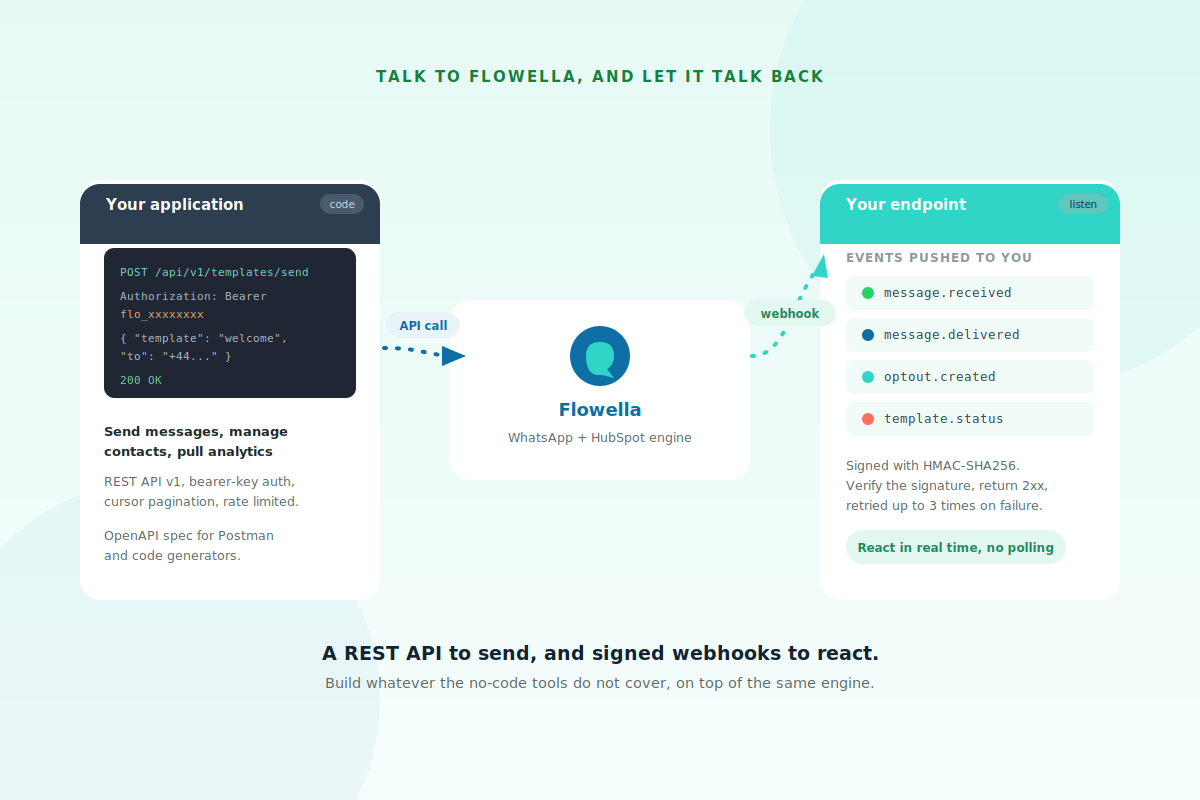
Call it, and let it call you back.
Two directions, one engine. Your application calls the REST API to make things happen: send a template, update a contact, fetch analytics. In the other direction, Flowella pushes signed webhook events to your endpoint the moment something happens, so you can react instantly instead of polling. Together they let you build whatever your stack needs on top of the same WhatsApp and HubSpot engine.
Send, manage, and report
A straightforward v1 REST API with bearer-key auth and predictable behaviour.
The REST API is v1, under https://app.flowella.io/api/v1. Every request carries an organisation-scoped bearer key in the Authorization header, created from Settings, API keys by an Owner or Admin and shown only once. List endpoints use cursor pagination with a limit of one to one hundred, errors come back in a consistent envelope with a stable code field, and requests are rate limited per organisation with a 429 when you go too fast. Phone numbers are best passed in E.164 form, and a machine-readable OpenAPI spec drops straight into Postman or a code generator.
For large bulk sends, the templates send endpoint accepts a throttle-per-hour parameter so Flowella paces delivery server-side, rather than you pacing requests yourself.
React to events in real time
Subscribe to the events you care about and Flowella POSTs a signed payload as they happen.
| Event | When it fires |
|---|---|
| message.received | An inbound WhatsApp message arrives from a contact |
| message.sent | Flowella has accepted your outbound message and submitted it to Meta |
| message.delivered | Meta confirmed delivery to the recipient's device |
| message.read | The recipient opened the message |
| message.failed | Meta returned a failure for the message |
| conversation.opened / closed | A conversation changed state |
| optout.created | A contact opted out on a channel |
| template.status_updated | Meta changed a template's status |
Each request is signed with an HMAC-SHA256 hex digest of the raw body, so verify the signature before processing. Flowella waits up to ten seconds for a 2xx, retries up to three times with backoff, and auto-disables an endpoint after ten consecutive failures. Because retries can repeat an event, use the event id as an idempotency key and treat duplicates as no-ops.
No-code first, code when you need it.
The API extends the product. It does not replace the parts that already work without code.
Start here for the common jobs.
Most of what teams need, sending templates, capturing Flow answers, triggering automation, is already covered without touching the API. Reach for code only when you need something beyond it.
- Form to Flow, native HubSpot sync
- Workflow actions and the inbox
- No code to write
Reach for code when you need more.
When you need to wire WhatsApp into a custom system, sync to a tool with no native connector, or react to events in your own backend, the API and webhooks give you full control.
- Custom apps and bespoke integrations
- React to events without polling
- Bulk sends with server-side throttling
- ⏱️ 30 seconds · Card on file
- 👤 With · Membership team
- 📩 Receipt sent here after renewal
Choose your plan
- 🏆 Annual · £49 ✓
- 🎯 Quarterly · £15 ✓
- 📅 Monthly · £6 ✓
Powered by Flowella · Secure renewal
Straight answers.
The questions developers ask.
How do I authenticate?
An organisation-scoped bearer key, created from Settings, API keys by an Owner or Admin. It is shown only once at creation, so store it safely and rotate it when teammates leave.
What can the API do?
Send WhatsApp messages and templates, manage contacts and opt-outs, list and bulk-send templates, and pull analytics. The full endpoint list is auto-generated from the OpenAPI spec.
Can I do large bulk sends?
Yes. Use the templates send endpoint with a throttle-per-hour parameter and Flowella enforces the pace server-side, so you do not need to manage timing or hit rate limits yourself.
How do I verify a webhook is genuine?
Every webhook is signed with an HMAC-SHA256 digest of the raw request body. Compute the same digest with your signing secret and compare, signing over the raw bytes before any JSON parsing.
What if my endpoint is down?
Flowella retries up to three times with backoff, and auto-disables the endpoint after ten consecutive failures. Re-enable it from Settings, Webhooks once your endpoint is fixed.
How do I avoid processing duplicates?
Use the event id as an idempotency key, keep a short-lived cache of processed keys, and treat repeats as no-ops. Retries mean the same event can arrive more than once.
Read the developer docs
Everything on this page, with the full reference and code samples, lives in the docs.
The full developer reference lives in the knowledge base.
API introduction covers the base URL, authentication, errors, pagination, rate limits and the OpenAPI spec.
Outbound webhooks covers configuring a webhook, the full event list, signature verification, retries and idempotency, with code samples.