Turn ad clicks into conversations, not bounces.
Click-to-WhatsApp ads send people from Facebook or Instagram straight into a WhatsApp chat with your business. Flowella picks it up from there: a keyword launches a structured Flow, the questions get answered in chat, and every answer syncs into HubSpot as a real lead. Scroll, tap, done.
From the feed to a real lead.
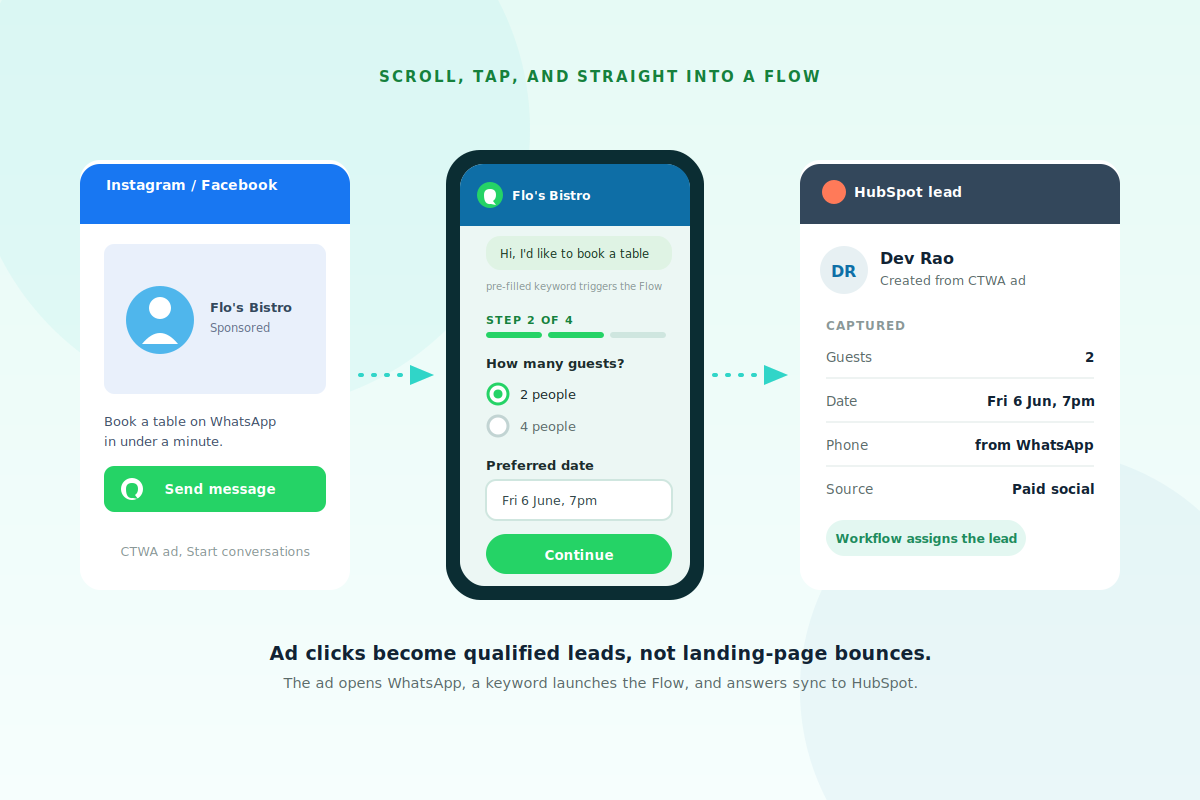
A landing page asks someone to leave the app, wait for a load, and fill in a form on a small screen. Many give up. A Click-to-WhatsApp ad opens a chat instead. The ad runs as a Start conversations campaign with a pre-filled keyword, Flowella detects that keyword and launches the matching Flow, and the captured answers sync into HubSpot ready for follow-up. The friction of the landing page simply disappears.
Two ad set-ups, one that reaches HubSpot.
Meta limits Flows attached straight to an ad. The keyword approach unlocks the full journey.
Useful, but it cannot reach your CRM.
Meta's Collect info with a form on WhatsApp option attaches a Flow to the ad directly, but it must be static. It cannot create or look up HubSpot records, so it stays basic lead capture.
- Meta requires ad-attached Flows to be static
- No data exchange with your backend
- Basic lead capture, no CRM logic
Start a conversation, then trigger a Flow.
Use the ad to open WhatsApp with a keyword. Flowella detects it and runs the full, dynamic Flow that talks to HubSpot. Low-friction ad, complete journey, real sync.
- Ad opens a chat with a pre-filled keyword
- Keyword launches the full Flowella Flow
- Answers sync into HubSpot as a lead
- ⏱️ 30 seconds · Card on file
- 👤 With · Membership team
- 📩 Receipt sent here after renewal
Choose your plan
- 🏆 Annual · £49 ✓
- 🎯 Quarterly · £15 ✓
- 📅 Monthly · £6 ✓
Powered by Flowella · Secure renewal
Five steps to a working funnel
Build the Flow, wire the keyword, then test before you spend a penny on budget.
| Step | What you do |
|---|---|
| 1. Build the Flow | Create a short Flow Template tailored to the ad's promise, for example a booking or quote. The phone number is captured automatically. |
| 2. Set a trigger phrase | Pick a unique pre-filled message such as Hi, I'd like to book a table. Keep it distinctive so it never collides with another flow. |
| 3. Map to HubSpot | Map each answer to a HubSpot contact property so every submission becomes a real record. |
| 4. Build the ad | In Ads Manager pick a messaging objective and Start conversations, then set the pre-filled message to your keyword. |
| 5. Test end to end | On a real phone: tap the ad, confirm WhatsApp opens with the keyword, complete the Flow, and check the HubSpot record appears. |
Best practices and pitfalls
The short version of what works, and what trips people up.
A few habits make the difference between clicks and conversions. Make the value clear in the ad and mention WhatsApp by name, so people know what will open. Set a strong pre-filled message, since it is the trigger Flowella listens for. Keep the Flow short and match it to the ad's promise. Optimise for conversations rather than clicks, and always test the whole journey on a phone before scaling spend.
The most common pitfalls are the wrong chat option in Ads Manager (the static form rather than Start conversations), a keyword broken by case, spacing or autocorrect, an over-long flow, and skipping end-to-end testing.
Straight answers.
The questions advertisers ask about CTWA.
What is a Click-to-WhatsApp ad?
Click-to-WhatsApp ads are Facebook and Instagram ads whose call to action opens a WhatsApp chat with your business instead of a landing page. People arrive in a conversation, not a form.
Why not just attach a Flow to the ad?
Because Meta requires Flows attached straight to an ad to be static, with no backend data exchange. A CRM-connected journey needs a dynamic Flow, so we open a conversation with a keyword and let Flowella launch the full Flow.
What is the keyword for?
A unique pre-filled message that Flowella listens for. When the user taps send, Flowella detects the keyword and launches the matching Flow. Keep it distinctive so it never collides with another flow.
Do I need to ask for a phone number?
No. The phone number comes automatically from the WhatsApp conversation, so the Flow only needs to ask what qualifies or fulfils the request.
How do I measure results?
Conversations started and cost per conversation in Ads Manager, then flows started versus completed and leads created in Flowella and HubSpot, through to downstream metrics like opportunities and revenue.
How should I test before launch?
Always run the full journey on a real phone first: tap the ad, confirm WhatsApp opens with the keyword, complete the Flow, and check the HubSpot record. Fix anything broken before scaling spend.
Read the full how-to
Everything on this page, with the step-by-step detail, lives in the docs.
The knowledge base has the full walkthrough, including Ads Manager settings, keyword tips and a worked example.
Run Click-to-WhatsApp ad campaigns covers the static versus dynamic limitation, the five-step setup, tracking and the common pitfalls in detail.