Το WhatsApp είναι ένας από τους ευκολότερους τρόπους για τους πελάτες να επικοινωνήσουν με μια επιχείρηση. Ωστόσο, ένας εκπληκτικά μεγάλος αριθμός εταιρειών δεν προχωρά ποτέ στην υιοθέτησή του, και σπάνια η τεχνολογία είναι αυτή που τις εμποδίζει. Το ζήτημα είναι πολύ πιο απλό: ποιον αριθμό τηλεφώνου θα χρησιμοποιήσουμε;
Κανείς δεν θέλει να δώσει στους πελάτες τον προσωπικό του αριθμό κινητού. Ούτε θέλει κανείς να μπερδέψει τους πιστούς πελάτες με έναν άγνωστο νέο αριθμό. Τα καλά νέα είναι ότι, στις περισσότερες περιπτώσεις, μπορείτε να χρησιμοποιήσετε τον υπάρχοντα επαγγελματικό σας αριθμό τηλεφώνου με το WhatsApp Business και να διατηρήσετε τον αριθμό που οι πελάτες σας αναγνωρίζουν ήδη.
Αυτό το άρθρο εξηγεί ποιοι αριθμοί πληρούν τις προϋποθέσεις, τι συμβαίνει με τα σταθερά τηλέφωνα, τι πρέπει να κάνετε αν ο αριθμός υπάρχει ήδη στο WhatsApp και πώς η ομάδα σας θα διαχειρίζεται τις συνομιλίες μόλις αρχίσουν να φτάνουν.
Η σύντομη απάντηση: ναι, στις περισσότερες περιπτώσεις
Μπορείτε να καταχωρίσετε έναν υπάρχοντα επαγγελματικό αριθμό τηλεφώνου στην πλατφόρμα WhatsApp Business, υπό την προϋπόθεση ότι ανήκει στην επιχείρησή σας, διαθέτει κωδικό χώρας και περιοχής και μπορεί να λάβει είτε SMS είτε φωνητική κλήση για την ολοκλήρωση της επαλήθευσης. Τόσο οι αριθμοί κινητών όσο και οι σταθεροί τηλεφωνικοί αριθμοί πληρούν τις προϋποθέσεις. Οι σύντομοι κωδικοί δεν πληρούν τις προϋποθέσεις.[1]
Υπάρχει μια σημαντική λεπτομέρεια που αξίζει να γνωρίζετε πριν προχωρήσετε. Μόλις ένας αριθμός καταχωρηθεί στην πλατφόρμα, συνεχίζει να λειτουργεί κανονικά για απλές τηλεφωνικές κλήσεις και μηνύματα κειμένου, αλλά δεν μπορεί πλέον να χρησιμοποιηθεί με την εφαρμογή WhatsApp για καταναλωτές σε κινητό τηλέφωνο.[1]
Στην πράξη, αυτό είναι ακριβώς αυτό που επιθυμούν οι περισσότερες επιχειρήσεις. Ο αριθμός συνεχίζει να χτυπά στο γραφείο. Οι συνομιλίες στο WhatsApp φτάνουν σε ένα μέρος πολύ πιο χρήσιμο από ένα απλό κινητό τηλέφωνο.
«Δεν θέλω οι πελάτες να έχουν τον προσωπικό μου αριθμό WhatsApp»
Αυτή είναι πιθανώς η μεγαλύτερη παρανόηση σχετικά με το WhatsApp για επιχειρήσεις.
Όταν οι άνθρωποι σκέφτονται το WhatsApp, φαντάζονται την εφαρμογή στο δικό τους κινητό. Επομένως, η πρώτη ανησυχία είναι κατανοητή: μήπως αυτό σημαίνει ότι θα πρέπει να δώσουν τον προσωπικό τους αριθμό κινητού;
Όχι. Μια σωστή ρύθμιση του WhatsApp Business διατηρεί τις επαγγελματικές συνομιλίες εντελώς ξεχωριστές από τον προσωπικό λογαριασμό WhatsApp οποιουδήποτε. Κανείς δεν κάθεται με το προσωπικό του κινητό να απαντά σε μηνύματα πελατών.
Με μια πλατφόρμα όπως η Flowella, οι συνομιλίες φτάνουν αντίθετα στο Inbox της Flowella, όπου ολόκληρη η ομάδα σας μπορεί να τις δει και να απαντήσει. Το κοινόχρηστο Inbox εξασφαλίζει ότι όλοι εργάζονται από την ίδια οθόνη, οπότε μόλις ένας συνάδελφος ανοίξει μια συνομιλία, αυτή παύει να εμφανίζεται ως «μη προβλεφθείσα» για όλους τους άλλους.
«Αλλά δεν θέλω ούτε νέο αριθμό»
Αυτή είναι η άλλη πλευρά του προβλήματος.
Φανταστείτε ότι διευθύνετε την επιχείρησή σας εδώ και δέκα χρόνια. Ο αριθμός τηλεφώνου σας εμφανίζεται:
- Ιστοσελίδα και στη σελίδα επικοινωνίας
- Προφίλ της επιχείρησής σας στο Google
- Επαγγελματικές κάρτες και υπογραφές email
- Διαφημίσεις, τόσο σε έντυπη μορφή όσο και σε πληρωμένες αναζητήσεις
- Τα έγγραφα των πελατών, τα τιμολόγια και τις συμβάσεις
Οι πελάτες σας το αναγνωρίζουν. Τότε, κάποιος σας λέει ότι το WhatsApp απαιτεί έναν εντελώς διαφορετικό αριθμό, και ξαφνικά δημιουργείται ένα πρόβλημα εμπιστοσύνης.
Οι πελάτες αρχίζουν να θέτουν στον εαυτό τους τις προφανείς ερωτήσεις. Είναι πραγματικά η ίδια εταιρεία; Γιατί ο αριθμός είναι διαφορετικός; Στέλνω μηνύματα στους σωστούς ανθρώπους;
Για κλάδους όπου η εμπιστοσύνη παίζει καθοριστικό ρόλο, όπως δικηγορικά γραφεία, χρηματοοικονομικές υπηρεσίες, πάροχοι υγειονομικής περίθαλψης και επαγγελματικές υπηρεσίες, αυτή η διστακτικότητα κοστίζει ακριβά. Οι άνθρωποι είναι ήδη επιφυλακτικοί απέναντι σε απροσδόκητα μηνύματα από αριθμούς που δεν γνωρίζουν.
Η χρήση του αριθμού που καλούν εδώ και χρόνια εξαλείφει εντελώς την αμφιβολία. Ίδια επιχείρηση. Ίδιος αριθμός. Νέο κανάλι επικοινωνίας.
Ποιοι αριθμοί επιχειρήσεων πληρούν τις προϋποθέσεις για το WhatsApp Business;
Η Meta δημοσιεύει ένα σαφές σύνολο κανόνων επιλεξιμότητας, και ο τύπος του αριθμού έχει σημασία κυρίως επειδή καθορίζει τον τρόπο με τον οποίο θα λάβετε την επαλήθευση.
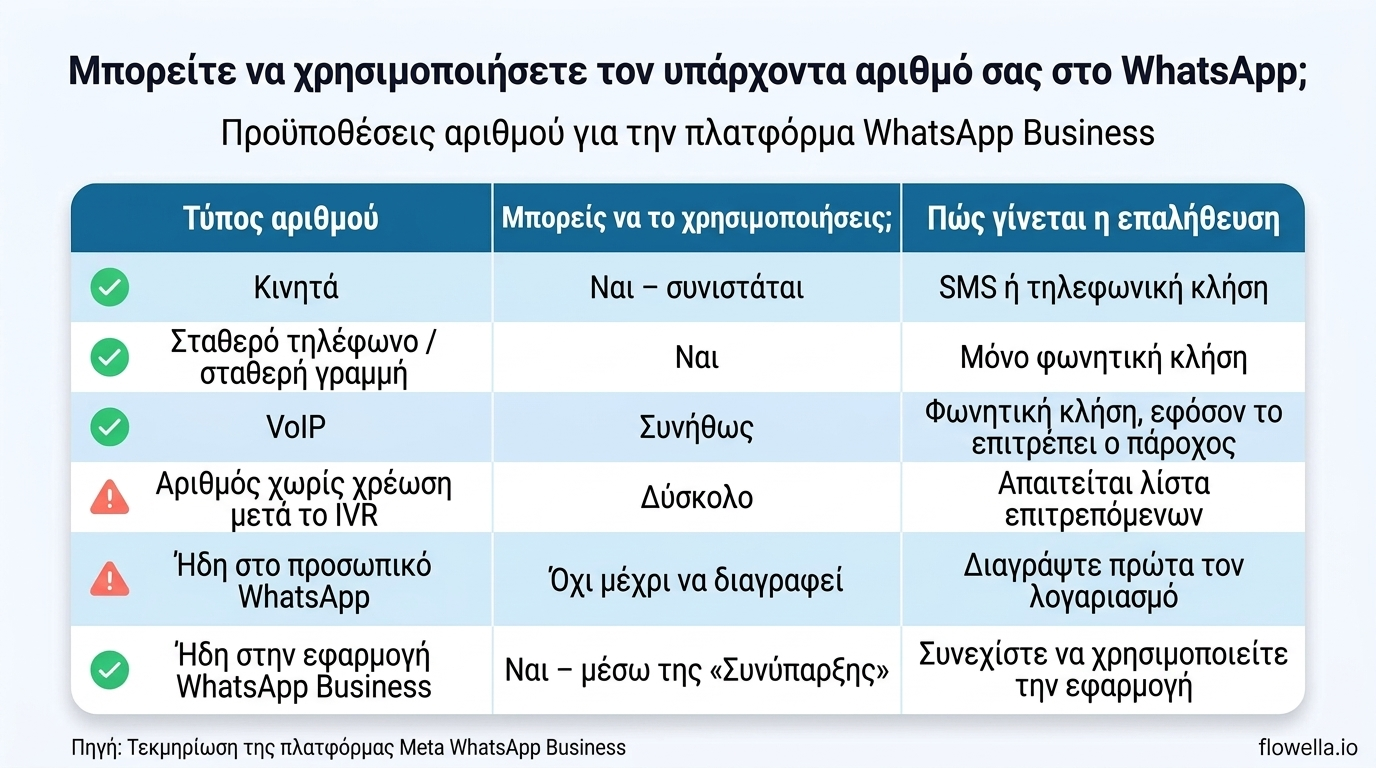
| Τύπος αριθμού | Επιλέξιμος; | Τι πρέπει να προσέξετε |
|---|---|---|
| Κινητό | Ναι, συνιστάται | Επαλήθευση μέσω SMS ή τηλεφωνικής κλήσης. Ο πιο απλός τρόπος. |
| Σταθερό τηλέφωνο | Ναι | Επαλήθευση μέσω φωνητικής κλήσης. Τα SMS δεν είναι αξιόπιστα στις σταθερές γραμμές. |
| VoIP | Συνήθως | Βεβαιωθείτε ότι ο πάροχός σας δέχεται διεθνείς κλήσεις για τον κωδικό επαλήθευσης. |
| Αριθμός χωρίς χρέωση μέσω IVR | Δύσκολο | Μια κλήση επαλήθευσης δεν μπορεί να περιηγηθεί σε ένα μενού. Απαιτείται λίστα επιτρεπόμενων αριθμών ή προσωρινή ανακατεύθυνση. |
| Σύντομος κωδικός | Όχι | Δεν υποστηρίζεται. Ο αριθμός πρέπει να περιλαμβάνει κωδικό χώρας και περιοχής. |
Η ίδια η επαλήθευση είναι γρήγορη. Η Meta στέλνει έναν εξαψήφιο κωδικό, συνήθως μέσω SMS, και καταφεύγει σε μια αυτοματοποιημένη φωνητική κλήση μετά από τρεις αποτυχημένες προσπάθειες αποστολής SMS.[3]
Ένα σημείο που πρέπει να λάβετε υπόψη και που συχνά αιφνιδιάζει τις αναπτυσσόμενες επιχειρήσεις: τα νέα επιχειρηματικά προφίλ έχουν αρχικά όριο δύο καταχωρημένων επιχειρηματικών αριθμών τηλεφώνου. Το όριο αυτό αυξάνεται αυτόματα σε 20 μόλις η επιχείρησή σας ολοκληρώσει την επαλήθευση ή φτάσει το όριο των 2.000 μηνυμάτων.[1] Αν σκέφτεστε να χρησιμοποιήσετε ξεχωριστούς αριθμούς για τις πωλήσεις και την υποστήριξη, λάβετε αυτό υπόψη από νωρίς. Ο οδηγός μας για τη δημιουργία ενός επαληθευμένου λογαριασμού WhatsApp Business περιγράφει αναλυτικά τη διαδικασία επαλήθευσης.
Τι γίνεται με τα σταθερά τηλέφωνα;
Αυτή είναι η ερώτηση που ακούμε πιο συχνά. «Ο κύριος αριθμός της επιχείρησής μας δεν είναι κινητό. Μπορούμε να τον χρησιμοποιήσουμε;»
Ναι. Οι σταθερές γραμμές υποστηρίζονται ρητά και η επαλήθευση γίνεται μέσω φωνητικής κλήσης και όχι μέσω SMS.[1] Μια αυτοματοποιημένη κλήση διαβάζει τον εξαψήφιο κωδικό και κάποιος από την πλευρά σας τον πληκτρολογεί.
Δύο πρακτικές συμβουλές για να γίνει αυτό ομαλά:
- Βεβαιωθείτε ότι οι διεθνείς κλήσεις είναι ενεργοποιημένες στη γραμμή πριν ξεκινήσετε. Η κλήση επαλήθευσης προέρχεται από το εξωτερικό.
- Απενεργοποιήστε την προώθηση κλήσεων και οποιοδήποτε μενού IVR για τα λίγα λεπτά που διαρκεί η επαλήθευση. Μια αυτοματοποιημένη κλήση δεν μπορεί να πατήσει το «2 για πωλήσεις».
Οι αριθμοί χωρίς χρέωση που βρίσκονται πίσω από ένα τηλεφωνικό μενού αποτελούν την πραγματικά δύσκολη περίπτωση. Μερικές φορές μπορούν να καταχωρηθούν, αλλά μόνο αν η γραμμή δέχεται διεθνείς κλήσεις και τις δρομολογεί σε πραγματικό άτομο ή σε φωνητικό ταχυδρομείο που μπορεί να καταγράψει τον κωδικό. Η Meta θα κοινοποιήσει τους αριθμούς από τους οποίους προέρχεται η κλήση επαλήθευσης, ώστε να μπορείτε να τους προσθέσετε σε μια λίστα επιτρεπόμενων αριθμών.[1]
Αξίζει να επαναλάβουμε το γενικότερο συμπέρασμα: ελέγξτε τον υπάρχοντα αριθμό σας πριν αγοράσετε έναν νέο. Πολλές επιχειρήσεις αγοράζουν μια κάρτα SIM κινητού που δεν χρειάστηκαν ποτέ.
Τι γίνεται αν χρησιμοποιώ ήδη τον αριθμό στο WhatsApp;
Εδώ αξίζει να σκεφτείτε πριν προχωρήσετε, γιατί η απάντηση εξαρτάται εξ ολοκλήρου από το πώς χρησιμοποιείται ο αριθμός σήμερα.
Χρησιμοποιείται ήδη στο προσωπικό WhatsApp
Ένας αριθμός που χρησιμοποιείται στην εφαρμογή WhatsApp για καταναλωτές δεν μπορεί να καταχωρηθεί στην πλατφόρμα μέχρι να διαγραφεί πρώτα ο λογαριασμός.[1] Η διαγραφή του λογαριασμού καταργεί το ιστορικό συνομιλιών, οπότε εξαγάγετε ό,τι χρειάζεστε εκ των προτέρων.
Χρησιμοποιείται ήδη στην εφαρμογή WhatsApp Business
Αυτή είναι η πιο ευνοϊκή περίπτωση, και εκείνη στην οποία βρίσκονται οι περισσότερες μικρές επιχειρήσεις. Οι αριθμοί που χρησιμοποιούνται ήδη στην εφαρμογή WhatsApp Business μπορούν να συνδεθούν, χρησιμοποιώντας μια μέθοδο που ονομάζεται «Συνύπαρξη».[2]
Η «συνύπαρξη» επιτρέπει στην ομάδα σας να συνεχίσει να χρησιμοποιεί την εφαρμογή WhatsApp Business σε μια συσκευή για ατομικές συνομιλίες, ενώ η Flowella διαχειρίζεται ταυτόχρονα την αυτοματοποίηση, τα πρότυπα και τα WhatsApp Flows στον ίδιο αριθμό. Διατηρείτε τον αριθμό, τις σχέσεις με τους πελάτες και το ιστορικό συνομιλιών.
Πριν προχωρήσετε στη ρύθμιση, αξίζει να γνωρίζετε μερικές λεπτομέρειες:[4]
- Ιστορικό συνομιλιών – Μπορούν να συγχρονιστούν έως και έξι μήνες ιστορικού ατομικών συνομιλιών, αλλά αυτή η επιλογή γίνεται μία φορά κατά τη ρύθμιση και δεν μπορεί να αλλάξει αργότερα χωρίς πλήρη αποσύνδεση.
- Ομαδικές συνομιλίες – αυτές δεν συγχρονίζονται.
- Έκδοση εφαρμογής - Χρειάζεστε την εφαρμογή WhatsApp Business 2.24.17 ή νεότερη έκδοση.
- Διαθεσιμότητα - υποστηρίζονται οι περισσότεροι κωδικοί χωρών, με εξαίρεση προς το παρόν τη Νιγηρία και τη Νότια Αφρική.
- Συνδεδεμένες συσκευές - οι συνοδευτικές συσκευές αποσυνδέονται κατά τη ρύθμιση, ενώ ορισμένες μπορούν να επανασυνδεθούν στη συνέχεια.
Αναλύσαμε την κυκλοφορία αυτής της λειτουργίας με περισσότερες λεπτομέρειες όταν η Flowella πρόσθεσε τη συνύπαρξη και τα συμβάντα της εφαρμογής HubSpot.
Ήδη στην πλατφόρμα WhatsApp Business αλλού
Εάν ο αριθμός είναι ενεργός σε άλλο πάροχο, απαιτείται μετεγκατάσταση και όχι εγγραφή. Πρόκειται για μια καθορισμένη διαδικασία, όχι για μια απλή αποσύνδεση με την ελπίδα ότι όλα θα πάνε καλά. Μην διαγράψετε τίποτα πριν συμφωνηθεί η διαδικασία μετεγκατάστασης.
Χρειάζομαι αριθμό των ΗΠΑ;
Όχι. Αυτός ο μύθος είναι εξαιρετικά επίμονος και κοστίζει χρήματα στις επιχειρήσεις.
Οι κανόνες επιλεξιμότητας δεν αναφέρονται σε συγκεκριμένη χώρα. Ο αριθμός πρέπει απλώς να ανήκει στην επιχείρησή σας, να φέρει κωδικό χώρας και περιοχής και να μπορεί να λάβει κωδικό επαλήθευσης.[1] Επιχειρήσεις στο Ηνωμένο Βασίλειο, σε όλη την Ευρώπη και αλλού χρησιμοποιούν τους δικούς τους τοπικούς αριθμούς καθημερινά.
Αν κάποιος σας λέει το αντίθετο, περιγράφει τους δικούς του περιορισμούς στη ρύθμιση και όχι αυτούς της πλατφόρμας.
Πού καταλήγουν πραγματικά τα μηνύματα
Η επιλογή του αριθμού είναι το πρώτο μισό της απόφασης. Το πού καταλήγουν οι συνομιλίες είναι το μισό που καθορίζει αν αυτό λειτουργεί σε μεγάλη κλίμακα.
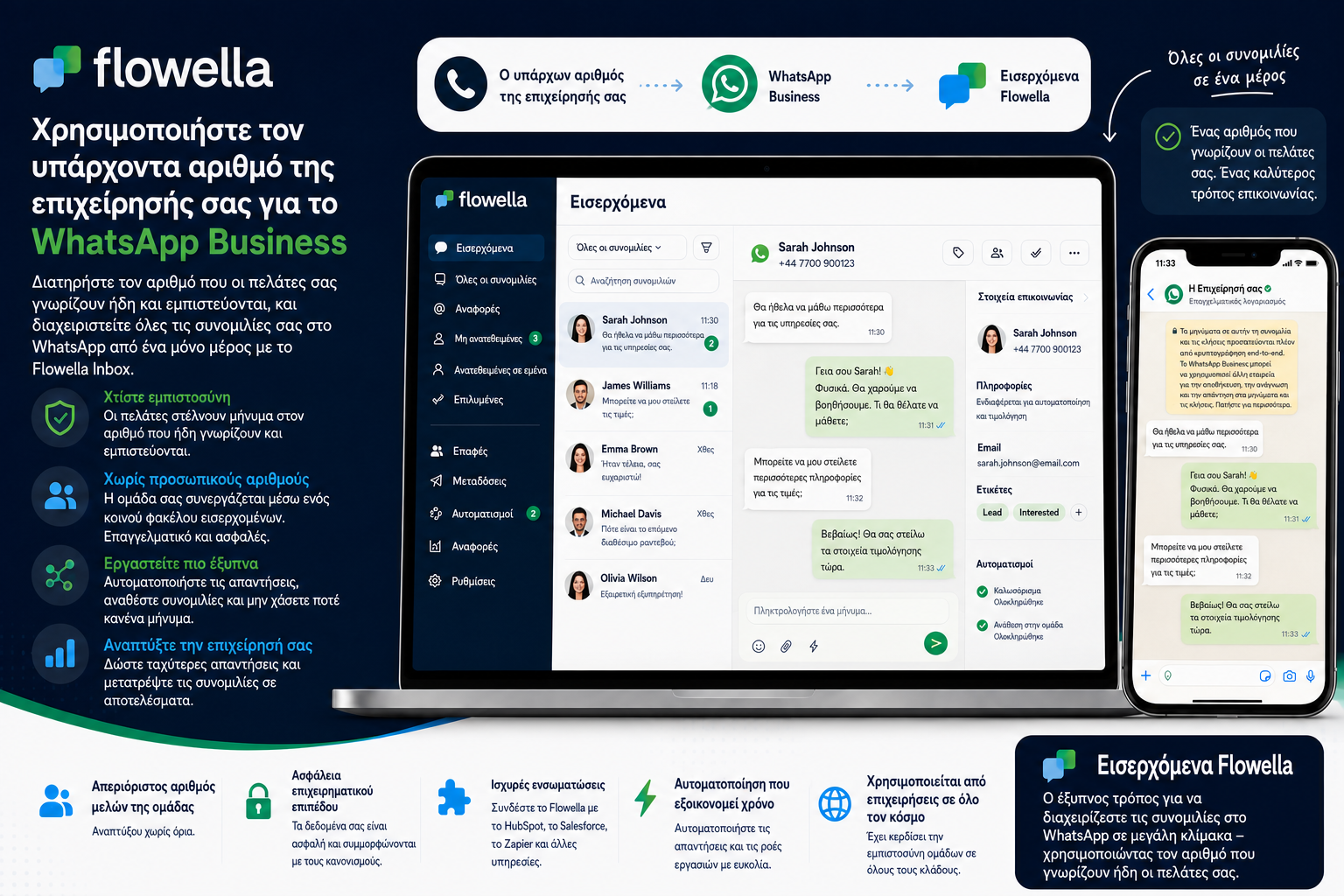
Φανταστείτε πέντε άτομα που χειρίζονται ερωτήσεις πελατών. Δεν θέλετε πέντε υπάλληλοι να δίνουν πέντε διαφορετικούς προσωπικούς αριθμούς WhatsApp. Και όταν κάποιος αποχωρήσει, σίγουρα δεν θέλετε οι συνομιλίες με τους πελάτες σας να φύγουν μαζί του.
Ένας ενιαίος αριθμός της επιχείρησης που τροφοδοτεί ένα κοινό εισερχόμενο δημιουργεί ένα πολύ πιο καθαρό μοντέλο:
Πελάτης → Ο αριθμός της επιχείρησής σας → Εισερχόμενα Flowella → Η ομάδα σας
Ο πελάτης επικοινωνεί με την επιχείρησή σας, όχι με τον προσωπικό λογαριασμό ενός ατόμου. Πίσω από αυτό, οι συνομιλίες συνδέονται με το CRM σας, ενεργοποιούν επακόλουθες ενέργειες και μεταφέρονται ομαλά μεταξύ αυτοματισμών και πραγματικών ανθρώπων. Ο πελάτης σας δεν χρειάζεται ποτέ να γνωρίζει ότι όλα αυτά υπάρχουν. Απλώς έχει έναν γρήγορο, βολικό τρόπο να επικοινωνήσει μαζί σας.
Έλεγχος πέντε σημείων πριν από τη μετάβαση
Ελέγξτε τα παρακάτω πριν αλλάξετε οτιδήποτε:
- Βεβαιωθείτε ότι ο αριθμός μπορεί να λαμβάνει διεθνή SMS ή κλήσεις. Αυτή είναι η πιο συνηθισμένη αιτία αποτυχίας της επαλήθευσης.
- Ελέγξτε αν ο αριθμός είναι ήδη καταχωρημένος στο WhatsApp και προσδιορίστε ποια έκδοση χρησιμοποιεί: προσωπική, Business App ή Platform.
- Δοκιμάστε τη δρομολόγηση των κλήσεών σας. Εάν υπάρχει IVR ή προώθηση κλήσεων μπροστά από τη γραμμή, προγραμματίστε να το παρακάμψετε κατά τη διάρκεια της επαλήθευσης.
- Αποφασίστε σχετικά με το ιστορικό συνομιλιών εάν χρησιμοποιείτε τη λειτουργία «Συνύπαρξη». Μπορείτε να επιλέξετε μόνο μία φορά.
- Συγκεντρώστε τα έγγραφα ιδιοκτησίας, ώστε η επαλήθευση της επιχείρησης να μην σας καθυστερήσει αργότερα.
Ο πλήρης οδηγός μας για την απόκτηση αριθμού WhatsApp Business καλύπτει ολόκληρη τη διαδικασία εγγραφής, ενώ ο οδηγός αριθμών τηλεφώνου της Flowella περιλαμβάνει τη λεπτομερή λίστα ελέγχου πριν από την επαλήθευση.
Μην αφήσετε τον αριθμό τηλεφώνου να γίνει εμπόδιο
Αν έχετε αναβάλει τη χρήση του WhatsApp επειδή δεν θέλατε να μοιραστείτε έναν προσωπικό αριθμό ή δεν θέλατε οι πελάτες να βλέπουν έναν άγνωστο αριθμό, στην πραγματικότητα δεν επιλέγατε ποτέ μεταξύ αυτών των δύο επιλογών.
Ο υπάρχων αριθμός της επιχείρησής σας μπορεί σχεδόν σίγουρα να γίνει ο αριθμός σας στο WhatsApp Business. Σε συνδυασμό με ένα κοινόχρηστο inbox, αυτό σας προσφέρει την καθιερωμένη επιχειρηματική σας ταυτότητα, ένα κανάλι που οι πελάτες σας χρησιμοποιούν ήδη καθημερινά, ένα ενιαίο χώρο εργασίας για την ομάδα σας και καμία ανταλλαγή προσωπικών αριθμών.
Είναι ένας πολύ πιο απλός τρόπος να ενσωματώσετε το WhatsApp στην επιχείρησή σας από ό,τι πιστεύουν οι περισσότεροι.
Ξεκινήστε μια δωρεάν δοκιμή του Flowella και μάθετε αν ο αριθμός σας πληροί τις προϋποθέσεις, ή επικοινωνήστε με την ομάδα μας αν η εγκατάστασή σας είναι πιο περίπλοκη από τις περισσότερες.