If you’ve ever tried to roll WhatsApp into your marketing or sales process, you’ll know the two biggest friction points:
- “Do we have to change our WhatsApp number?”
- “How do we actually see what’s happening in HubSpot—and automate from it?”
To start 2026, we’ve released two new features that remove both blockers and unlock a whole new level of WhatsApp-powered automation inside HubSpot:
- Co-existence: use your existing WhatsApp Business App number with Flowella—no number migration required—and have conversations appear in both the HubSpot Inbox and the WhatsApp Business App.
- App Events: Flowella activity now shows up directly on the HubSpot contact record (message sent, reply received, form completed, read receipt)… and you can use these events as workflow triggers, including “delay until” logic.
Let’s break down why these are a big deal—and then steal three real-world workflow ideas you can launch right away.
1) Co‑existence: keep your existing WhatsApp Business number (and get the best of both worlds)
Historically, WhatsApp “integration projects” have a hidden cost: operational disruption.
Teams worry about:
- Changing a number that customers already know and trust
- Losing momentum (or missing messages) during a migration
- Forcing everyone to switch tools overnight
- Field teams still need the WhatsApp Business App on their phones
Co-existence is our answer.
With Flowella co-existence, you can connect your existing WhatsApp Business App number and still run Flowella—while keeping the WhatsApp Business App in play.
Why this is a great thing
Because it removes the biggest adoption blockers:
- No number migration drama
You keep the number that’s on your website, your vans, your signage, your ads, your Google Business profile… everything. - No “all-or-nothing” rollout
Teams can start using Flowella and HubSpot today, while others continue in the WhatsApp Business App during the transition (or permanently). - Conversations appear in two places
Your team can reply and manage conversations in HubSpot Inbox and still see them in the WhatsApp Business App—so nobody feels like they’ve lost access. - Better continuity + less risk
If someone is on the go, they can keep using the WhatsApp Business App. If they’re at a desk, HubSpot Inbox is the command centre. Same conversation. Same customer. More flexibility.
In short: you don’t have to choose between “WhatsApp familiarity” and “HubSpot power.” You get both.
2) App Events: Flowella activity now lives on the HubSpot contact timeline (and triggers workflows)
The second update is about visibility and automation—the two things that turn WhatsApp from “messages” into a revenue system.
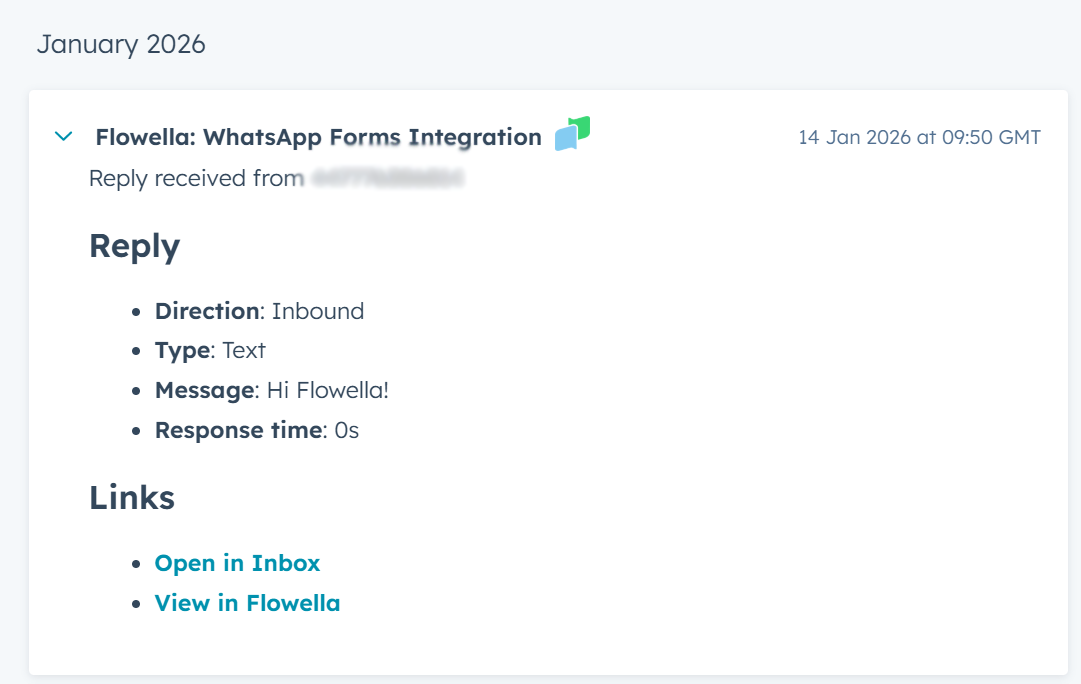
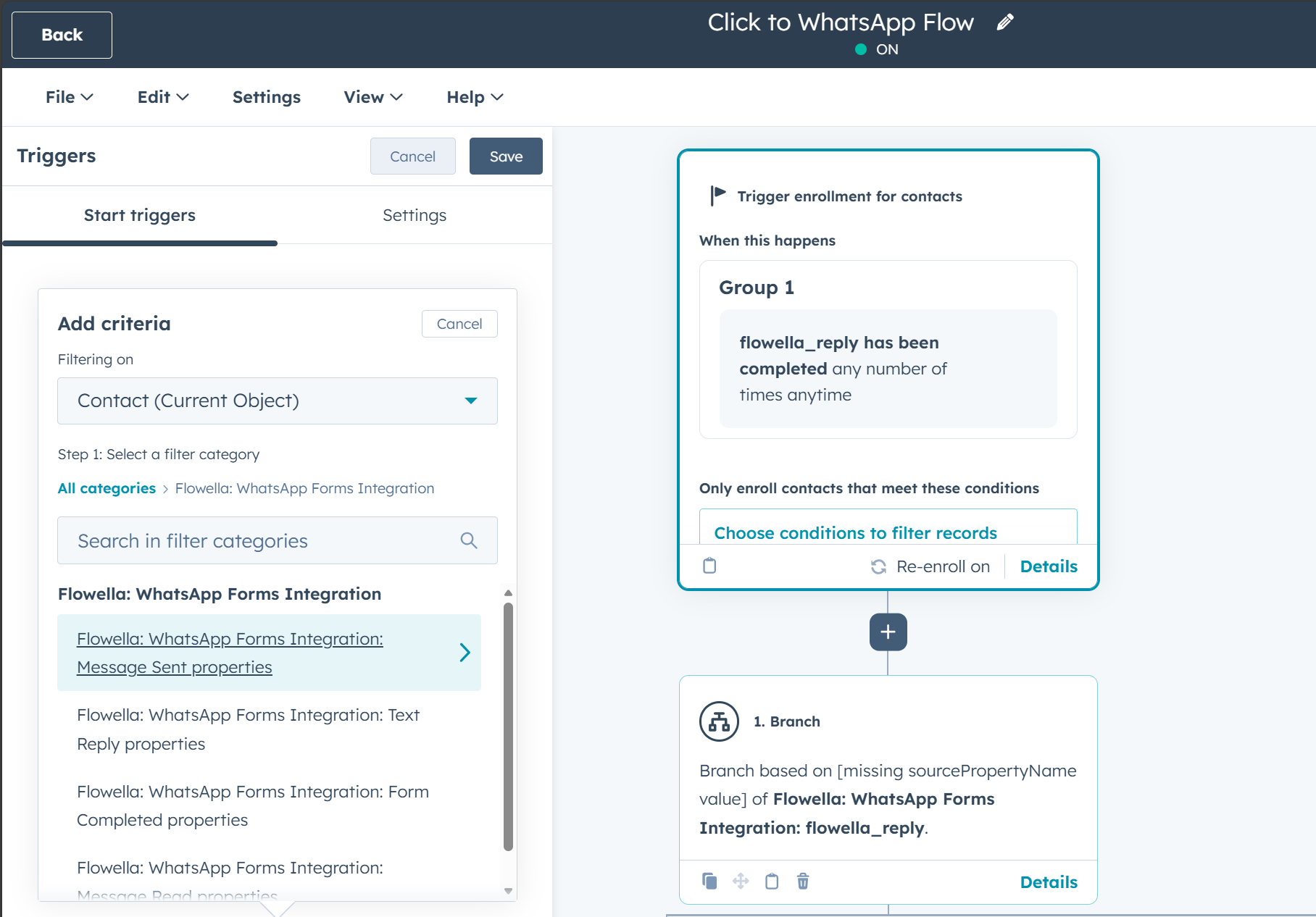
Flowella now logs key WhatsApp events into HubSpot as contact activities, including:
- Message sent
- Reply received
- Flowella form completed
- Read receipt
Why this is a great thing
Because it closes the loop inside HubSpot:
- Everyone sees the full story
Sales, marketing, and service can open the contact record and immediately understand what happened—without hunting through tools or asking around. - You can measure what’s working
“Was it delivered?” → “Was it read?” → “Did they reply?” → “Did they complete the form?”
That’s the funnel, now visible on every contact. - You can automate from real WhatsApp behaviour
This is the big one: App events aren’t just for reporting. You can use them to enrol contacts into HubSpot workflows, branch logic, and even build “delay until X happens” sequences.
So instead of automating based on guesses (“wait 2 days and hope”), you can automate based on intent signals (“they read it 2 minutes ago—follow up now”).
3 workflow ideas you can copy today (with triggers + “delay until” creativity)
Below are three real-world workflows across different industries. Each uses Flowella App Events as triggers and combines them with “delay until” style logic to create experiences that feel personal—but scale like automation.
Workflow #1: Automotive dealership – “Read receipt → instant test drive scheduling”
Industry: Automotive (dealerships, used cars, EV retailers)
Goal: Turn inbound leads into booked test drives faster—without chasing every lead manually.
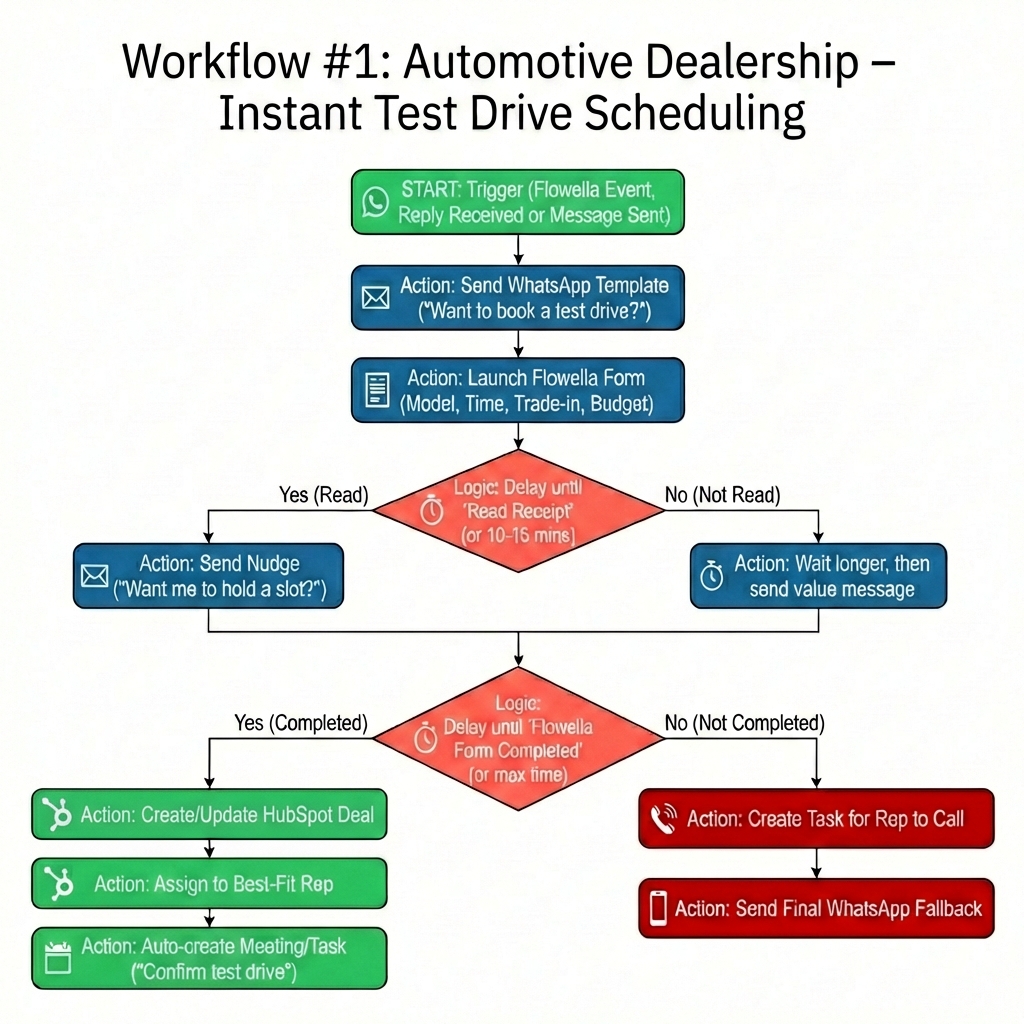
Trigger
-
Flowella event: Reply received (or Message sent if you’re starting the outreach automatically after a lead is created)
What happens
-
Send a WhatsApp template:
“Thanks for your interest in the [Model]. Want to book a test drive? Tap to choose a time.” -
Launch a Flowella form to collect:
-
Preferred model/trim
-
Time window (today / tomorrow / weekend)
-
Trade-in? (yes/no)
-
Budget range (optional)
-
-
Delay until “Read receipt” (or wait a short period like 10–15 minutes), then branch:
-
If read but no reply yet: send a quick “one-tap” nudge
“Want me to hold a slot for you? Reply 1) Today 2) Tomorrow 3) Weekend” -
If not read: wait longer, then try a different angle (e.g., a value message like availability, incentive, trade-in estimate)
-
-
Delay until “Flowella form completed” (or a maximum time window), then branch:
-
If completed:
-
Create/update a Deal in HubSpot
-
Assign to the best-fit rep (based on model choice or postcode)
-
Auto-create a meeting/task: “Confirm test drive + prep vehicle”
-
-
If not completed:
-
Create a task for a rep to call
-
Send a final WhatsApp fallback: “Prefer I ask 2 quick questions here instead?”
-
-
Why it works
Read receipts let you time your follow-up like a human would—right when interest is highest—while the Flowella form captures structured info that makes reps faster and more confident.
Workflow #2: Healthcare clinic – “Pre‑visit intake that reduces no‑shows”
Industry: Healthcare (dental, physio, private clinics, aesthetics)
Goal: Collect pre-appointment info and reduce no-shows without burdening reception.
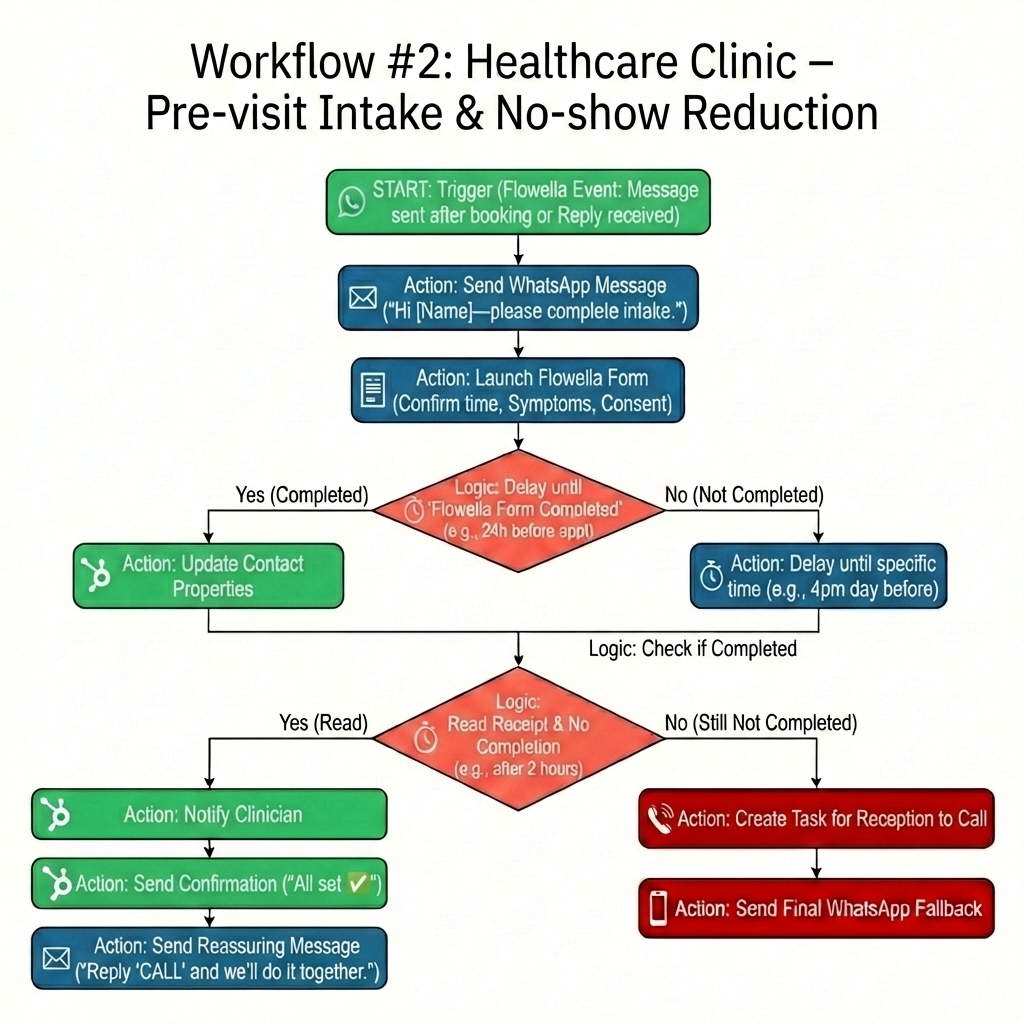
Trigger
-
Flowella event: Message sent (after an appointment is booked)
or Reply received (if patients initiate contact first)
What happens
-
Send a WhatsApp message:
“Hi [Name]—before your appointment, please complete this quick intake (2 minutes).” -
Launch a Flowella form for:
-
Confirmation of appointment time
-
Symptoms/reason for visit
-
Consent checkbox
-
Optional: photo upload instructions (if relevant)
-
-
Delay until “Flowella form completed” with a deadline (e.g., “up to 24 hours before appointment”), then branch:
-
If completed:
-
Update key contact properties (reason for visit, consent)
-
Notify the clinician with a summary
-
Send confirmation: “All set ✅ See you at 3:30 pm”
-
-
If not completed:
-
Delay until a specific time (e.g., 4 pm the day before) and send a reminder
-
If still not completed: create a task for reception to call
-
-
-
Add a “smart” engagement step using read receipts:
-
If read receipt but no completion after 2 hours:
send a reassuring message:
“No stress—if you’re busy, just reply ‘CALL’ and we’ll do it together.”
-
Why it works
You’re not just reminding people—you’re adapting based on real behavior:
- Read but didn’t act → gentle assist
- Didn’t read → try later or alternate channel
- Completed → confirmation + internal readiness
That’s how you reduce no-shows without sounding robotic.
Workflow #3: E‑commerce – “Post‑purchase support + review collection (with instant escalation)”
Industry: E-commerce (DTC brands, subscription boxes, high-ticket products)
Goal: Turn WhatsApp into a retention engine—capture reviews, prevent churn, and rescue unhappy customers fast.
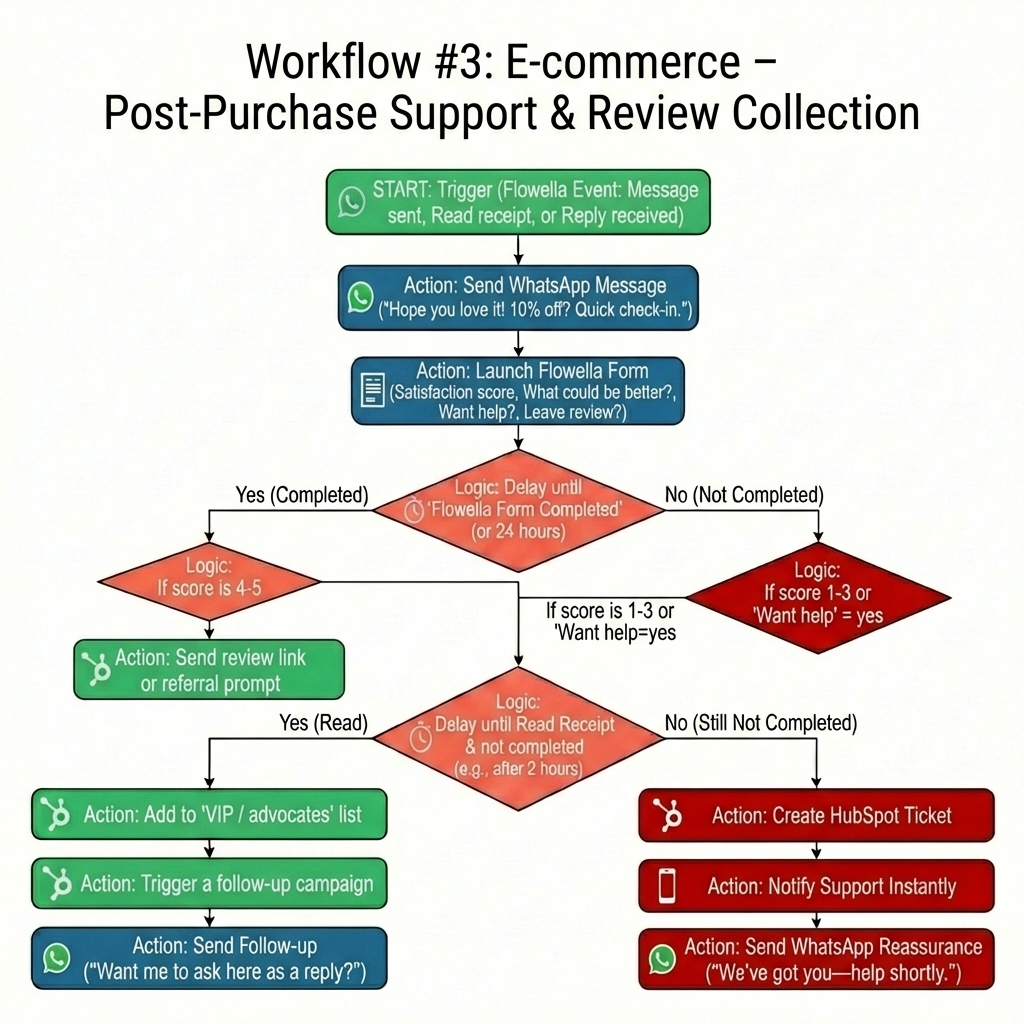
Trigger
-
Flowella event: Message sent (post-delivery check-in)
OR Read receipt (to time the ask)
OR Reply received (support intent)
What happens
-
After delivery, send:
“Hope you love it! Want 10% off your next order? Quick 3-question check-in.” -
Launch a Flowella form:
-
Satisfaction score (1–5)
-
“What could be better?” (optional)
-
“Want help?” (yes/no)
-
“Leave a review?” (yes/no)
-
-
Delay until “Flowella form completed” (or 24 hours), then branch:
-
If score is 4–5:
-
Send a review link or referral prompt
-
Add the contact to a “VIP / advocates” list
-
Trigger a follow-up campaign (UGC request, subscription offer)
-
-
If score is 1–3 or “Want help” = yes:
-
Create a HubSpot ticket
-
Notify support instantly
-
Send WhatsApp reassurance: “We’ve got you—someone will help shortly.”
-
-
-
Use read receipts to increase completion:
-
Delay until read receipt, then (if not completed within 2 hours) send:
“Want me to ask the 3 questions right here as a reply instead?”
-
Why it works
This workflow flips WhatsApp from “broadcast” into a feedback + rescue loop. The best part: unhappy customers don’t linger unnoticed. The moment they submit a low score, HubSpot gets the signal and the team gets moving.
The bigger picture: WhatsApp automation that still feels human
These two features—Co‑existence and App Events—combine into something powerful:
- Co-existence removes the operational friction (“we can’t change our number”)
- App Events remove the visibility gap (“we can’t track or automate this properly”)
Result: WhatsApp becomes a true HubSpot-native growth channel—where every message, reply, read receipt, and Flow completion can drive the next best action automatically.